Introduction
Most customer service leaders can name a dozen AI tools they've been pitched this year. But beneath the buzzwords sits one decision that determines whether your investment delivers faster resolutions or just adds expensive complexity: the distinction between an "AI assistant" and an "AI agent." It's not a semantic difference — it's a costly one many CS teams are getting wrong.
The wrong choice doesn't just waste budget. It means agents still struggling with slow knowledge retrieval, customers waiting on unresolved tickets, and CSAT scores that refuse to move. According to Gartner, at least 30% of generative AI projects will be abandoned after proof of concept by end of 2025 — with organizations incurring $5 million to $20 million in failed deployment costs.
That pressure isn't easing. 91% of customer service leaders report executive pressure to implement AI in 2026, creating urgency that routinely outpaces strategic clarity.
This guide breaks down exactly what separates AI assistants from AI agents, which one your team actually needs, and how to avoid the deployment mistakes that derail early adopters.
TL;DR
- AI assistants are reactive — they respond to prompts but don't initiate action, used in chatbots and agent-assist tools
- AI agents plan and execute multi-step workflows autonomously, without waiting for a human prompt
- Choose AI assistants if your goal is cutting handle time and improving first-call resolution for live agents
- Choose AI agents if you need autonomous resolution of complex, multi-step workflows without human handoff
- Most mature customer service teams deploy both: assistants for agent support, agents for self-service automation
AI Agent vs AI Assistant: Quick Comparison
| Dimension | AI Assistant | AI Agent |
|---|---|---|
| Level of Autonomy | Responds to individual prompts; requires human direction for each step | Plans and executes multi-step workflows independently toward a goal |
| Trigger Mechanism | Prompt-based — activated by user input (question, command, search query) | Goal-based — given an objective, determines and executes required steps |
| Memory & Learning | Limited session memory; typically stateless between interactions | Persistent memory of past interactions, context, and outcomes for adaptive decision-making |
| Task Complexity | Single-step or simple multi-step tasks (search, answer, recommend, route) | Complex, multi-system workflows (verify, update, execute, notify) |
| Primary CS Application | Chatbots, knowledge search, agent-assist tools, FAQ responses | End-to-end ticket resolution, proactive outreach, automated escalation handling |
| Implementation Complexity | Lower — faster deployment, fewer integrations, simpler governance | Higher — requires robust CRM/backend integration, policy controls, continuous monitoring |
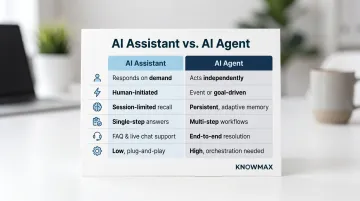
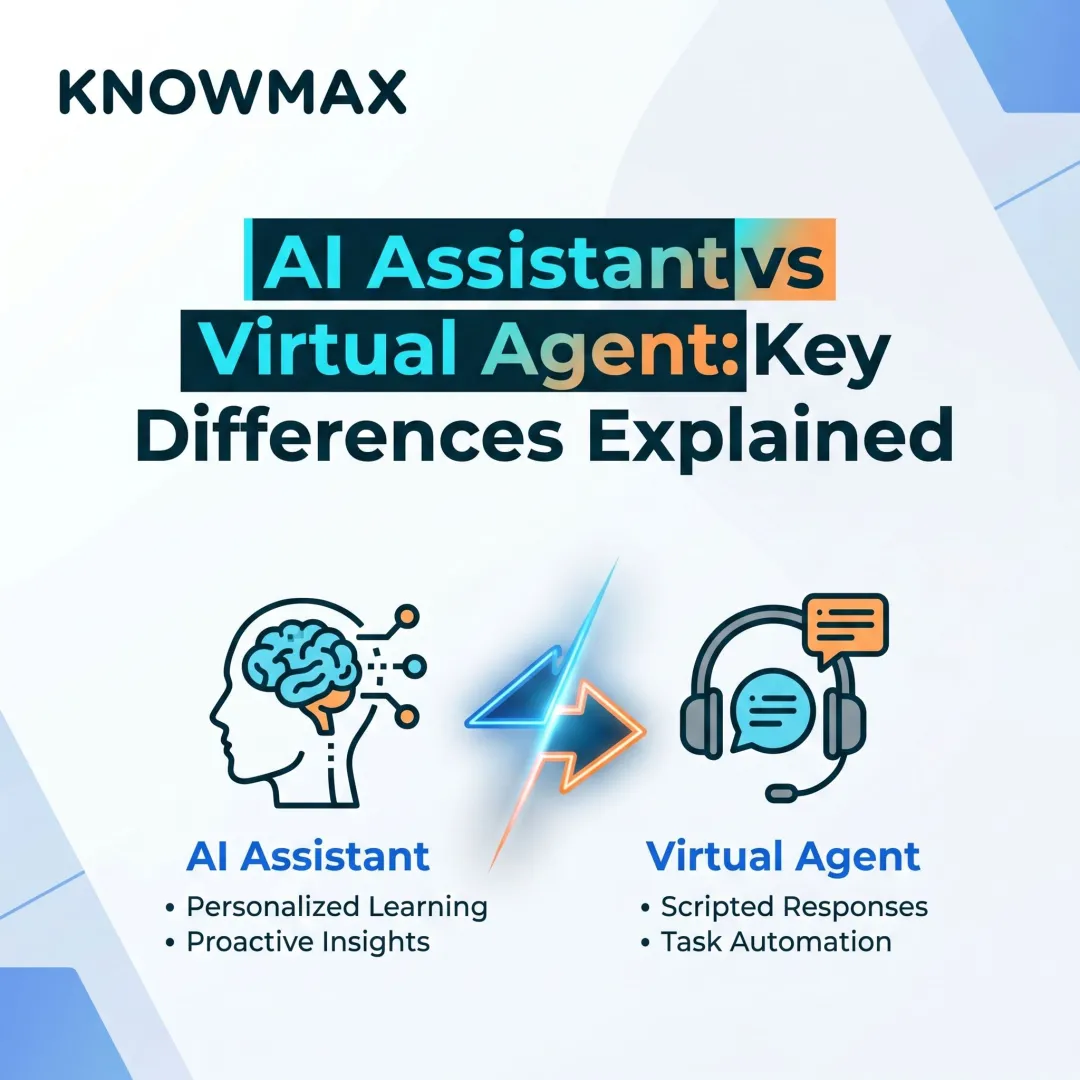
The reactive vs. proactive distinction matters more than it sounds. An AI assistant waits for a customer or agent to ask before acting. An AI agent can detect trigger conditions — a billing error, a ticket past SLA, a customer approaching churn risk — and initiate contact or resolution on its own.
Cost and deployment timelines differ sharply between the two. AI assistants require less infrastructure investment and can go live in weeks. AI agents demand deeper integration with billing systems, CRM platforms, and policy engines — often taking months to reach production and requiring dedicated governance frameworks to prevent errors or misalignment.
What is an AI Assistant in Customer Service?
AI assistants are NLP-powered tools that operate on a prompt-response loop. They activate only when a human — whether a customer or an agent — provides a specific input, then deliver a response or complete a single defined task. They don't take further action unless prompted again.
In customer service, AI assistants power chatbots, virtual agents in IVR systems, and agent-assist knowledge popups. They process natural language queries using large language models, retrieve relevant information from connected knowledge bases, and surface answers, suggestions, or next steps.
How they work in a CS environment:
- Agent enters a query or customer question during a live interaction
- AI assistant searches knowledge repositories using intent-based matching
- System surfaces relevant articles, decision trees, troubleshooting guides, or scripts
- Agent uses retrieved information to respond; assistant waits for next prompt
Key CS benefits:
- Reduced Average Handle Time (AHT) by surfacing answers mid-call instead of forcing agents to search manually
- Consistent response quality across channels — every agent accesses the same knowledge
- Lower onboarding time for new agents who have on-demand guidance available
- 24/7 availability for customer-facing chatbot deployments
Core limitation: AI assistants cannot string together multi-step resolutions independently. If a customer's billing issue requires checking account status, applying a credit, and sending confirmation — an assistant can help with each step, but a human must still drive the workflow forward.
Despite that ceiling, AI assistants cover a wide range of high-value scenarios in live support environments.
Use Cases of AI Assistants in Customer Service
Agent-Assist Tools
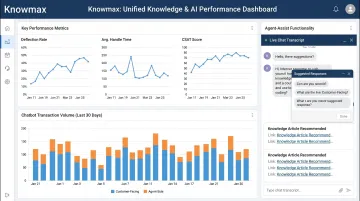
During live voice or chat interactions, an AI assistant listens to the conversation or reads the chat thread, then automatically surfaces the most relevant knowledge articles, troubleshooting guides, or decision trees. This eliminates the time agents spend searching while on a call, directly improving First Call Resolution (FCR) and reducing AHT.
Real-world results back this up:
- Vodafone's GenAI agent-assist deployment in German call centers achieved a 61% improvement in agent "helpfulness" ratings by providing instant overviews of customer communication history
- A US credit union saw a 15% AHT reduction within 100 days of deployment, driven entirely by removing manual information retrieval
Customer-Facing Chatbots
For common, single-step queries — order status checks, account balance inquiries, password resets, FAQ responses — AI assistants deliver instant answers without agent involvement. According to McKinsey, 50% to 60% of customer interactions remain transactional, with roughly 50% of banking call volumes and 40% of telecom calls consisting of routine queries — all candidates for AI deflection.
The volume potential is significant. Concentrix handled over 3.7 million transactions via Knowmax-powered chatbots while improving knowledge access for 120+ agents. At a Fortune 500 retailer, Knowmax's AI-powered decision trees and visual guides replaced 640 complex SOPs, delivering a 13% reduction in AHT by simplifying agent workflows.
What is an AI Agent in Customer Service?
AI agents are autonomous systems that accept a goal — not just a prompt — and independently determine the steps, tools, and sequence needed to achieve it. Unlike assistants, they don't stop and wait after each action. They continue executing until the goal is complete or human review is needed.
Key technical enablers: persistent memory, tool integrations (CRM, billing, communication platforms), task chaining (ability to execute step 1, then step 2, then step 3 automatically), and adaptive decision-making (adjusting approach based on outcomes).
How they work in CS:
When a customer submits a complex request — such as a disputed charge requiring verification of transaction history, policy eligibility check, refund issuance, and resolution email — an AI agent executes all steps autonomously. It integrates with CRM, billing systems, and email platforms, checking in with a human only at defined escalation points (such as refund amounts exceeding policy thresholds).
Key CS benefits:
- 24/7 autonomous resolution for complex issues without human involvement
- Significant reduction in escalations to human agents for routine-but-multi-step workflows
- Ability to scale CX operations during peak volume without proportional headcount increase
- Continuous improvement through memory of past interactions and outcomes
Core limitations:
AI agents are costlier to deploy and require robust integrations, well-structured knowledge, and ongoing monitoring. Without strong oversight, they risk misalignment: taking actions that don't reflect policy or context.
The governance gap is real. Gartner predicts over 40% of agentic AI projects will be cancelled by end of 2027 due to escalating costs, unclear business value, or inadequate risk controls. Only 13% of organizations believe they have the right AI agent governance in place, with identified risks including misinformation from ungoverned agents, data oversharing, and agents exceeding their intended scope.
Use Cases of AI Agents in Customer Service
End-to-End Autonomous Ticket Resolution:
For medium-complexity issues like billing disputes, subscription changes, or service outages, an AI agent can intake the request, verify eligibility, apply the resolution, update the CRM, and notify the customer — all without human handoff. Two enterprise deployments show what this looks like at scale:
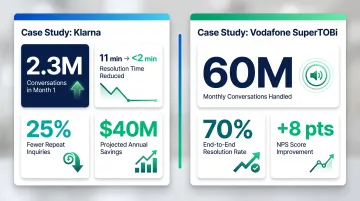
- Klarna deployed an AI agent powered by OpenAI that handled 2.3 million conversations in its first month, equivalent to 700 full-time agents. Resolution time dropped from 11 minutes to under 2 minutes, repeat inquiries fell 25%, and Klarna projected $40 million in profit improvement for 2024.
- Vodafone's SuperTOBi GenAI-powered agent handles approximately 60 million customer conversations monthly, achieving a 70% end-to-end resolution rate and an 8-point NPS improvement over its previous AI system.
Proactive Outreach and Follow-Up:
AI agents can monitor for trigger conditions — a flagged transaction, an unresolved ticket past SLA, a customer approaching churn risk — and autonomously initiate contact or action rather than waiting for the customer to call in. A leading telecom company achieved a 46% reduction in call volume and 21% improvement in FCR by leveraging Knowmax's AI-powered knowledge management, with 73% of transactions handled by AI chatbots.
AI Agent vs AI Assistant: Which Does Your Customer Service Team Actually Need?
Decision Framework:
Ask yourself these questions before choosing:
What percentage of your tickets are single-step vs multi-step? If most issues require only one action (password reset, order status check), AI assistants are sufficient. If many require 3+ coordinated actions (verify, update, notify), consider AI agents.
Do your agents spend more time searching for answers or solving complex issues? If search and knowledge access are the bottleneck, prioritize AI assistants for agent support. If agents know what to do but are overwhelmed by volume, AI agents can automate repetitive resolutions.
What is your current level of CRM and systems integration? AI assistants require minimal integration — often just knowledge base connectivity. AI agents demand deep integration with CRM, billing, inventory, and communication platforms.
What is your team's readiness for AI oversight and governance? AI assistants are lower risk — they suggest, humans act. AI agents take action autonomously, requiring clear policy controls, audit trails, and escalation rules.
How mature is your knowledge management foundation? Both AI assistants and agents depend on structured, accurate knowledge. Without it, assistants surface irrelevant articles and agents execute incorrect workflows.
Situational Recommendations:
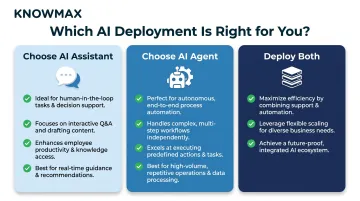
Choose AI assistants if:
- You need to improve agent efficiency and knowledge access without replacing human judgment
- Your contact center handles high volumes of guided conversations where agents need real-time support
- Your priority is reducing AHT and improving FCR through better information access
- You're early in your AI adoption journey and need quick wins
Choose AI agents if:
- You have high automation maturity with integrated backend systems
- A large proportion of your tickets are routine-but-multi-step issues consuming disproportionate agent time
- You need to scale CX during peak periods without adding headcount
- You have governance frameworks and oversight capability in place
Deploy both if:
- You're an enterprise CS operation serving millions of interactions
- You want AI assistants supporting human agents on complex cases while AI agents handle fully automated self-service
- You can invest in both the knowledge infrastructure and integration architecture required
Real-World Example:
Bank of America's AI assistant Erica has surpassed 3 billion client interactions since 2018, with nearly 50 million users averaging more than 58 million interactions per month. Erica delivers proactive, personalized insights and has been adopted by over 90% of Bank of America employees, reducing calls into the IT service desk. This demonstrates how a well-deployed AI assistant can scale to handle massive volumes while supporting both customers and internal teams.
The Hybrid Reality:
Most enterprise CS teams layer both strategically rather than choosing one or the other. AI assistants empower human agents during live conversations; AI agents handle fully automated self-service channels. The decision isn't binary — it's about placing the right capability at the right point in the service journey, from simple FAQ deflection through to autonomous multi-step resolution.
The Knowledge Foundation:
Both AI assistants and agents are only as effective as the knowledge they're built on. A hallucinating assistant or misaligned agent can damage CSAT faster than no AI at all. This is where structured, accurate knowledge management becomes critical.
Knowmax addresses this directly — providing the knowledge layer that connects both AI assistants and AI agents to accurate, governed content. Its decision trees, intent-based search, and visual troubleshooting guides integrate with platforms like Salesforce, Zendesk, and Genesys, ensuring the knowledge feeding your AI deployments stays current and reliable.
Frequently Asked Questions
Frequently Asked Questions
What is the difference between an AI agent and an AI assistant?
AI assistants are reactive tools that require a human prompt for each task, responding with information or completing single actions. AI agents are proactive, autonomous systems that plan and execute multi-step workflows toward a goal with minimal ongoing human input.
Are systems like ChatGPT and Siri AI agents or AI assistants?
By default, both ChatGPT and Siri are AI assistants — they respond to prompts but don't act independently. With tools, memory, and integrations added (such as ChatGPT in operator mode), they can exhibit agent-like behavior by executing multi-step tasks autonomously.
Where do AI assistants fit in a contact center's technology stack?
AI assistants typically sit at the point of interaction — powering chatbots, agent-assist tools, and self-service portals. They surface knowledge during live conversations but rely on the agent or customer to drive each next step, making them most effective when backed by a structured, up-to-date knowledge base.
What are the types of AI agents?
The four main types are simple reflex agents (react to current input), model-based agents (use past state memory), goal-based agents (plan toward objectives), and utility-based agents (optimize outcomes). Enterprise contact centers most commonly deploy goal-based or utility-based agents configured around specific resolution targets.
Who develops or controls AI assistants and AI agents?
AI assistants and agents are built by major AI platform providers (OpenAI, Google, IBM), enterprise SaaS vendors, and in-house development teams. In customer service, they are typically configured and governed by the deploying organisation, with oversight from CX and IT teams to ensure policy compliance and performance monitoring.