Knowledge management (KM) is the systematic process of capturing, organizing, sharing, and applying organizational knowledge so the right people get the right information at the right time. In this guide, you'll learn what knowledge management is, how it differs from basic information storage, why it's critical for customer-facing teams, the core components that make KM systems work, and how to implement a strategy that delivers measurable business results.
TLDR:
- KM systems deliver actionable knowledge instantly, cutting agent search time and boosting First Call Resolution by 1% for every 1% improvement in knowledge access
- Contact center agents spend over 10% of their time searching multiple sources—only 29% regularly use their knowledge management tools
- Tacit knowledge (expertise locked in people's heads) is the hardest to capture but most valuable; decision trees and guided workflows surface it effectively
- Effective KM reduces onboarding time by up to 75% and prevents costly knowledge loss when employees leave (replacement costs range from 40-200% of salary)
- Start with a knowledge audit, set measurable goals tied to CX metrics (AHT, FCR, CSAT), and choose technology that integrates into existing workflows
What Is Knowledge Management?
APQC defines knowledge management as "the application of a structured process to help information and knowledge flow to the right people at the right time," helping employees "efficiently and effectively find, understand, share, and use knowledge to create value."
Where information management stops at collecting and storing data, KM goes further — transforming that information into actionable knowledge embedded directly into decision-making and workflows. The distinction matters in practice: a database tells you what happened; a knowledge management process tells your team what to do next.
Knowledge Management System vs. Basic FAQs
A knowledge management system (KMS) is the technology layer that makes KM operational — storing, organizing, and surfacing knowledge for employees and customers in real time. That's a very different function from a static FAQ page, which is essentially a fixed document. A KMS acts as a dynamic search engine with:
- AI-powered search that interprets intent, not just keyword matches
- Guided decision trees that walk agents through complex resolutions step by step
- Visual troubleshooting guides for technical issues
- Real-time content updates to keep knowledge accurate and current
- Omnichannel delivery across agent desktops, self-service portals, chatbots, and mobile
Example in action:
A telecom customer calls about slow internet. Instead of escalating or searching outdated PDFs, the agent types "slow internet troubleshooting" into the KMS. The system surfaces an interactive decision tree that guides the agent through diagnostics, identifying the router model, checking connection status, and delivering a step-by-step reset procedure—complete with visual guides. The agent resolves the issue in minutes without escalating the call.
Types of Knowledge in Knowledge Management
Not all knowledge is created equal. Understanding the different types helps you build a KM strategy that captures and distributes each effectively.
The Three Core Types
| Type | Definition | Example |
|---|---|---|
| Tacit | Personal, experience-based knowledge that's hard to document | A senior agent instinctively calming an upset customer using tone, pacing, and empathy |
| Explicit | Clearly documented knowledge | SOPs, product manuals, troubleshooting FAQs, policy documents |
| Implicit | Undocumented know-how embedded in processes but not yet formalized | An agent's workaround for a recurring system glitch that hasn't been officially documented |
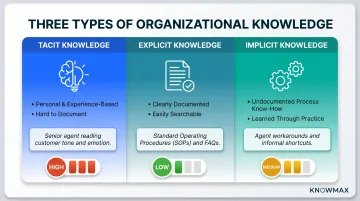
This framework originated with philosopher Michael Polanyi (1966) and was applied to organizational settings by Nonaka and Takeuchi (1995) in their SECI model of knowledge creation.
Why Categorization Matters
- Explicit knowledge is the lowest-effort starting point — document it once and distribute it across every channel
- Tacit and implicit knowledge require deliberate effort to surface: structured interviews, after-action reviews, decision trees, and guided workflows
- Organizations that skip tacit knowledge capture lose critical expertise every time a senior employee leaves
That bias toward explicit knowledge has real consequences. Research from IDC finds that "most organizational knowledge is not effectively captured, shared, and utilized" — the majority sits locked in tacit and implicit forms, invisible to anyone who wasn't there when it was learned.
Structured vs. Unstructured Knowledge
Beyond the tacit/explicit divide, knowledge also splits along another practical line:
- Structured knowledge is organized in predefined formats: databases, categorized articles, decision trees
- Unstructured knowledge exists in emails, chat logs, call transcripts, and conversations
Modern KM platforms handle both. AI-powered search makes unstructured knowledge findable and usable without requiring manual tagging — which matters when the bulk of your institutional knowledge lives in chat logs and call transcripts, not neatly formatted articles.
What Are the Core Components of a Knowledge Management System?
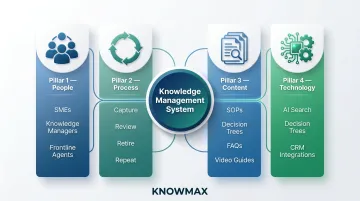
Most KM frameworks are built on four foundational pillars: People, Process, Content, and Technology. Mature programs often add Strategy and Governance as fifth and sixth pillars.
People
People are the creators, sharers, and users of knowledge. This includes:
- Subject matter experts (SMEs) who document best practices and tacit knowledge before it walks out the door
- Knowledge managers who govern content quality, accuracy, and lifecycle from creation to retirement
- Frontline employees — agents and support reps — who both consume and contribute knowledge daily
Culture is critical. A KMS only works if people use it. APQC emphasizes that "expecting new technology to change employee behavior is like expecting a new car to make you a better driver." Adoption requires leadership buy-in, workflow integration, and incentives that make knowledge sharing rewarding.
Process
Process defines the structured activities that move knowledge through the organization:
- Capturing lessons learned after major projects or customer escalations
- Reviewing and approving content before publishing
- Retiring outdated articles on a regular schedule
- Building workflows that make knowledge sharing a habit, not an afterthought
Without process, knowledge becomes stale. SQM Group (2022) found that while 94% of contact centers report updating their KM tools regularly, only 19% of agents are "very satisfied" with them—suggesting that update frequency doesn't equate to content quality or usability.
Content
Content is the substance of KM. Types include:
- Standard operating procedures and troubleshooting guides
- Decision trees for complex, multi-step resolutions
- Video tutorials and visual device guides
- FAQs and policy documents
Quality over quantity. Well-structured, accurate, and regularly updated content builds trust. Outdated or contradictory content erodes that trust fast — and typically shows up as longer handle times, wrong answers, and repeat contacts.
Technology
Technology powers KM, but it should serve the strategy—not the other way around. Core tools include:
- Knowledge bases with AI-powered, intent-based search
- Decision trees that walk agents through complex, multi-step resolutions
- Integrations with CRM, telephony, and ticketing platforms — including Salesforce, Zendesk, Genesys, and Freshchat
- Omnichannel delivery across agent desktops, self-service portals, chatbots, and mobile
A platform like Knowmax brings these capabilities together in one system — combining AI-powered content generation, interactive decision trees, and auto-translation into 25+ languages so knowledge stays consistent whether an agent in Mumbai or a chatbot in Manila is delivering it.
Why Is Knowledge Management Important?
Faster, More Consistent Customer Service
When agents have instant access to accurate, organized knowledge, they resolve issues faster and more consistently. KM directly impacts key CX metrics:
- First Call Resolution (FCR): SQM Group (2022) benchmarks show that every 1% improvement in FCR produces a 1% improvement in customer satisfaction and a 1% reduction in operating costs
- Average Handle Time (AHT): Gartner analyst Michael Maoz (2014) found that improved contextual knowledge delivery reduces time-to-answer by 20-80% and can cut customer support costs by 25% or more
- Agent search burden: Contact center agents spend over 10% of their time searching multiple sources for the right content, yet only 29% actually use their KM tool (SQM Group, 2022)
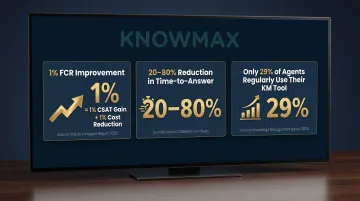
The data points to the same conclusion: faster access to the right information drives down costs while pushing satisfaction scores up.
Reduced Agent Errors and Better Onboarding
New agents ramp up faster when they can access structured, step-by-step guides rather than relying on shadowing or tribal knowledge. KM reduces the margin for human error, especially in complex industries like banking, insurance, and telecom.
An ICMI case study (2019) documented a contact center that cut agent time-to-proficiency from 60 days to 15 days—a 75% reduction—by restructuring onboarding around searchable decision trees and knowledge base articles. Within 30 days, new agents were described as "pretty much experts."
Why? Because structured KM content eliminates guesswork and ensures agents can handle any call type confidently, even during their first weeks.
Knowledge Retention When Employees Leave
When experienced employees exit, they take critical knowledge with them—unless it's been captured and documented. KM creates an organizational memory that survives turnover and prevents the same mistakes from recurring.
Gallup (2024) estimates that replacing employees costs:
- 200% of salary for leaders and managers
- 80% of salary for technical professionals
- 40% of salary for frontline employees
Voluntary turnover costs U.S. businesses $1 trillion per year. KM mitigates this by preserving institutional expertise before employees leave, reducing the recurring cost of workforce churn.
Better Decision-Making Across the Organization
When employees have easy access to historical data, product updates, policy changes, and past case resolutions, decisions improve across the board. For contact centers handling high volumes of complex queries, this consistency directly affects accuracy and compliance.
In practice, better knowledge access enables teams to:
- Apply the correct policy version consistently across all agents
- Route escalations based on documented precedent, not guesswork
- Identify recurring issues faster using historical case data
- Onboard process changes without waiting for team-wide retraining
Improved Collaboration and Innovation
Better individual decisions compound when knowledge flows freely across teams. KM breaks down information silos, connects departments, and enables cross-functional sharing — so teams build on each other's work instead of duplicating it.
This creates conditions for continuous improvement. When agents, product teams, and operations leads access the same knowledge base, process gaps surface faster and fixes spread organization-wide rather than staying siloed within one team.
Bloomfire's Value of Enterprise Intelligence 2025 report, published via Harvard Business Review, found that inefficiency costs businesses an average of 25% of annual revenue, with employees spending 14% of work time recreating information they couldn't find. At that scale, knowledge silos carry a direct cost to the bottom line.
Common Challenges in Knowledge Management
Capturing Tacit Knowledge
The hardest knowledge to manage is the expertise that lives only in people's heads. When a senior agent retires or moves on, that judgment and pattern recognition goes with them — unless it's been captured first.
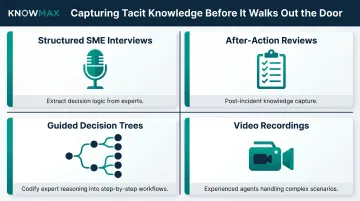
Several methods help extract and document that institutional knowledge:
- Structured interviews with SMEs to extract decision logic
- After-action reviews following major incidents or projects
- Guided decision trees that codify expert reasoning into step-by-step workflows
- Video recordings of experienced agents handling complex scenarios
Keeping Knowledge Current
Tacit knowledge capture is only half the battle. A knowledge base that isn't maintained becomes a liability — stale or contradictory content erodes agent trust and quietly introduces errors into customer interactions.
Consistent governance prevents that decay:
- Assign clear ownership for every article or content module
- Establish regular review cycles (quarterly or biannual)
- Use automated flags to identify content approaching expiry dates
- Implement approval workflows to ensure quality before publishing
Low Adoption and Cultural Resistance
A KM system only works if employees actually use it. APQC's 2024 KM Priorities survey found that change management has been the #1 skill need for KM teams for four consecutive years, and the "people aspect continues to remain the greatest challenge for most organizations."
Getting teams on board requires more than a launch announcement:
- Leadership buy-in and visible support
- Integration into daily workflows (not a separate system agents avoid)
- Incentives that make knowledge sharing feel rewarding rather than burdensome
- Training that demonstrates value quickly
How to Get Started with Knowledge Management
Start with a Knowledge Audit
Before building or buying anything, identify:
- What knowledge exists (documents, spreadsheets, email threads, people's heads)
- Where it lives (scattered across teams or centralized)
- Who needs it (agents, managers, customers, partners)
- What gaps exist (missing, outdated, or inaccessible knowledge)
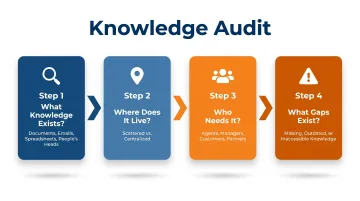
This audit becomes the foundation of your KM strategy.
Define Clear Goals Aligned to Business Outcomes
KM programs succeed when they're tied to specific, measurable objectives:
- Reduce AHT by 15% within six months
- Cut new agent onboarding time from 60 days to 30 days
- Increase FCR by 10 percentage points
- Reduce escalations by 20%
Vague goals produce vague results. Tie KM investments to CX metrics your leadership already tracks. ### Choose the Right Technology and Integrate It Into Workflows
Once your goals are set, technology selection becomes straightforward: you need a platform that fits those goals and connects to the systems your team already uses. A KM tool that requires agents to switch screens mid-call will never get adopted, regardless of how capable it is.
Look for a platform that integrates with your existing CRM, telephony, and ticketing systems. Knowmax, for example, is built specifically for customer-facing teams and connects with Salesforce, Zendesk, Genesys, and Freshchat out of the box. Core capabilities to evaluate include:
- AI-powered search that surfaces answers by intent, not just keyword matches
- Decision trees that walk agents through complex troubleshooting step by step
- Visual guides for device and technical support scenarios
- Omnichannel delivery across agent desktop, self-service portals, chatbots, and mobile
- Analytics to track which content gets used and where gaps remain
When knowledge is embedded directly into daily workflows, agents use it consistently — and your KM investment starts returning measurable results.
Frequently Asked Questions
What is knowledge management in business?
In a business context, KM is the systematic approach to capturing, organizing, and distributing organizational knowledge so employees can make better decisions, serve customers more effectively, and preserve institutional expertise—even as teams grow and turnover occurs.
What is knowledge management in simple terms?
KM is making sure the right people in your organization can find and use the right information at the right time—instead of wasting time searching, guessing, or starting from scratch.
What are the 5 core components of knowledge management?
The five commonly cited components are People, Process, Content, Technology, and Strategy (with Governance sometimes cited as a sixth). These work together as an interconnected system—no single element works in isolation, and gaps in one area undermine the others.
What are the four types of knowledge management?
Most frameworks identify four knowledge types: tacit (know-how held in people's heads), explicit (documented and searchable), implicit (undocumented but transferable), and embedded (built into processes or systems). Each type requires a different approach to capture and share effectively.
What is the difference between a knowledge base and a knowledge management system?
A knowledge base is a repository where articles and information are stored. A knowledge management system is a broader platform that encompasses the knowledge base along with tools for creating, organizing, searching, governing, and delivering that knowledge across multiple channels and user types.
How does knowledge management improve customer experience?
KM gives agents instant access to accurate, up-to-date information, reducing resolution times and eliminating inconsistent answers across channels. The result is faster call handling, higher customer satisfaction scores, and lower operating costs.