Introduction
Enterprise teams in 2026 face a critical challenge: knowledge is fragmented across dozens of tools, agents waste hours searching for answers, and inconsistent information costs organizations real money in resolution time and customer satisfaction. Knowledge workers spend about 1.8 hours per day—nearly 9.3 hours per week—searching for and gathering information. This scattered knowledge creates bottlenecks that impact both agent productivity and customer experience.
Only 14% of customer service issues are fully resolved through self-service, according to Gartner—a gap that puts the pressure squarely on agent-facing knowledge systems. Purpose-built knowledge management tools address this directly: they centralize information, cut resolution times, and deliver consistent support across every channel.
Poor knowledge access shows up fast—in longer handle times, higher error rates, and agents who can't confidently answer basic questions. This guide covers the top knowledge management platforms for 2026, what each does well, and how to evaluate them against your team's actual needs.
TLDR
- KM tools capture, organize, and deliver the right information at the right time—not just store documents
- The best 2026 platforms are AI-native, featuring intent-based search and automated content authoring
- The right tool depends on your use case: CX and support teams need guided workflows, while internal teams need collaborative wikis
- Shortlist tools by scoring them on AI search quality, integration depth, content governance, and compliance certifications
- Knowmax leads for contact centers and CX teams — Confluence, Guru, Document360, Zendesk, and Notion cover other use cases
What Is a Knowledge Management Tool?
A knowledge management tool is software that enables organizations to create, store, retrieve, and distribute institutional knowledge—covering everything from agent-facing SOPs to customer self-service articles. Unlike general document storage platforms, KM systems are designed specifically for knowledge retrieval, decision-making, and workflow support.
Gartner defines a customer service knowledge management system as "a collection of technologies that enable the timely provision of accurate, contextually relevant, personalized information to an organization's customers and customer service and support employees."
Main Categories in 2026
Modern KM software falls into several categories—many platforms combine two or more of these:
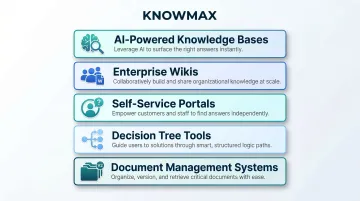
- AI-powered knowledge bases – Search by intent, not keywords; includes AI content generation and guided resolution workflows
- Enterprise wikis – Team-editable documentation hubs built for internal knowledge sharing across departments
- Self-service portals – Public-facing help centers where customers find answers without contacting support
- Decision tree tools – Step-by-step branching flows that guide agents through complex or compliance-sensitive processes
- Document management systems – Version-controlled repositories for storing, auditing, and retrieving structured files
The tools reviewed below were evaluated on AI capability, ease of use, integration depth, and enterprise readiness for 2026.
Top Knowledge Management Tools for 2026
Each tool below was evaluated across six criteria:
- AI-powered search capability and intent understanding
- Content authoring and localization features
- Integration ecosystem depth
- Scalability for enterprise use
- Compliance standards (GDPR, SOC 2, HIPAA, ISO 27001)
- Suitability for customer-facing and internal knowledge delivery
Knowmax
Knowmax is an AI-powered knowledge management platform purpose-built for CX teams, contact centers, and enterprise support operations across industries including telecom, banking, insurance, eCommerce, and BPOs. Unlike document storage systems, Knowmax actively guides agents and customers to the right answer through structured, visual workflows.
What Sets It Apart:
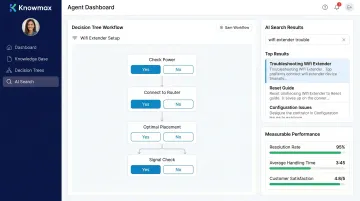
Knowmax is the only platform on this list built specifically to reduce Average Handle Time and improve First Call Resolution at enterprise scale. Its no-code interactive decision trees turn complex troubleshooting SOPs into step-by-step guided flows that reduce agent error.
AI-powered intent-based search (which understands what users need, not just keywords) surfaces answers in seconds across any channel.
Key differentiators include:
- AI content authoring tools (rephrasing, summarization, auto-translation across 25+ languages)
- Visual how-to guides and device troubleshooting for 18,000+ telecom and broadband devices
- Omnichannel deployment across agent desktop, self-service portals, chatbots, and mobile
- Enterprise compliance: GDPR, SOC 2, ISO 27001, HIPAA certified
- Deep integrations with Salesforce, Zendesk, Freshworks, Genesys, Talkdesk, and SAP
Measured Results:
- A leading telecom provider achieved a 21% improvement in First Call Resolution
- An online food delivery app reduced Average Handle Time by 15%
- A Fortune 500 telecom saved $60,000 in content migration costs and cut migration time by 83%
| Key Features | AI-powered search, no-code decision trees, visual troubleshooting guides, AI content authoring, omnichannel knowledge delivery, integrated LMS, browser extension for agents |
|---|---|
| Best For | Contact centers, CX teams, BPOs, and enterprises in telecom, banking, healthcare, and eCommerce requiring consistent multichannel support |
| Pricing | Available on request; enterprise pricing model |
Confluence (Atlassian)
Confluence is a wiki-based knowledge management and team collaboration platform popular among enterprises already using the Atlassian ecosystem — Jira, Jira Service Management, and related tools. It serves as a central documentation hub for engineering, product, and IT teams.
Its strength lies in deep Jira integration, allowing bi-directional linking between wiki pages and tickets. Robust permissions, a rich template library, and Atlassian Intelligence AI features for content summarization and Q&A make it ideal for structured internal documentation at scale. However, without active governance, page sprawl and adoption challenges can emerge.
| Key Features | Jira integration, spaces and page trees, granular permissions, template library, Atlassian Intelligence AI |
|---|---|
| Best For | Enterprises deep in the Atlassian ecosystem needing structured internal documentation and project-linked knowledge |
| Pricing | Starts at $5.50/user/month (Standard); Premium and Enterprise plans available |
Guru
Guru is an AI-powered knowledge platform that connects to existing tools — Slack, Teams, Notion, Google Drive, GitHub, Salesforce — and unifies scattered company knowledge into one searchable knowledge hub for employees.
Its standout capability is AI-powered enterprise search that understands context and delivers answers with citations directly within existing workflows. Over time, Guru's AI learns organizational workflows to surface context-aware answers proactively. Combined with a built-in wiki and employee intranet, Guru is ideal for distributed teams managing knowledge across multiple apps.
| Key Features | AI-powered enterprise search, company wiki, Slack and Teams integration, ChatGPT integration, knowledge cards with collaborative editing |
|---|---|
| Best For | Distributed teams unifying knowledge from multiple apps; companies building a smart internal wiki |
| Pricing | Custom pricing; contact sales for details |
Document360
Document360 is a dedicated AI-powered knowledge base platform designed for building both customer-facing and internal knowledge bases. Widely used by SaaS and tech companies for product documentation, user manuals, and help centers.
It features a rich WYSIWYG and Markdown editor, AI-powered search, and the Ask Eddy AI assistant for answering complex queries with cited, synthesized answers. Strong category management and version control make it well-suited for organizations that prioritize structured, public-facing documentation.
| Key Features | AI-powered search, Ask Eddy AI assistant, version control, category manager, analytics on content gaps and search trends |
|---|---|
| Best For | SaaS and tech organizations building customer-facing knowledge bases with strong content structure and AI-assisted search |
| Pricing | Tiered pricing available on request |
Zendesk
Zendesk is a leading customer service platform with a built-in knowledge base module that powers both agent-assist and customer self-service across 40+ languages. Suited for large enterprises running high-volume support operations.
Its Resolution Learning Loop™ continuously improves automation by connecting AI agents, human agents, and knowledge on one platform. It also supports no-code workflow automation, AI analytics dashboards, and knowledge connectors that pull content from Confluence, Google Drive, and SharePoint without migration.
| Key Features | Resolution Learning Loop™, AI agents, knowledge graph, no-code flow builder, multilingual support, AI-powered analytics |
|---|---|
| Best For | Large enterprises and growing customer support teams needing scalable, multilingual, AI-automated knowledge delivery |
| Pricing | Suite Team starts at $55/agent/month; plans scale to $169/agent/month for Enterprise |
Notion
Notion is a flexible all-in-one workspace that combines documentation, databases, project management, and knowledge sharing. Popular with SMBs and startup teams that need a single tool for cross-functional collaboration.
Its blank-slate approach offers high customization with relational databases, multiple view types, and 400+ integrations. However, without active governance, wikis can degrade at scale. Notion AI (a paid add-on) assists with drafting, summarizing, and translating content — best for smaller teams where a dedicated admin can maintain structure.
| Key Features | Flexible page and block structure, relational databases, multiple views, real-time collaborative editing, Notion AI (add-on), 400+ integrations |
|---|---|
| Best For | Small to mid-sized teams needing a single workspace for knowledge, projects, and databases with high customization |
| Pricing | Free for personal use; Team plan from $8/member/month; Notion AI add-on at $8/user/month |
How We Chose the Best Knowledge Management Tools
The evaluation process focused on identifying tools that deliver measurable business outcomes—not just feature checklists. Core criteria included:
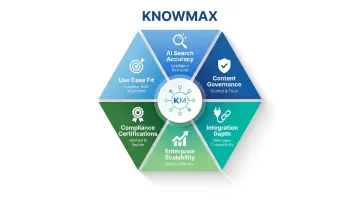
- AI search accuracy – Does the tool understand user intent, or just match keywords?
- Content creation and governance – Can non-technical authors create and manage content, with approval workflows included?
- Integration depth with CRM and support platforms – Does it work seamlessly with Salesforce, Zendesk, Genesys, and other enterprise tools?
- Enterprise scalability – Can it handle thousands of agents and millions of customer interactions?
- Compliance certifications – Does it meet GDPR, HIPAA, SOC 2, and ISO 27001 standards?
- Use case fit – Is it purpose-built for CX workflows, internal documentation, or customer self-service?
Common Selection Mistakes
Organizations often make critical errors when choosing KM tools:
- Selecting a general wiki (like Confluence) when the team actually needs guided CX workflows, decision trees, and agent-assist tools
- Underestimating adoption at scale — without governance, even well-built platforms become cluttered and unused
- Ignoring compliance: GDPR, HIPAA, and SOC 2 certifications aren't optional in regulated industries
- Assuming "AI-powered" means intent-based search — many tools still rely on basic keyword matching with autocomplete layered on top
Match the Tool to the Use Case
Contact centers and customer support teams have very different requirements from engineering or HR teams managing internal documentation. CX-focused platforms need guided resolution flows, omnichannel delivery, and CRM integration — capabilities a general wiki won't provide. Define your operational goals first, then choose the platform built to meet them.
Conclusion
In 2026, the defining difference between average and excellent KM tools is how well they deliver the right knowledge in the moment it is needed—whether through AI-guided agent workflows or fast self-service search. Storing documents is the baseline; what matters is surfacing the right answer at the right time.
Evaluate tools against your specific operational goals:
- For CX and contact center teams: Prioritize guided resolution capabilities, omnichannel delivery, and CRM integration
- For internal teams: Prioritize adoption ease, governance features, and scalability
For contact centers and enterprise support teams, Knowmax provides an AI knowledge management platform built around decision trees, guided agent workflows, and omnichannel delivery across voice, chat, and self-service. Request a demo to see how it fits your support operations.
Frequently Asked Questions
What is knowledge management software?
Knowledge management software is a platform for capturing, organizing, and delivering an organization's knowledge so employees and customers find the right information quickly. Modern KM tools are AI-powered — they surface answers in context, not just store documents.
How is a KMS different from a CMS?
A CMS (Content Management System) focuses on creating and publishing web content for public audiences, while a KMS (Knowledge Management System) organizes institutional knowledge for retrieval, decision-making, and workflow support. A KMS typically includes AI search, decision trees, and agent-assist features that a CMS does not.
What is enterprise knowledge management?
Enterprise KM covers the processes and tools large organizations use to manage knowledge across departments and channels. Typical use cases include support operations, agent onboarding, compliance documentation, and customer-facing self-service portals.
What are knowledge sharing tools?
Knowledge sharing tools are a subset of KM platforms that specifically enable employees to collaborate, exchange expertise, and surface each other's institutional knowledge. Examples include internal wikis, Q&A platforms, AI search tools, and community forums.
What are the three major knowledge management systems?
The three main categories are: knowledge bases (repositories of structured information for search and retrieval), document management systems (for storing and versioning files), and expert/AI systems (which actively surface answers based on user context and intent).
What are the best knowledge management tools?
The top tools covered in this article include:
- Knowmax — best for CX and contact centers
- Confluence — best for Atlassian-integrated enterprises
- Guru — best for distributed teams
- Document360 — best for customer-facing documentation
- Zendesk — best for large-scale support operations
- Notion — best for SMB all-in-one workspaces
Match the tool to your team's structure, support volume, and channel requirements.