Introduction
Contact center agent turnover averages 33% annually, with replacement costs ranging from $10,000 to $20,000 per departing agent. When your training infrastructure fails to keep pace with this churn, the operational costs multiply rapidly.
LMS implementation in contact centers is significantly more complex than standard enterprise rollouts. Shift-based operations, rapid onboarding cycles, and compliance-sensitive workflows mean disruption carries direct cost consequences.
When poorly planned, implementations typically produce:
- Inconsistent agent training across shifts and teams
- Low adoption rates that stall the rollout
- Expensive rework cycles as gaps emerge post-launch
- Training outcomes that never connect to KPIs like First Call Resolution (FCR) or Average Handle Time (AHT)
This guide walks contact center leaders and L&D teams through the correct, sequenced approach to implementing an LMS — from prerequisites through post-launch validation.
TL;DR
- LMS implementation requires stakeholder alignment, technical integration planning, and contact-center-specific content strategy before launch
- Skipping readiness checks or CRM/telephony integration planning leads to costly rework—get prerequisites right before moving fast
- A phased rollout (pilot → team → full deployment) reduces operational risk in shift-based contact centers
- Success metrics should measure FCR, AHT, onboarding time, and agent error rates—not just completion rates
- Training completion doesn't guarantee performance—pair your LMS with real-time knowledge tools
Before You Begin: Prerequisites for Contact Center LMS Implementation
Contact centers face unique readiness requirements: high agent-to-trainer ratios (typically 15-18 agents per trainer), multi-shift scheduling, rapid onboarding cycles, and compliance-sensitive scripts. These operational realities demand specific preparation before an LMS goes live.
Stakeholder Readiness Check
Operations leadership—not just L&D—must approve implementation. Without operations buy-in, scheduling training windows becomes impossible. Your stakeholder team must include:
- Operations or CX leadership (project sponsor)
- IT integration owner
- QA/compliance representative
- Frontline supervisors (change champions)
Brandon Hall Group found 44% of companies are dissatisfied with their current LMS—most skipped or rushed stakeholder alignment and pilot programs.
With the right people aligned, the next step is confirming your technology foundation can support the rollout.
Technical Prerequisites
Verify your technology stack readiness:
- Existing CRM platform (Salesforce, Zendesk, Freshworks)
- Telephony/WFM systems
- Single Sign-On (SSO) capability
- LMS vendor compatibility with your contact center's tech stack
75% of enterprise deals fail due to authentication gaps—making SSO configuration one of the first items to resolve, not the last.
Once your stack is confirmed, take stock of what training content you already have—and what needs rebuilding.
Content Inventory Audit
Identify existing training materials:
- SOPs, call scripts, compliance modules, product knowledge docs
- Current formats (Word docs, PDFs, SharePoint content)
- What needs rebuilding for digital delivery
Plan to rebuild 30-40% of legacy content for digital delivery — Word docs and PDFs rarely translate to LMS modules without restructuring.
Non-Negotiables
Do not proceed if:
- GDPR, PCI-DSS, or HIPAA requirements haven't been mapped to the LMS's data handling capabilities
- No named LMS administrator has been assigned with defined ownership
- Integration specifications haven't been documented
How to Implement an LMS in Your Contact Center: A Step-by-Step Guide
LMS implementation follows a defined sequence. Shortcuts taken in early phases—especially configuration and integration—consistently cause user adoption failures and content delivery problems at launch.
Phase 1: Define Goals, Roles, and Implementation Timeline
Set Contact-Center-Specific Goals
Goals must be measurable:
- Reduce new-hire time-to-readiness from 90 days to 60 days
- Improve compliance training completion rates to 95%+
- Decrease AHT by 8% through structured product knowledge training
- Reduce agent error rates by 40%
For every 1% improvement in FCR, operating costs decrease by 1%—approximately $286,000 in annual savings for a midsize centre.
Assemble Your Implementation Team
Core team members:
- Project sponsor: Operations or CX leadership
- L&D lead: Owns content strategy and learning paths
- IT/integration owner: Manages CRM, HRIS, SSO connections
- QA/compliance representative: Ensures regulatory requirements are met
- Frontline supervisor: Serves as change champion
Timeline Expectations
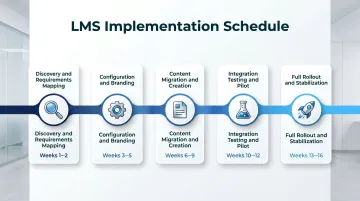
Cloud-based LMS implementation typically takes 8-16 weeks for contact centers, depending on the number of system integrations required. The timeline breaks down as:
- Weeks 1-2: Discovery and requirements mapping
- Weeks 3-5: Configuration and branding
- Weeks 6-9: Content migration and creation
- Weeks 10-12: Integration testing and pilot
- Weeks 13-16: Full rollout and stabilization
Phase 2: Select and Configure Your LMS
Selection Criteria for Contact Centers
Prioritize these capabilities:
- Mobile accessibility: Agents may not have dedicated desktops
- Ease of navigation: For non-technical users
- Microlearning formats: Bite-sized content reduces time away from calls
- SCORM compliance: Ensures portability of training content
- CRM/telephony integration: Salesforce, Zendesk, Freshworks, Genesys, Talkdesk compatibility
Mobile-optimized LMS deployments see 30-40% higher engagement than desktop-only systems — a meaningful gap when agents are frequently on shared terminals or mobile devices.
Configuration Steps
- Set up role-based access — separate tracks for new agent onboarding, tenured agent upskilling, and supervisor development
- Configure branding and notifications — align visuals and alert cadence to your contact center's existing identity
- Define course categories — map to workflows: compliance, product knowledge, soft skills, escalation handling
- Establish learning paths — sequential journeys that unlock as agents progress through assigned modules
Phase 3: Build and Migrate Training Content for Contact Center Roles
Content Requirements
Contact center content differs from generic eLearning:
- Simulated call scenarios
- Decision-tree-based troubleshooting guides
- Compliance acknowledgment modules
- Product/policy update micro-courses
Content should reflect real agent interactions to drive engagement among shift-based learners.
Once content is defined, the next challenge is getting it into the system efficiently.
Content Migration Process
For organizations moving from legacy systems or SharePoint:
- Audit existing assets for SCORM compatibility
- Prioritize high-frequency training modules for first upload
- Plan a continuous content calendar for post-launch updates tied to product or policy changes
Content migration and creation typically takes 4-8 weeks. Plan accordingly — delays here push the full launch date.
Phase 4: Integrate, Test, and Pilot Before Full Rollout
Integration Testing
Verify:
- SSO works across existing contact center systems
- Completion data flows correctly into HRIS or QA dashboards
- LMS is accessible on devices agents actually use (shared terminals, mobile)
Pilot Program Structure
Best practices for pilot programs:
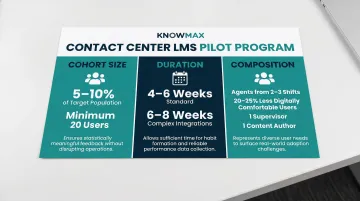
- Cohort size: 5-10% of target population, minimum 20 users
- Duration: 4-6 weeks for standard deployments; 6-8 weeks for complex integrations
- Composition: Include agents from 2-3 shifts; 20-25% should be users less comfortable with digital tools; at least one supervisor and one content author
Exit Criteria
Do not proceed to full rollout until:
- User satisfaction reaches 85% or higher
- Course completion rate hits 80%+ of assigned pilot courses
- Zero blocker-level issues remain
- Mobile success rate exceeds 90%
Post-Launch Checklist: Validating and Measuring Your LMS Impact
Validation Checks
Before declaring the LMS fully live:
- All integrations are stable
- All user roles have correct access
- Completion data populates correctly
- Supervisors can view team-level progress reports without admin access
Contact-Center-Specific KPIs
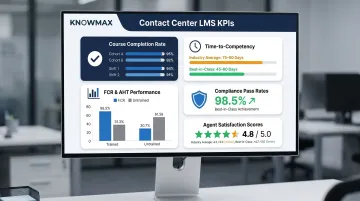
Track these metrics post-launch:
- Course completion rates by cohort and shift
- Time-to-competency for new hires (industry average: 75-90 days; best-in-class: 45-60 days)
- FCR and AHT changes for trained vs. untrained agents
- Compliance training pass rates
- Agent satisfaction scores with the learning experience
Roughly 40% of an average contact center's FCR fail-points are due to frontline agent error—addressable through structured coaching and training.
Feedback Loop Structure
Run a 30/60/90-day review cadence with L&D, operations, and QA leads. Use LMS reporting alongside QA call monitoring data to identify whether training gaps are driving recurring errors — then act on what you find before those patterns become entrenched.
Closing the Performance Gap
Training completion doesn't guarantee on-floor recall, especially in high-turnover environments. Once your review cadence surfaces persistent gaps, the next step is closing them in real time. Platforms like Knowmax sit alongside your LMS to give agents guided decision trees, searchable knowledge bases, and step-by-step troubleshooting at the point of the call — so training knowledge holds up under live pressure, not just in assessments.
Common LMS Implementation Mistakes in Contact Centers (and How to Fix Them)
Mistake 1: Ignoring Shift-Based Scheduling During Rollout
Problem: Training windows are assigned without accounting for shift patterns, causing agents on non-standard shifts to miss mandatory modules or receive inconsistent onboarding.
Fix:
- Build shift-aware training schedules from Phase 1
- Configure LMS notifications and deadlines around rotating shift patterns
- Set core module completion windows to 5–7 days, not single-day deadlines
Mistake 2: Under-Configuring Integrations Before Launch
Problem: The LMS goes live without completed CRM or HRIS integrations, leaving teams stuck with manual user management, duplicate data entry, and training records that never reach performance dashboards.
Fix:
- Start integration setup and testing in Phase 2 (configuration), not after go-live
- Run a dedicated IT checkpoint at the end of the pilot phase to validate all data flows
- Block full rollout until every integration is confirmed working end-to-end
Mistake 3: Using Generic Content Not Built for Contact Center Roles
Problem: Training modules borrowed from corporate L&D or third-party libraries don't reflect agent workflows—real call scripts, escalation paths, compliance steps—leading to low completion rates and agents who can't apply what they learned.
Fix:
- Adapt the top 5 business-critical modules to contact center context before launch
- Ground training in real call scenarios and product-specific examples
- Assign role-based learning paths so agents only complete what's relevant to their queue
Pro Tips for a Successful Contact Center LMS Rollout
Three operational decisions tend to separate smooth LMS rollouts from disruptive ones:
- Start with new hires, not the full agent population. Rolling out to an incoming cohort limits operational disruption, generates early success stories, and gives you a proof point before scaling to everyone else.
- Bring supervisors in before launch, not after. Frontline supervisors who understand the LMS and its reporting features reinforce training on the floor daily — that direct reinforcement drives completion rates better than top-down mandates.
- Keep a living implementation log. Document configuration decisions, integration specs, content versions, and pilot feedback as you go. Contact centers deal with constant policy and product changes, and that log makes every future LMS update faster to execute.
Frequently Asked Questions
What are the top 5 LMS platforms?
Commonly cited platforms include Docebo, Cornerstone OnDemand, SAP Litmos, TalentLMS, and Moodle. Contact centers should prioritize platforms with CRM/telephony integrations and mobile accessibility over generic feature lists, as these capabilities directly impact adoption and operational efficiency.
How long does LMS implementation take for a contact center?
Typical cloud-based LMS implementation takes 8-16 weeks for contact centers. Timelines extend based on the number of system integrations, volume of content migration, and size of the agent population.
What integrations does a contact center LMS need?
Core integrations include CRM platforms (Salesforce, Zendesk, Freshworks), HRIS for automated user provisioning, SSO for seamless agent access, and ideally a connection to QA or workforce management tools to correlate training data with performance metrics like FCR and AHT.
How do you measure the ROI of LMS implementation in a contact center?
Measure reduction in new hire ramp time, improvement in FCR and AHT for trained agents, compliance training completion rates, and reduction in agent error rates. Compare pre- and post-implementation data at the 90-day mark to quantify impact.
What is the difference between an LMS and a knowledge management system for contact centers?
An LMS delivers structured, scheduled training (onboarding, compliance, upskilling), while a knowledge management system provides real-time, on-demand answers during live customer interactions. Both are needed for a high-performing contact center—they complement rather than replace each other.
How do you ensure agent adoption of a new LMS in a contact center?
Key drivers include mobile and shift-compatible access, content relevant to real agent workflows, supervisor reinforcement, and a phased rollout using pilot feedback to build credibility before full deployment. 41% of organizations abandon their LMS within the first year due to poor planning. Adoption depends on readiness, not just launch execution.