Introduction
New agents in contact centres face an impossible standard: handle complex, multi-channel customer queries with minimal error from day one. Yet traditional onboarding cycles still stretch for weeks or months, creating a gap between executive expectations and operational reality. According to industry data, 91% of customer service leaders report pressure to implement AI, whilst standard agent ramp-up time ranges from 4 to 12 weeks, even with assisted training.
CX automation platforms are reshaping how agents learn. Rather than replacing training, they embed knowledge and guidance directly into the agent's live workflow. Contact centres using them report dramatic reductions in time-to-readiness, with some cutting training cycles from 6–7 weeks to just 1–4 weeks.
TLDR:
- CX automation reduces agent ramp-up time by embedding knowledge directly into live workflows
- Contact centres report training cycles compressed from 6–7 weeks to 1–4 weeks after deployment
- Decision trees, AI-powered search, and real-time coaching eliminate memorisation requirements
- Every 1% FCR improvement saves approximately $286,000 annually for mid-size centres
- Automation addresses the cost spiral: 39% annual attrition means training investments repeat constantly
The True Cost of Slow Agent Training in Contact Centres
The standard agent onboarding timeline creates measurable financial pressure. Classroom training typically runs 3-4 weeks, followed by 1-2 weeks of nesting. But full competency takes 6-12 months, with complex operations requiring up to two years before productivity levels off.
During this ramp period, agents don't just underperform — they actively generate cost. New agents typically deliver just 50% of tenured agent productivity after completing nesting. 25% of contacts handled by new agents require correction or rework, translating directly into longer handle times, more escalations, and depressed CSAT scores during the critical first 90 days.
The Attrition Multiplier:
Agent attrition compounds the training cost problem. Industry data shows annual attrition rates of 39% in 2024, down from 49% in 2023 but still meaning four in ten agents leave each year. Some studies place the figure even higher—ranging from 30-52% depending on sector and year. Every departure triggers a new training cycle, multiplying the cost with each hire cohort.
The Financial Impact Per Agent:
| Source | Replacement Cost | What It Includes |
|---|---|---|
| Gartner | $14,113 | Frontline agent replacement |
| ApexCX | $30,751 | Recruitment + training + nesting + lost productivity + rework |
| ICMI | Over $35,000 | Direct and indirect costs |
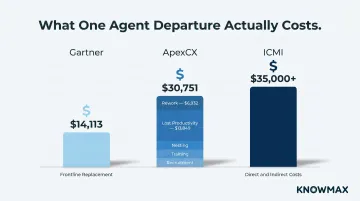
ApexCX's breakdown shows $13,849 in lost productivity and $6,932 in rework costs — line items that recruitment-only cost models miss entirely. Organisations using simpler calculations routinely undercount what slow ramp-up actually costs them.
The Customer Experience Penalty:
Slow training erodes customer trust long before attrition becomes visible on a balance sheet. In 45% of all calls, agents spend an average of 3 minutes searching for answers. For new agents still learning knowledge base navigation, that figure climbs higher — producing longer handle times, more transfers, and inconsistent responses throughout the first 90 days. At scale, this is how ramp-up inefficiency becomes a customer retention problem.
Why Traditional Training Methods Keep Failing Contact Centres
Traditional training suffers from a structural flaw: it front-loads learning before agents ever take a live call. Agents spend weeks in classrooms or e-learning modules, yet the moment they hit the floor, real customer interactions expose gaps that simulations could never anticipate.
The Forgetting Curve Problem:
Research shows humans forget 67% of learned material within 24 hours without reinforcement—a finding from Ebbinghaus (1885) that has been successfully replicated in peer-reviewed studies. Static manuals, SOPs, and training decks cannot be retained when delivered weeks before agents need them. By the time a new hire encounters a specific policy question on a live call, the classroom content has faded.
Knowledge Base Rot:
Even when agents remember to consult knowledge bases, the content often fails them. Over 50% of CX leaders cite "understanding what content needs to be updated" as a significant pain point, with 74% of lower-performing organisations saying outdated content impacts service delivery.
New agents lack the institutional memory to recognise when an article is obsolete. They simply follow what they find, and errors spread.
The Trainer Availability Trade-Off:
Traditional training requires senior agents or dedicated trainers to step off the floor to coach new hires. This creates a direct trade-off between training quality and operational capacity. During high-growth periods or after rapid product changes, this model breaks down entirely. 76% of agents report being overwhelmed by multiple systems, workflows, and information. Front-loaded classroom training simply cannot prepare them for that complexity.
The Complexity Gap:
The issues reaching agents have also grown harder. Consider:
- Only 14% of customer service issues are fully resolved via self-service alone
- Yet 73% of customers attempt self-service before calling
Agents must handle the escalated, messier cases that classrooms cannot simulate: multi-issue contacts, system failures, and frustrated customers who have already tried and failed to help themselves. Scripted training scenarios don't come close to preparing them for that reality.
How CX Automation Platforms Transform Agent Onboarding
CX automation platforms redefine what "training" means. Rather than forcing agents to memorise everything upfront, these platforms surface the right information at the right moment during live interactions—shifting the model from "train before you work" to "learn while you work."
Real-Time Knowledge Delivery
When agents can search and retrieve answers in seconds using intent-based AI search, the learning curve compresses. They no longer need to memorise every policy or product detail before taking calls. Instead, they build proficiency on the job, with the platform acting as an always-available safety net.
For example, Knowmax's AI-powered search understands intent, not just keywords. If an agent types "customer wants refund but past 30 days," the system surfaces the relevant policy exception workflow—even if those exact words don't appear in the knowledge base.
This eliminates the multi-minute search delays that slow down new agents across a significant share of interactions, allowing them to perform at higher levels from day one.
Guided Decision Trees as Training Scaffolds
Interactive decision trees replace the need for agents to memorise complex troubleshooting paths. A new agent handling a broadband connectivity issue can follow a guided flow for any query type, answering questions step-by-step until reaching resolution. Decision trees reduce AHT by 20-40% and cut training time by 50%, with one banking implementation achieving a 60% reduction in escalations.
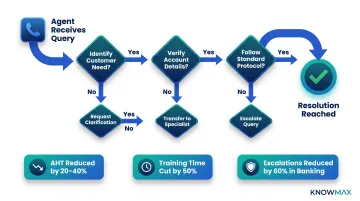
Knowmax offers industry-specific decision trees—particularly valuable in telecom and banking, where new agents must navigate multi-product complexity across jurisdictions. Every agent follows the same compliant, accurate path regardless of who trained them or when they joined.
Proven Impact on Escalations and Handle Time
Customer results from Knowmax deployments illustrate the scale of impact:
- A telecom client reported a 46% reduction in call volume after deploying the platform, driven by enhanced self-service and faster agent knowledge access (Knowmax internal data)
- Another client achieved a 21% improvement in first-call resolution after rolling out decision tree workflows (Knowmax internal data)
Beyond individual deployments, a field study of 5,172 customer support agents found that AI assistant access increased productivity by 15% on average—with the largest gains among less experienced agents. Generative AI applied to customer service reduced handle time by 9%, cut escalations by 25%, and increased issue resolution by 14% per hour.
Genesys Internal Case Study
When Genesys deployed its own Cloud AI platform across its 450-engineer product support team, the results were striking:
- 43% reduction in case escalations
- 5-minute reduction in average handle time via Agent Copilot
- 25% projected reduction in support engineer onboarding costs
- 157,000 cumulative working hours saved over three years
- 9.8X cumulative ROI equivalency
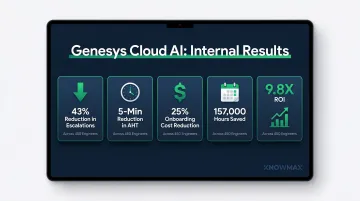
The data confirms what contact centre leaders already know: automation delivers the greatest productivity gains to the least experienced agents.
The CX Automation Features That Directly Reduce Training Time
Guided Decision Trees and Step-by-Step Workflows
Interactive decision trees eliminate memorisation by guiding agents through resolution paths in real time. New agents can handle complex troubleshooting—policy exceptions, multi-step technical fixes, compliance-sensitive scenarios—without deep prior knowledge.
How they accelerate onboarding:
- Replace weeks of product training with on-demand, contextual guidance
- Ensure every agent follows the same compliant, accurate workflow
- Reduce escalations by 60% in high-stakes environments like banking
- Cut training time by 50% when built with tooltips and inline policy explanations
Knowmax's decision trees integrate with CRM platforms, auto-pulling customer data to eliminate redundant questions. Agents spend less time asking "Can I have your account number?" and more time solving problems—compressing handle time from the very first interaction.
AI-Powered Knowledge Search
Intent-based AI search transforms how agents access information. Rather than memorising file names or article titles, agents type what they need in natural language—"how to override credit limit for loyal customer"—and the system surfaces the right workflow instantly.
Why it matters for new agents:
- Reduces search time from 3 minutes to seconds
- Eliminates dependency on knowing where information lives in the knowledge base
- Handles typos, abbreviations, and conversational queries without failing
- Delivers contextual answers, not just keyword matches
Knowmax's AI search understands semantic meaning, so even vague queries retrieve accurate results. This matters most during onboarding, when agents don't yet know what they don't know. A Fortune 500 retailer using the platform achieved a 13% reduction in handling time and a 30% decrease in agent errors after transforming complex SOPs into searchable, visual guides (Knowmax internal data).
Visual Troubleshooting Guides
Visual content is processed 60,000 times faster in the brain than text. For technical support roles—telecom, broadband, device troubleshooting—picture guides allow agents to walk customers through resolution processes without deep prior training.
The retention gap between text and visuals is significant for new agents:
- After three days, users retain only 10–20% of written information
- Visual information retention climbs to 65%
- Illustrated text is 83% more effective when testing is delayed
In practice, this means agents supporting broadband customers can follow device-specific visual steps rather than memorising technical specifications for hundreds of models. Knowmax's ready repository of 18,000+ devices makes this possible at scale—new hires reach the production floor weeks faster than with traditional pre-training.

Real-Time Coaching and Next-Best-Action Prompts
Real-time agent assist tools function as an "invisible trainer" sitting beside new agents on every call. These systems listen to or monitor live interactions, surfacing contextual suggestions—script recommendations, compliance reminders, resolution steps—at the moment they're needed.
Impact on training:
- Developing agents effectively can boost performance by up to 27% and make them 1.5× more likely to exceed goals
- AI can now analyse 100% of conversations for compliance, tone, and quality—replacing traditional QM that reviews only 1–2% of interactions
- Supervisor interaction review time dropped from 10 minutes to under 1 minute using AI-powered scoring (Genesys case study)
For new agents, this real-time feedback closes the loop that weekly coaching sessions can't. Rather than discovering a missed compliance step days later, agents receive in-the-moment prompts that correct behaviour as it happens—cutting the time to full proficiency by weeks, not days.
How to Integrate CX Automation Into Your Agent Training Workflow
Step 1: Audit the Knowledge Gap Before Automation
Before deploying any CX automation tool, identify where new agents struggle most during training. Use data to pinpoint failure points:
- Which product categories generate the most escalations in the first 30 days?
- What policy areas cause the longest handle times for new hires?
- Where do agents abandon searches or fall back to asking senior team members?
Prioritise automation features that address the highest-frequency pain points first. If new agents struggle with broadband troubleshooting, deploy visual device guides and decision trees for that vertical before tackling other areas.
Step 2: Embed Knowledge Tools Into the Agent Desktop from Day 1
Don't treat the knowledge base as a resource to consult after training. Integrate it into the live agent workspace so it becomes the default tool from a new hire's very first interaction. This normalises automation-assisted work and builds proficiency faster.
Knowmax integrates natively with Salesforce, Zendesk, Freshworks, Genesys, and Talkdesk, embedding knowledge delivery directly into existing agent desktops without workflow disruption. Agents search and share knowledge without leaving the CRM — eliminating the tab-switching friction that slows down new hires most.
Step 3: Shorten Structured Training Without Removing What Matters
CX automation is most effective when it replaces rote memorisation — product catalogues, policy FAQs, troubleshooting steps — rather than scenario-based, soft-skill, or empathy training. A balanced approach shortens the classroom phase whilst preserving what automation cannot replicate.
For example, reduce initial training from 6 weeks to 2 weeks by focusing only on:
- Communication and de-escalation techniques
- System navigation basics
- Company culture and values
- Top 5 most frequent call types
Let automation handle the remaining edge-case scenarios through decision trees and AI search during live work.
Step 4: Build Feedback Loops Between Live Usage and Training Gaps
Once agents are working live, their behaviour inside the knowledge base becomes its own data source. Track which articles they access most in early tenure, where decision trees get abandoned, and which query types still result in escalations.
Knowmax's analytics module surfaces these patterns — article access frequency, time-on-content, and decision tree drop-off points — so training managers can continuously refine workflows, update outdated content, and direct coaching where it has the greatest impact.
How to Measure Training Time Reduction After CX Automation
Primary Metrics That Signal Reduced Training Time:
- Track how quickly new agents handle a contact without supervisor monitoring (time-to-first-independent-call)
- Measure days to reach acceptable CSAT, FCR, and AHT benchmarks — the clearest signal that ramp-up is complete
- Monitor escalation rate at 30, 60, and 90 days — a declining transfer rate confirms agents are gaining confidence
- Watch knowledge base searches per interaction over time — fewer searches per call indicates growing proficiency
Benchmark Pre- and Post-Automation:
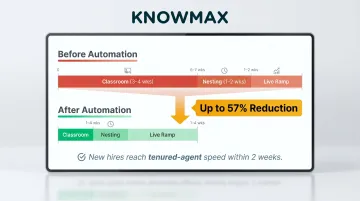
Organisations should capture baseline ramp-up data before deployment to calculate actual reduction, not just infer it. Forrester's TEI study of Verint documented training compression from 6-7 weeks to 1-4 weeks, with new hires reaching tenured-agent handling speed within 2 weeks. The same study found organisations could shift training focus from hundreds of call types to just the top 5, with AI handling guidance for less common scenarios.
| Study | Pre-Automation | Post-Automation | Improvement |
|---|---|---|---|
| Forrester TEI (Verint) | 6-7 weeks | 1-4 weeks | Up to 57% reduction |
| Genesys (internal) | Baseline | 25% cost reduction | Projected savings |
Downstream Business Metrics:
Training time reduction affects broader business outcomes:
- Reduces cost-per-hire by lowering the training component for each new agent
- Cuts error rates in the first 90 days, protecting CSAT scores during ramp-up
- Narrows the performance gap between new and tenured staff through consistent AI-guided support
- Frees senior agents from repetitive coaching — automation fills the always-available trainer role
The FCR Connection:
Those downstream gains connect directly to one of the most financially significant metrics in contact centre operations. Every 1% improvement in FCR translates to approximately $286,000 in annual savings for a mid-size contact centre. Cross-industry average FCR sits below 70%, with "world-class" performers (top 5%) achieving 80%+.
When automation gets new agents to FCR benchmarks faster, each percentage point gain arrives weeks earlier — and the savings accumulate from day one of deployment.
ROI Realisation Timeline:
60% of organisations report ROI within 12 months of deploying AI in contact centre operations. Forrester TEI studies document 391% ROI (Verint) and 396% ROI (Salesforce Agentforce) over three years, both with payback periods under 6 months.
Structure pilot deployments with 90-day measurement windows. That timeframe is long enough to capture meaningful ramp-up data, and short enough to build the business case before budget cycles close.
Frequently Asked Questions
How does automation improve customer experience?
Automation improves CX by removing delays and inconsistencies caused by undertrained agents. Faster access to accurate answers means shorter handle times, fewer escalations, and more consistent service across channels—particularly during an agent's first 90 days.
What steps should I take to integrate AI agents into my existing customer experience workflows?
Start by auditing current pain points, then prioritise high-impact use cases like knowledge delivery and guided resolution. Ensure native integration with your CRM/telephony stack (Salesforce, Zendesk, Genesys, etc.), and measure adoption and outcomes before scaling beyond the initial pilot.
How long does it typically take to train a new customer service agent?
Industry benchmarks range from 4–12 weeks for initial onboarding, with full competency taking 6–12 months. CX automation platforms compress this timeline by replacing rote memorisation with real-time knowledge delivery. Some organisations have cut onboarding from 6–7 weeks down to 1–4 weeks.
Can CX automation platforms replace traditional agent training entirely?
No. Automation supplements rather than replaces training—it removes the memorisation-heavy, documentation-dependent portions of onboarding. Soft skills, empathy, and scenario practice still require human-led instruction and cannot be fully automated.
What is the ROI of reducing agent training time with CX automation?
ROI spans three dimensions: direct savings (reduced trainer time, shorter classroom periods), operational gains (faster time-to-productivity), and CX quality improvements (fewer errors, better CSAT in the first 90 days). Most organisations see payback within 6–12 months.
How do knowledge management tools specifically help new agents during training?
Knowledge management tools surface the right information at the moment of need—through AI search, decision trees, and visual guides—reducing the volume of information agents must memorise before taking live calls and helping them handle live calls sooner.