Introduction
Most support teams publish an FAQ page, wait for ticket volume to drop, and instead watch nothing change. The FAQ sits on the website, agents keep answering the same questions, and customers still call, email, and chat at the same rate they did before.
Publishing an FAQ and actually deflecting tickets are not the same task. The difference is in how questions are sourced, how answers are written, where the FAQ lives, and whether anyone maintains it after launch.
Only 14% of customer service issues are fully resolved in self-service, despite 73% of customers attempting it. That gap is not a willingness problem — it is an execution problem. Most FAQs fail because they answer the wrong questions, rely on poor search, or push customers back to human agents instead of resolving the issue in the article itself.
This guide covers exactly what separates an FAQ that deflects tickets from one that just occupies a page on your website.
TL;DR
- Build your FAQ from real support data — not internal guesses about what customers ask
- Answer quality matters more than quantity: vague responses generate follow-up tickets, not deflection
- Customers must find the FAQ before they file a ticket — search, placement, and channel visibility make that happen
- Track ticket volume trends, search success rates, and helpfulness ratings to confirm deflection is working
- FAQs are living systems — stale content increases ticket volume instead of reducing it
When Should You Build a Self-Service FAQ?
A self-service FAQ delivers the highest ticket deflection in specific scenarios:
- Your support team handles the same categories of questions repeatedly, and the top 20 question types represent 60-80% of all tickets
- Ticket volume is growing, but the underlying issues are predictable and resolvable without human judgment
- Customers reach out during off-hours when live agents are unavailable—74% of customers require 24/7 service availability, but 60-80% of after-hours calls go unanswered when businesses rely on voicemail
These scenarios point to a clear demand signal. 81% of consumers prefer resolving simple issues independently before contacting support, yet 53% still bypass self-service entirely and call a live agent. The barrier is trust, not availability — customers doubt the FAQ will actually solve their problem.
When a FAQ Is Insufficient
A FAQ is a poor fit when:
- Queries require access to account-specific data (order status, billing history, usage reports)—a static FAQ cannot retrieve or display personalized information
- Issues require multi-step guided troubleshooting with conditional branching (if X, then Y)—interactive decision trees handle this better
- The product or policy changes faster than the team can update static content, creating a risk of publishing outdated information that contradicts current behavior
What You Need Before Building Your Self-Service FAQ
The inputs going into a FAQ directly determine how well it deflects. Skipping the preparation phase is the most common reason FAQs fail.
Support Data and Ticket Taxonomy
The primary input is a structured export of recent support tickets, categorized by question type and volume. Without this, teams default to guessing what customers ask — producing a FAQ that answers the wrong questions. 43% of self-service failures occur because customers cannot find content relevant to their issue — the single largest cause of FAQ ineffectiveness.
Pull a 90-day sample of tickets and categorize them. Identify the top 20-30 repeating question types. These become the foundation of the FAQ, not topics chosen by internal brainstorm.
Content Ownership and Update Process
Someone must own the FAQ — a defined role responsible for reviewing tickets, updating answers, and retiring outdated content. Teams that skip this step run into two predictable problems:
- The FAQ becomes a liability, not an asset, as answers drift out of sync with the product
- Stale content that contradicts current behavior generates new tickets from customers who followed wrong instructions
A Publishing Environment With Search and Analytics
The FAQ needs to live in a platform that offers keyword and intent-based search, tracks zero-result queries (questions customers typed that returned no answer), and collects helpfulness feedback. Skip these signals and there is no way to improve the FAQ over time.
Knowmax, for example, gives teams these capabilities out of the box:
- Intent-based search that matches the customer's meaning, not just exact keywords
- Built-in analytics tracking article view rates and search success rates
- Helpfulness ratings that surface content gaps before they compound into ticket volume
Together, these signals show teams exactly where the FAQ is failing — and what to fix first.
How to Build a Self-Service FAQ That Deflects Support Tickets
Step 1: Mine Your Support Tickets for Real Questions
Pull a 90-day sample of support tickets and categorize them by topic and frequency. Identify the top 20-30 repeating question types using actual ticket data, not internal assumptions.
Use the exact language customers used in their tickets rather than internal product terminology. Customers will search using their own phrasing. If customers type "I was charged twice," but the FAQ only surfaces an article titled "Billing and Payment Policy," the FAQ fails. Intent-based search (which matches the customer's meaning rather than exact keywords) improves resolution rates without requiring customers to guess the "right" phrasing.
Step 2: Prioritize Questions by Deflection Potential
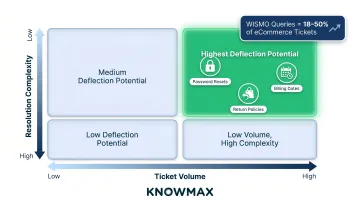
Not all questions are equally deflectable. High-volume, low-complexity questions (billing dates, password resets, return policies) have the highest deflection potential. Complex, account-specific, or emotionally sensitive issues are poor FAQ candidates.
Use a simple scoring method: multiply ticket frequency by resolution complexity (inverse) to rank questions. Start the FAQ with the top 10-15 highest-scoring questions. In eCommerce, for example, "where is my order" (WISMO) queries account for 18-50% of support tickets, rising to 70-80% during peak periods. High volume, but often resolvable with basic order tracking information.
Step 3: Write Answers That Resolve, Not Redirect
A deflecting answer provides every piece of information needed to complete the task or resolve the issue within the FAQ itself. No links to a phone number, no "contact us for more details." Answers phrased as "please contact our support team" are not self-service. They are ticket generators.
Formatting best practices for answers:
- Use numbered steps for procedural questions (how to reset a password, how to initiate a return)
- Write clear conditionals ("if your order was placed before 2 PM, it ships the same day; if placed after 2 PM, it ships the next business day")
- Add screenshots or short video clips where the process is visual
Knowmax's AI author tools and visual troubleshooting guides help teams produce structured, multimedia-rich answers faster and keep them consistent across languages.
When answers are incomplete, they generate tickets rather than prevent them. 58% of customers feel their issue is only partially resolved after a support interaction. An answer that covers 80% of the question generates a ticket for the remaining 20%.
Step 4: Categorize and Structure for Navigation
A flat list of 50 questions overwhelms customers and drives them to contact support instead. Group questions into 4-6 clear topic categories that mirror how customers think about their problems, not how internal teams are organized.
Place a "most viewed" or "top questions" section prominently at the top of the FAQ. This surfaces answers to the highest-volume questions before a customer even searches. Knowmax's analytics identify which articles get the most views and where engagement drops, so teams know which questions to promote and which answers need work.
Step 5: Make the FAQ Findable Before Customers File a Ticket
A FAQ that customers discover after submitting a ticket has zero deflection value. Placement is as important as content. 57% of inbound calls come from customers who visited the company's website first but could not resolve their issue.
Key placement strategies:
- Surface FAQ results inside the ticket submission form as the customer types their issue description
- Embed FAQ links in automated email responses
- Place the FAQ search bar on high-traffic pages (pricing, checkout, login)
- Optimize FAQ content for SEO so customers searching Google can find answers before they ever reach the contact page
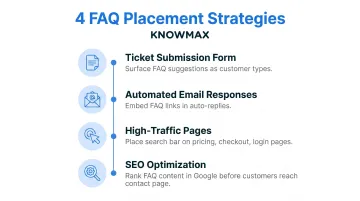
Proactive engagement can deflect up to 25% of inbound calls when FAQ suggestions are surfaced at the moment of intent.
Step 6: Measure Deflection and Iterate Monthly
Track core FAQ deflection metrics:
- Ticket volume change: Compare covered categories before and after FAQ launch
- Search success rate: Percentage of searches that led to a viewed article
- Zero-result query rate: Questions customers typed that returned no answer
- Negative helpfulness rate: "Was this helpful — No" clicks that flag answer quality gaps
The monthly review cycle should include:
- Retiring questions with zero views
- Expanding answers where negative helpfulness ratings are high
- Adding new questions based on ticket topics that appeared in the previous month
Knowmax tracks these metrics natively, with visibility into engagement patterns, time spent on content, and feedback ratings at the article level.
Key Factors That Determine Whether Your FAQ Actually Deflects
Answer Completeness
The single largest driver of deflection failure is incomplete answers. Only 14% of customer service issues are fully resolved in self-service, and 58% of customers feel their issue is only partially resolved after interacting with support. An answer that resolves 80% of the question will generate a ticket for the remaining 20%.
Every answer must end in a resolution, not a handoff, for questions that belong in a FAQ.
Search Quality and Intent Matching
If a customer types "I was charged twice" but the FAQ only surfaces an article titled "Billing and Payment Policy," the FAQ fails. Intent-based search—which matches the customer's meaning rather than exact keywords—improves resolution rates without requiring customers to use the "right" phrasing.
43% of self-service failures stem from customers being unable to find content relevant to their issue. Knowmax's AI-powered intent search addresses this by analyzing what the customer means, not just what they typed, routing them to the right answer even when their phrasing doesn't match the article title.
Content Freshness
Outdated answers erode trust and generate tickets from customers who followed the wrong instructions. Set content expiry triggers tied to product release cycles or policy change dates. Knowmax's scheduling and archiving tools let teams assign start and end dates to content, so outdated articles retire automatically when they're no longer valid.
Visibility at the Moment of Intent
The FAQ must intercept the customer at the exact moment they are about to submit a ticket—not after. Display FAQ suggestions inside the support contact form as the customer describes their issue. EarthLink reduced calls by 8% by monitoring its knowledge center and initiating a chat if a customer spent more than 90 seconds on a page or clicked "Contact Us."
Common Mistakes That Kill FAQ Deflection Rates
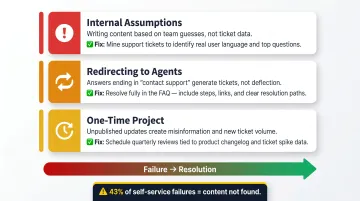
Most FAQ deflection failures trace back to the same three mistakes:
- Building from internal assumptions instead of ticket data
- Redirecting customers to agents instead of resolving their issue
- Treating the FAQ as a finished product rather than a living resource
Building the FAQ from Internal Assumptions
The most common mistake is writing FAQ content based on what the support team thinks customers ask rather than what tickets prove they ask. This produces a FAQ that answers the wrong questions in detail while high-volume questions go unanswered. According to Gartner, 43% of self-service failures occur because customers cannot find content relevant to their issue.
The fix is straightforward: pull your top 20 ticket categories from the past 90 days and build your FAQ around those — not around what feels logical to the team internally.
Writing Answers That Redirect to Human Support
Answers phrased as "please contact our support team for further assistance" or "it depends on your account type" are not self-service — they are ticket generators. Every answer must end in a resolution, not a handoff, for any question that belongs in a FAQ.
If an answer genuinely requires account-specific context, that question shouldn't be in the FAQ at all.
Treating the FAQ as a One-Time Project
A FAQ published and never updated becomes actively harmful. Stale content that contradicts current product behaviour frustrates customers and generates tickets about the misinformation itself — adding to the problem it was meant to solve.
Schedule content reviews monthly at minimum, timed to product updates or policy changes.
When a Self-Service FAQ Isn't Enough
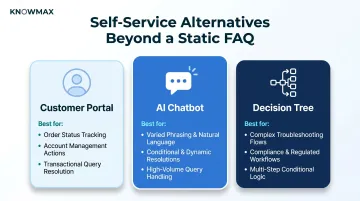
A FAQ is optimised for pattern-based, informational questions. When customers need to take actions on their accounts—cancel, upgrade, retrieve data—a static FAQ cannot complete those actions. A customer portal or integrated self-service workflow is required.
For example, WISMO (where is my order) queries—which are transactional and require data retrieval—account for 18–50% of eCommerce support tickets, rising to 70–80% during peak periods. These queries need a customer portal that displays live order status, not a static FAQ article.
Alternative: AI-Powered Chatbot With Knowledge Base Integration
A conversational AI layer adds value when customers phrase questions in highly varied ways a static FAQ cannot anticipate, or when the answer depends on the customer's specific situation. 71% of contact centers use FAQs, but only 22% use chatbots — the gap reflects the additional investment required in training data, intent mapping, and escalation design.
Knowmax connects the same FAQ content across chatbot, agent desktop, self-service portal, and mobile — so answers stay consistent regardless of channel. In one case, a leading telecom using Knowmax's knowledge-backed chatbot handled 73% of transactions through AI automation, significantly reducing agent dependency.
A chatbot layer makes the most sense when:
- Customer questions vary significantly in phrasing or intent
- Resolution paths differ based on account type or history
- Volume justifies the upfront training and escalation investment
Alternative: Interactive Decision Trees
For complex troubleshooting scenarios with multiple conditional steps, a decision tree delivers higher deflection than a FAQ. It guides customers through a branching resolution path, adapting at each step based on their input rather than returning a single static answer. This approach works especially well in telecom, SaaS, and hardware support contexts.
Knowmax's interactive decision trees deliver step-by-step guidance based on customer inputs — particularly effective for compliance-heavy workflows where the resolution path must be both accurate and auditable. Unlike a FAQ that surfaces information, a decision tree surfaces the right next action given what the customer has already told you.
Frequently Asked Questions
How to offer self-service options?
Self-service options include knowledge bases, FAQs, chatbots, customer portals, and interactive guides. The key is to place them where customers look before contacting support and ensure the content is accurate and complete enough to fully resolve common issues.
What is the meaning of self-service?
Self-service is the practice of enabling customers to find answers and resolve issues independently, without requiring live agent assistance, through digital tools such as FAQ pages, knowledge bases, or automated workflows.
What are examples of self-service?
Examples include a telecom FAQ that walks customers through router troubleshooting steps, a banking app's self-reset password flow, an eCommerce returns portal, and a SaaS help center with searchable how-to articles.
How do I measure whether my FAQ is actually deflecting support tickets?
Start by comparing ticket volume in FAQ-covered categories before and after launch. From there, track search success rate (searches that result in an article view) and negative helpfulness ratings — both signal where answer quality is falling short.
How often should I update my self-service FAQ?
FAQ content should be reviewed at minimum monthly—timed to product updates or policy changes. Zero-result search queries and negative helpfulness ratings should trigger immediate content reviews rather than waiting for a scheduled cycle.