Introduction
Building or scaling a knowledge base forces a decision most support leaders underestimate: who owns the content, and what happens when it breaks down? Two models dominate — managed and self-managed — and they differ significantly in cost, control, and maintenance burden.
The wrong model has real consequences: outdated content, slower resolution times, onboarding friction, or an overburdened IT team. SQM Group's 2022 research found that agents waste over 10% of their time searching multiple sources to answer customer queries.
The adoption gap makes this worse. Only 29% of agents use their Knowledge Management Tool when they need help — and when calls aren't resolved on the first attempt, agents are the source of the error 40% of the time.
Your knowledge management model shapes all of this. This article breaks down managed versus self-managed knowledge bases so you can evaluate which fits your team's size, structure, and resources.
TL;DR
- Managed platforms reduce IT burden, deliver faster AI feature access, and scale without additional infrastructure investment
- Self-managed solutions offer maximum data control and customization but require dedicated IT resources and ongoing maintenance
- Your decision hinges on team size, IT capacity, compliance requirements, and how central knowledge management is to daily support operations
- For contact centers and BPOs, managed models win on faster deployment and ready-built CRM/telephony integrations
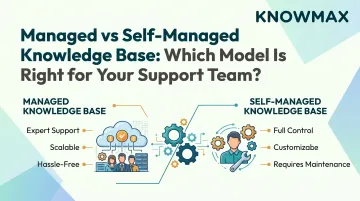
Managed vs. Self-Managed Knowledge Base: Quick Comparison
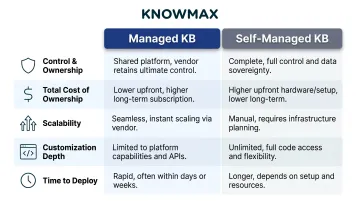
| Dimension | Managed KB | Self-Managed KB |
|---|---|---|
| Control & Ownership | Vendor handles hosting, updates, and infrastructure; team focuses on content strategy | Organization owns all infrastructure, data, and upgrade cycles |
| Total Cost of Ownership | Predictable subscription pricing; no server or IT maintenance costs | Lower licensing costs upfront, but ongoing personnel costs account for 50-85% of total app cost |
| Scalability | Scales with vendor's infrastructure; handles peak traffic and growing content libraries without additional hardware | Scalability requires internal infrastructure investment and planning |
| Customization Depth | Configurable within vendor's framework; supports deep API integrations | Full code-level customization for teams with dedicated developer resources |
| Time to Deploy | No server provisioning required; teams typically go live in days to a few weeks | Longer setup timelines due to server provisioning, database configuration, and testing cycles |
What Is a Managed Knowledge Base?
A managed knowledge base is a cloud-hosted knowledge management solution delivered and maintained by a vendor. The provider handles infrastructure, security patches, backups, and platform updates — freeing the support team to focus entirely on content quality and keeping agents effective.
Core Operational Benefits
Managed platforms deliver reduced IT overhead, faster feature access, and guaranteed uptime SLAs that self-managed setups must build and maintain themselves. This matters especially for AI capabilities like intent-based search, auto-translation, and content suggestions, which require ongoing infrastructure investment to support.
Not all managed KB platforms are equal, though. Modern AI-powered platforms like Knowmax go beyond basic article repositories to deliver interactive decision trees, guided resolution flows, and omnichannel knowledge delivery.
That breadth matters when agents are handling customers across voice, chat, email, and self-service simultaneously — a single knowledge source needs to work across all of them without inconsistency.
Pre-built integrations are another practical differentiator. Managed platforms typically ship with connectors for CRM, telephony, IVR, and ticketing systems — including Salesforce, Zendesk, Genesys, and Freshworks — which is critical for support teams that can't afford months of custom integration work.
Use Cases of a Managed Knowledge Base
Managed KBs fit best in these scenarios:
- Contact centers handling thousands of daily interactions across voice, chat, and email
- BPOs juggling multiple client accounts that need rapid deployment and isolated knowledge sets per client
- Enterprises with geographically distributed agent teams that require a single, centralized knowledge source
- Organizations publishing in multiple languages where content updates need to propagate quickly
The operational gains are documented. For instance, GE HealthCare reduced new hire onboarding time to under 90 days from six months after implementing a managed KB platform, while Esure achieved over 30% reduction in average handling time.
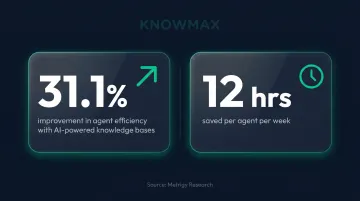
Research from Metrigy shows that automating agent functions with AI-powered knowledge bases improves agent efficiency by 31.1%, equating to approximately 12 hours per week per agent.
What Is a Self-Managed Knowledge Base?
A self-managed knowledge base is deployed on the organization's own servers or private cloud. The internal IT team owns everything: installation, upgrades, security patching, and database management.
Why Organizations Choose Self-Managed
Some organizations choose this model for specific reasons:
- Maintains full data sovereignty — essential for banking, healthcare, and government compliance
- Allows unrestricted customization at the infrastructure level
- Eliminates recurring vendor subscription fees (though hidden costs often offset this)
- Integrates directly with existing on-premises systems
Resource Requirements
Self-managed deployments require dedicated IT personnel with system administration, networking, and database skills. You also need a formal disaster recovery and backup plan, plus ongoing budget for hardware or virtual compute resources.
These costs are often underestimated. Gartner estimates the annual cost to own and manage software can be up to 4x the initial purchase price when personnel and infrastructure costs are factored in.
Content Governance Challenge
Without automated update workflows or vendor-managed AI features, self-managed KBs are more vulnerable to content staleness, inconsistent formatting, and outdated troubleshooting procedures. The SDI Service Desk Benchmarking Report found that the percentage of organizations reporting knowledge base systems as "too difficult to implement and maintain" rose from 27% in 2013 to 37% in 2017.
Use Cases of a Self-Managed Knowledge Base
Self-managed deployments make sense in specific contexts:
- Serve government agencies and financial institutions facing strict data residency or sovereignty regulations
- Suit companies with mature on-premises infrastructure and dedicated IT teams already managing self-hosted systems
- Work well in ITSM contexts where internal technical documentation — not customer-facing support — is the primary use case
Self-managed setups are less common in customer support and more prevalent in ITSM. The HDI 2017 Technical Support Practices & Salary Report found that 82% of IT organizations use knowledge management technology, making it the second-most adopted ITSM process.
Managed vs. Self-Managed: Which Model Fits Your Support Team?
Decision Framework
Evaluate your choice based on four key factors:
| Factor | Key Question | What It Means |
|---|---|---|
| IT Capacity | Does your team have dedicated resources for infrastructure, security patching, and maintenance? | If not, managed platforms remove this burden entirely |
| Content Update Frequency | How often does product or process knowledge change? | Managed platforms with AI authoring tools make frequent updates far easier |
| Compliance Requirements | Does your industry require on-premise data storage? | Self-managed may be necessary — but verify with legal counsel, as many managed platforms carry SOC 2, GDPR, ISO 27001, and HIPAA certifications |
| Integration Complexity | How many tools does your KB need to connect with? | Managed platforms typically offer pre-built CRM, CCaaS, and telephony integrations, cutting implementation time from months to weeks |
Situational Guidance
Choose a managed KB if:
- Your support team prioritises speed-to-value and AI-powered agent assistance
- You need omnichannel delivery across agent desktop, self-service, chatbot, and mobile
- Scalability without IT overhead is critical
- Your team lacks dedicated infrastructure resources
Choose a self-managed model if:
- You operate in a highly regulated environment with strict data sovereignty needs
- You have dedicated IT infrastructure capacity
- Your organisation already manages complex on-premise software environments
- Customisation at the infrastructure level is a business requirement
The Hybrid Question
Some organisations use a managed KB for customer-facing and agent-assisted interactions while maintaining a self-managed repository for internal compliance documentation. This creates knowledge fragmentation risks: agents must toggle between systems, and content governance becomes significantly more complex — and more costly.
The Long-Term Cost Picture
That added complexity ties directly into the broader cost question. While self-managed solutions appear cheaper upfront, total cost of ownership analysis reveals hidden costs:
- IT labour for maintenance and upgrades
- Server and hosting infrastructure
- Security management and patching
- Downtime recovery and remediation
- Scaling costs (additional licensing and datacentre expenses)
Aberdeen Group research found that cloud-based contact centres experience 36% less downtime (2.4 hours vs. 3.7 hours) and achieve 51% FCR compared to 30% FCR in traditional on-premise environments.
Real-World Example: How a Support Team Made the Switch
Vodafone, a Fortune 500 telecom group, faced declining customer service metrics with their self-managed knowledge platform. Agents couldn't access contextual, actionable knowledge quickly enough — directly hurting FCR, C-SAT, and NPS scores.
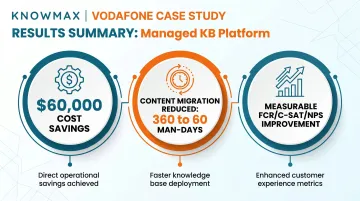
After transitioning to Knowmax's managed platform, Vodafone achieved:
- $60,000 in cost savings through AI-driven content migration
- Content migration time reduced from 360 man-days to just 60 man-days
- Measurable improvement in FCR, C-SAT, and NPS
If your team is dealing with knowledge gaps, inconsistent agent responses, or rising maintenance overhead, a managed knowledge base is worth a serious look.
Conclusion
There's no universal winner in the managed versus self-managed debate. Managed KBs deliver speed, AI capabilities, and scalability that most support teams need today. Self-managed remains valid for organizations with specific data sovereignty or infrastructure requirements.
The right choice comes down to your team's operational reality. Before deciding, weigh your IT capacity, content update frequency, compliance requirements, and integration complexity — these four factors will surface the answer faster than any general framework.
The deployment model matters less than what it produces. Research shows that every 1% improvement in FCR drives a corresponding 1% gain in customer satisfaction — and FCR is directly tied to how current and accessible your knowledge base is. Agent accuracy, handle time, and CSAT all follow from that.
Whichever model you choose, treat content governance as an ongoing operational discipline — not a launch checklist. The teams that see sustained gains are the ones that audit, update, and retire content on a defined cadence, not just when something breaks.
Frequently Asked Questions
What is the difference between managed and self-managed knowledge base software?
Managed KB is vendor-hosted and maintained, reducing IT burden and delivering faster feature updates. Self-managed is internally deployed and maintained, offering greater data control but requiring dedicated IT resources. The key difference lies in who owns the infrastructure and maintenance responsibility.
Which knowledge base model is better for contact centers?
Managed KBs are generally better suited for contact centers. They offer faster deployment, built-in CRM and telephony integrations, AI-powered search, and lower IT overhead — all of which directly affect speed-to-resolution in high-volume support environments.
What are the hidden costs of a self-managed knowledge base?
Hidden costs include IT staffing for maintenance and upgrades, server and hosting infrastructure expenses, security management, downtime risk and recovery costs, and the indirect cost of content staleness when dedicated update workflows are absent. Personnel costs alone can account for 50–85% of total application cost.
Can a managed knowledge base integrate with existing CRM and ticketing tools?
Yes. Modern managed KB platforms are built for integration, typically offering pre-built connectors for Salesforce, Zendesk, Freshworks, Genesys, Talkdesk, and other leading CX platforms. This is a primary advantage over most self-managed setups, which require custom development for each integration.
How does a managed knowledge base improve agent performance?
Managed KBs provide agents with always-current, AI-searchable content, guided decision trees, and contextual answers at the point of need. This reduces errors by up to 40%, lowers average handle time, and accelerates onboarding for new agents — helping teams achieve faster resolution and higher customer satisfaction.
When should a team consider switching from a self-managed to a managed knowledge base?
Key triggers include rising content staleness, increasing agent error rates, growing IT maintenance burden, or inability to support omnichannel delivery. If your current system limits agent productivity or creates governance challenges, it's time to evaluate managed alternatives.