Unlike generic business software, a knowledge management platform is accessed constantly by agents (often hundreds or thousands simultaneously), updated frequently, and tied directly to the quality of customer interactions — making deployment model a direct CX lever.
TL;DR
- Cloud knowledge management systems are hosted by a vendor, accessed via the internet, with minimal IT overhead — on-premise runs on your own servers with full infrastructure control
- Cloud delivers faster deployment, automatic updates, and lower upfront cost; on-premise prioritises data sovereignty and deep customisation
- The right choice depends on compliance requirements, IT capabilities, content update frequency, and integration needs
- Most contact centres see faster time-to-value with cloud; on-premise fits highly regulated or air-gapped environments
- Hybrid approaches exist for sensitive workflows requiring on-premise hosting with cloud delivery
Cloud vs On-Premise Knowledge Management: Quick Comparison
The table below maps the key decision dimensions side by side. Use it as a starting framework, then pressure-test each row against the specific vendors you're evaluating.
| Dimension | Cloud KMS | On-Premise KMS |
|---|---|---|
| Deployment & Setup | 2-3 business days to full functionality | 1-3 months (hardware procurement, configuration, testing) |
| Cost Structure | Subscription-based (OpEx); typically $10,000-$25,000/year for 50 agents | High upfront CapEx ($50,000-$150,000+); ongoing IT costs $30,000-$80,000/year |
| Data Control & Security | Shared responsibility model; vendor manages infrastructure, you manage access | Full control and full responsibility for security |
| Compliance Support | SOC 2, ISO 27001, HIPAA, GDPR certifications standard | Requires internal compliance management |
| Scalability | Add 500 agents in minutes without infrastructure changes | Requires hardware procurement with weeks-to-months lead time |
| Content Update Speed | Real-time publishing across all agents and channels instantly | IT change management cycles introduce lag |
| IT Overhead | Minimal; vendor handles maintenance, updates, backups | Dedicated IT team required for platform management |
| Integration Flexibility | Native connectors for major CRM/telephony platforms | Custom API work required; may not support cloud-hosted tools |
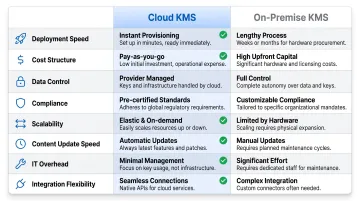
Note: This table reflects general patterns. Actual experience varies by vendor — use these dimensions as evaluation criteria, not hard rules that every platform will match exactly.
What Is Cloud-Based Knowledge Management?
A cloud-based knowledge management system (KMS) is a platform hosted on the vendor's servers — or a major cloud provider like AWS or Azure — and accessed by agents, customers, or administrators via the internet under a subscription model. Modern cloud KMS platforms are purpose-built for enterprise CX, with AI-powered search, real-time content delivery, and omnichannel access.
Core Benefits for CX Teams
Contact centers and BPO teams gain several operational advantages:
- Always-updated content without manual deployment cycles
- AI-powered features like intent-based search, auto-translation, and decision trees that rely on cloud infrastructure
- Remote and distributed agent access from any location
- Rapid onboarding of new agents without IT provisioning delays
Addressing Security Concerns
Enterprise cloud KMS platforms now carry certifications such as SOC 2, ISO 27001, HIPAA, and GDPR compliance — meaning data residency and access controls are addressed at the platform level. Gartner forecasts worldwide public cloud spending to reach $723.4 billion in 2025, with 21.5% growth from 2024. In financial services, 84% of traditional banks and insurers adopt cloud to drive operational efficiency.
For enterprise buyers, these certifications signal that the vendor has undergone independent audits — an important checkpoint during any procurement process.
Cost Model
Cloud KMS operates on a subscription-based (OpEx) model:
- No upfront hardware investment
- Costs scale with usage or user count
- Organizations avoid hardware refresh cycles every 3-5 years
- Internal IT staffing overhead for platform management is eliminated
Knowmax, for instance, is a cloud-native KMS certified under GDPR, SOC 2, ISO 27001, and HIPAA, with native integrations into Salesforce, Zendesk, Genesys, Freshworks, and Talkdesk — giving procurement teams a verifiable compliance baseline alongside deployment flexibility.
Use Cases of Cloud-Based KMS
Cloud KMS fits well across a range of contact center scenarios:
- Distributed or remote teams — Contact centers and BPOs with large agent populations get consistent knowledge access across locations and work-from-home setups without VPN dependencies.
- High content velocity environments — Organizations with frequent product updates, policy changes, or regulatory shifts can publish changes in real time, skipping IT deployment queues entirely.
- Rapid scaling operations — Enterprises entering new markets or managing seasonal hiring spikes can onboard agents immediately, with no infrastructure lead time.
What Is On-Premise Knowledge Management?
On-premise KMS is installed and run on servers physically located within the organization's own data centre or facilities, managed by the internal IT team. All data remains within the organization's network perimeter.
Core Benefits
- Absolute data sovereignty: Data never leaves the organization's physical control — required by certain regulations or internal policies where third-party hosting is prohibited.
- Deep customization: Lets IT teams modify the platform directly and connect legacy systems that aren't exposed to the internet.
- Air-gapped operation: Functions in restricted network environments where internet access is prohibited or limited.
Key Trade-offs
Organizations choosing on-premise must manage several challenges:
- High upfront capital expenditure for hardware, software licensing, and implementation
- Ongoing IT team responsibility for patching, updates, backups, and hardware failures
- Content update delays — changes must be managed and deployed internally, slowing time-to-accuracy for agents
- Scalability constraints — growth requires physical procurement with weeks-to-months lead time
The financial burden adds up fast. Average IT manager salaries exceed $151,000 annually, and dedicated on-premise infrastructure can add $30,000–$80,000 per year in labor costs on top of that. Hardware refresh cycles hit every 3–5 years, and unplanned downtime averages $5,600 per minute.
Use Cases of On-Premise KMS
On-premise deployments make sense in a narrow set of scenarios:
- Government, defense, and regulated industries operating under data residency or sovereignty laws that prohibit third-party hosting
- Organizations with mature IT infrastructure — significant existing server investment and in-house teams already equipped to manage platform operations
- Low-connectivity environments — manufacturing plants, government facilities, or regions where unreliable internet makes cloud access impractical
Cloud vs On-Premise KMS: What Factors Actually Matter?
Security and Compliance
"On-premise is more secure" is a common but oversimplified belief. The real question is whether your organization has the internal security expertise to match what enterprise cloud vendors provide.
Cloud platforms operate under a shared responsibility model: vendors manage infrastructure security (physical data centers, DDoS mitigation, failover, SLAs), while customers control access management, data protection, and configuration. Gartner predicts that through 2025, 99% of cloud security failures will be the customer's fault, primarily due to misconfigurations.
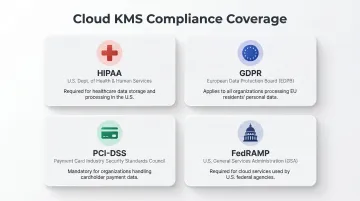
Compliance requirements should drive this decision:
- HIPAA for healthcare: Permitted with Business Associate Agreements (BAAs) — major cloud providers offer HIPAA-eligible services
- GDPR for EU data: Allows cloud processing with Data Processing Agreements and Standard Contractual Clauses
- PCI-DSS for financial transactions: Cloud platforms can achieve certification
- FedRAMP for government: Authorized 118 cloud services in one fiscal year, up from fewer than 50/year historically, with review times now under 5 weeks
On-premise gives you total control but total responsibility. Cloud gives you shared responsibility with a vendor who invests heavily in certifications and infrastructure.
Content Update Speed and Knowledge Freshness
This is a KMS-specific factor rarely covered in generic cloud vs on-prem comparisons. Knowledge management platforms must reflect current SOPs, product specs, pricing, and policies accurately — delayed updates cause agent errors and poor CX.
The industry benchmark for First Call Resolution (FCR) is 70%, with only 5% of call centers achieving world-class FCR of 80% or higher. Notably, 49% of FCR failures are attributed to organizational policies and procedures, and 38% to agent mistakes — with "agent lacked the knowledge to resolve the issue" cited as a top-five root cause of repeat calls.
A 1% improvement in FCR equals approximately $286,000 in annual operational savings for an average midsize call center.
Cloud KMS platforms allow real-time content publishing across all agents and channels instantly. On-premise workflows typically involve IT change management cycles that introduce lag, increasing the window during which agents operate with outdated information.
Integration with CRM, Telephony, and CX Stack
Cloud KMS platforms offer pre-built integrations with major CRM (Salesforce, Zendesk, Freshworks), telephony (Genesys, Talkdesk), and messaging platforms. On-premise integrations require custom API work and may not be compatible with cloud-hosted CRM platforms at all.
For contact centers, agents need knowledge surfaced directly within their ticketing or telephony interface — integration ease isn't a nice-to-have, it's operational. Knowmax is natively available across:
- Salesforce AppExchange
- Zendesk Marketplace
- Genesys AppFoundry
- Freshworks Marketplace
- Talkdesk AppConnect
Total Cost of Ownership (TCO) Over 3-5 Years
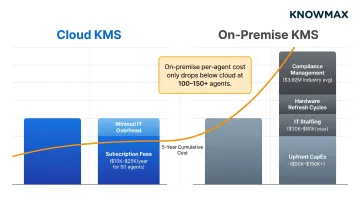
The CapEx vs OpEx distinction creates a misleading perception. Cloud appears costlier on a monthly subscription view, but on-premise's true cost includes hardware, infrastructure, IT staffing, refresh cycles, and downtime.
For a 50-agent team, cloud annual costs typically range from $10,000 to $25,000. On-premise upfront investment starts at $50,000–$150,000+, with per-agent costs only dropping below cloud after reaching 100–150 agents.
Beyond initial investment:
- On-premise maintenance consumes a higher percentage of IT budget vs cloud equivalents
- Companies spend an average of $3.92 million annually on regulatory compliance
- Hardware refresh cycles every 3-5 years require ongoing capital expenditure
- Downtime risk carries significant cost exposure
Scalability and Agent Onboarding Speed
Cloud KMS scales immediately — adding 500 new agents for a seasonal campaign requires no infrastructure changes. Cloud contact center solutions can be deployed in 2-3 business days and scale additional agents in minutes.
On-premise scaling requires hardware procurement, installation, and configuration — typically a 1–3 month process. For BPOs onboarding a new client, or fintechs scaling support during a product launch, that gap can mean missed SLAs.
The global cloud-based contact center market was valued at $40.73 billion in 2025 and is projected to grow to $298.29 billion by 2034, exhibiting a CAGR of 24.76% — a trajectory driven largely by enterprises prioritizing operational agility over infrastructure ownership.
Which Deployment Model Should You Choose?
Choose Cloud KMS If:
- Your agents are distributed or remote
- Your product/policy knowledge changes frequently
- You need CRM and telephony integrations
- You don't have a dedicated IT infrastructure team to manage an on-premise platform
- You're scaling rapidly
Cloud is also the better default for organizations entering new markets or launching new service lines who need KMS up and running in days, not months.
Choose On-Premise KMS If:
- You operate under regulations that explicitly prohibit third-party data hosting (certain government, defense, or regional financial frameworks)
- You have an air-gapped network requirement
- You have existing server infrastructure with remaining useful life
- You have a dedicated IT team capable of full platform management
This set of conditions is increasingly narrow — even regulated industries like banking and healthcare now widely use certified cloud platforms.
Real-World Outcomes
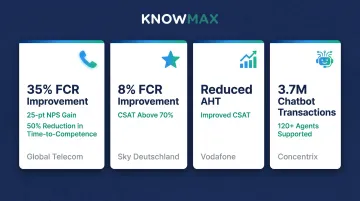
These results from cloud KMS deployments show the pattern across industries:
- Global Telecom (via eGain): 35% improvement in FCR, 25-point NPS gain, and 50% reduction in time-to-competence for new hires — translating to hundreds of millions in annual savings
- Sky Deutschland: 8% improvement in First Contact Resolution and Customer Satisfaction above 70% through cloud-based knowledge management
- Vodafone (Knowmax): Reduced Average Handle Time (AHT) and improved CSAT scores after transitioning to cloud KMS
- Concentrix (Knowmax): Handled over 3.7 million chatbot transactions while improving knowledge access for 120+ agents
For most contact centers, cloud KMS is the faster, lower-cost path to measurable CX improvement. Knowmax's cloud platform is SOC 2, ISO 27001, GDPR, and HIPAA certified — built to meet compliance requirements without sacrificing deployment speed.
Conclusion
Cloud KMS is the pragmatic choice for most enterprises — especially those in customer-facing, agent-heavy operations where knowledge freshness, agent productivity, and integration with CX tools are paramount. On-premise KMS remains valid for a specific set of compliance-driven, infrastructure-rich organisations.
To find the right fit, work through these four checkpoints in order:
- Regulatory environment — do your data residency or sovereignty requirements rule out cloud hosting?
- Content velocity — how frequently does your knowledge base change, and who owns updates?
- Integration needs — which CX platforms (CRM, CCaaS, chatbot) must your KMS connect to?
- IT capacity — does your team have the bandwidth to manage infrastructure, or is that cost better outsourced?
Whichever model you choose, the quality, structure, and accessibility of your knowledge base ultimately determines whether agents can resolve issues on the first call, reduce handle time, and deliver consistent customer experiences. Deployment model shapes the conditions for that — but it never substitutes for it. Pick the model that removes the most friction between your agents and the right answer.
Frequently Asked Questions
Is on-premise cheaper than cloud?
On-premise appears cheaper upfront due to no monthly fees, but total cost of ownership over 3-5 years — factoring in hardware, IT staffing, maintenance, and refresh cycles — often makes on-premise more expensive. Cloud's OpEx model includes vendor-managed maintenance and updates that on-premise organisations must fund internally.
How to compare cloud vs on-premise options for knowledge management?
Evaluate compliance and data residency requirements, content update frequency, CRM/telephony integration needs, TCO over a multi-year horizon, and your IT team's capacity to manage infrastructure. For knowledge management specifically, knowledge freshness and agent access patterns carry more weight than generic IT infrastructure criteria.
Is on-premise becoming obsolete?
On-premise is not obsolete but is increasingly a niche choice — relevant mainly for organisations with strict data sovereignty mandates or air-gapped environments. For the majority of enterprises, cloud KMS platforms have closed the security, compliance, and customisation gaps that once made on-premise the default.
What are the security risks of a cloud-based knowledge management system?
Reputable cloud KMS vendors address the major risks through SOC 2, ISO 27001, HIPAA, and GDPR certifications, encryption at rest and in transit, and role-based access controls. Residual risks — misconfigured permissions and service outages — are manageable through careful configuration and SLA evaluation at the vendor selection stage.
Which knowledge management deployment model is better for contact centers?
Cloud KMS is the stronger fit for contact centers. Agents need real-time access to current knowledge across distributed locations, fast content updates as policies change, and seamless CRM and telephony integrations — all areas where cloud deployment outperforms on-premise setups.