Introduction
When customer support teams lack a unified knowledge system, service delivery suffers in measurable ways. Agents give inconsistent answers because they're pulling from different sources—or relying on outdated documentation. Customers wait on hold while representatives scramble through scattered folders, email threads, and disconnected tools.
New hires spend weeks piecing together institutional knowledge held by a handful of veterans—knowledge that was never written down anywhere.
Knowledge workers lose 2.8 hours per week searching for information, and contact center agents spend over 10% of their time hunting through multiple sources for resolution content. This fragmentation frustrates employees, degrades customer experience, and quietly inflates operational costs.
A knowledge base system solves this by creating a centralized platform that organizes, stores, and delivers the right information to the right people at the right time. This article breaks down what a knowledge base system is, the three primary types, essential components, measurable benefits for contact centers, and what separates modern AI-powered platforms from legacy solutions.
TLDR
- A knowledge base system centralises organisational knowledge and delivers it to agents, employees, and customers on demand
- Three core types exist: internal (employee-facing), external (customer self-service), and hybrid (unified management with role-based access)
- Modern systems use AI-powered semantic search that interprets user intent to surface the most relevant answers
- Measurable benefits include 21% FCR improvement, 15% AHT reduction, and 40% faster agent onboarding
- Key features to look for: decision trees for guided resolution, omnichannel delivery, CRM integration, and real-time analytics
What Is a Knowledge Base System?
A knowledge base system (KBS) is a software platform that captures an organization's collective knowledge—policies, processes, troubleshooting guides, FAQs, product documentation—and makes it searchable and accessible to employees, agents, or customers on demand. It serves as the technical infrastructure that manages how information is created, organized, maintained, and distributed across teams and channels.
Many people conflate a knowledge base with a knowledge base system, but they serve distinct functions. A knowledge base is the content repository itself: the collection of articles, guides, and documents. A knowledge base system is the software platform that governs how that content is authored, approved, versioned, categorized, searched, and delivered. The system ensures the right person gets the right knowledge at the right moment.
A KBS is built to solve three interconnected problems:
- Eliminate information silos so knowledge isn't trapped in individual inboxes or departmental folders
- Reduce time spent searching for answers during live interactions or self-service sessions
- Ensure consistency across every touchpoint — whether a contact center agent is on a live call, a field technician is troubleshooting equipment, or a customer is navigating a self-service portal
Modern knowledge base systems have evolved considerably from the static intranets and document repositories of the past. Early systems functioned as digital filing cabinets where users had to know exactly what they were looking for. Today's AI-powered platforms understand user intent, suggest relevant articles based on context, surface real-time answers during live interactions, and continuously learn from usage patterns to improve relevance.
That evolution has measurable consequences. According to McKinsey Global Institute research, a strong knowledge management system can reduce information search time by up to 35% and boost organization-wide productivity by 20–25%.
Types of Knowledge Base Systems
Not all knowledge base systems serve the same audience or purpose. Understanding the three core types helps organizations choose the right approach for their operational needs and customer experience goals.
Internal Knowledge Base
An internal knowledge base is accessible only to employees—contact center agents, support staff, HR teams, IT departments, and other internal users. It typically houses:
- Standard operating procedures (SOPs)
- Product and service documentation
- Troubleshooting scripts and workflows
- Onboarding and training materials
- Compliance guidelines and regulatory documentation
- Company policies and HR resources
For contact centers and customer support teams, internal knowledge bases are mission-critical. Agents need instant access to verified, up-to-date information during live interactions to reduce Average Handle Time (AHT) and improve First Call Resolution (FCR).
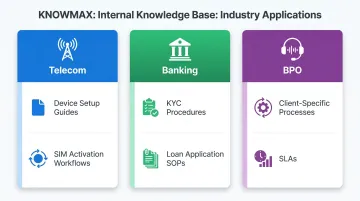
When agents reference a single source of truth, answers stay consistent regardless of experience level — reducing errors and improving compliance. Common industry applications include:
- Telecom: Device setup guides and SIM activation workflows
- Banking: KYC procedures and loan application SOPs
- BPOs: Client-specific processes and service-level agreements
External Knowledge Base
An external knowledge base is a publicly accessible self-service portal designed for customers, partners, or end users. Common content types include:
- Frequently asked questions (FAQs)
- How-to guides and tutorials
- Product manuals and technical documentation
- Video walkthroughs
- Community forums
The business case is straightforward: 81% of customers attempt self-service before contacting a live representative, and self-service costs an average of $1.84 per contact compared to $13.50 for assisted channels like phone or live chat. Customers who resolve issues independently reduce inbound call and ticket volumes, lowering support costs while improving satisfaction scores—especially among younger demographics who prefer self-service options.
Hybrid Knowledge Base
A hybrid knowledge base combines internal and external repositories within a single system, allowing organizations to maintain separate permission layers—secure internal content for agents and public-facing content for customers—while managing both from one centralized platform.
For enterprises, the core advantage is consistent knowledge governance across both agent-assist and self-service channels. Content is authored once, then published to multiple audiences with role-based access controls — reducing duplication and keeping information accurate.
When a policy changes, it's updated in one place and reflected across all touchpoints at once.
Key Components of a Knowledge Base System
Two foundational components define how a knowledge base system functions:
Knowledge Repository The structured database where all articles, guides, documents, and multimedia content are stored and organized. It uses categories, tags, folder structures, and metadata to classify content — making it retrievable and reusable across channels. A repository built with this structure in mind can scale from hundreds to tens of thousands of articles without degrading search performance or user experience.
Search or Inference Engine The mechanism that retrieves relevant information in response to a user's query. Basic systems rely on keyword matching, which breaks down when users phrase questions differently or use synonyms. Modern platforms use AI-powered semantic search and natural language processing (NLP) to understand intent, interpret context, and surface the right answer even when queries are vague or contain typos.
For contact center agents handling dozens of calls per shift, that difference translates directly into faster resolution times and fewer escalations.
Beyond these two core components, a fully functional knowledge base system includes:
Content Management Layer The authoring, editing, versioning, and governance tools that allow subject matter experts to create, update, approve, and retire content. This includes:
- WYSIWYG editors for article creation
- Approval workflows (maker-checker processes)
- Version control and content history
- Scheduling and archiving capabilities
- Content interlinking and media embedding
Content accuracy matters as much as volume. A knowledge base with 10,000 outdated articles is less useful than one with 500 current, verified guides.
Role-Based Access Controls Organizations need precise control over who can view, create, edit, or publish different categories of knowledge. This is especially critical in regulated industries like banking, healthcare, and telecom, where sensitive information must stay secure while remaining accessible to the right people.
Permission tiers typically include viewer, author, editor, approver, and administrator roles — applied at both the content category and user group level.
Benefits of a Knowledge Base System for Customer Support Teams
Faster Issue Resolution and Improved First Call Resolution (FCR)
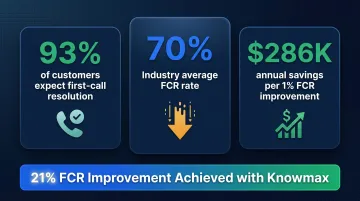
Agents with immediate access to verified, contextual knowledge can resolve customer queries on the first contact without escalation or hold time. 93% of customers expect to resolve their interaction on the first call, yet the industry average FCR rate is only 70%.
The gap between expectation and reality has a direct cost. For every 1% improvement in FCR, customer satisfaction improves by 1%, and operating costs decrease by 1%—roughly $286,000 in annual savings for a midsize contact center. A leading telecom company achieved a 21% improvement in FCR after implementing Knowmax's knowledge management platform.
Reduced Average Handling Time (AHT)
Structured knowledge—especially decision trees and step-by-step guides—allows agents to follow guided workflows rather than piecing together answers from multiple sources. This directly cuts call and chat duration. The industry benchmark for AHT is approximately 7 minutes, but contact centers using AI-powered knowledge tools see a 9% reduction in AHT and a 14% increase in issues resolved per hour.
Real customer results reflect this at scale:
- A leading online food delivery app reduced AHT by 15% using Knowmax's platform
- A fintech startup achieved a 35-second reduction per interaction
At hundreds of interactions per day, those 35 seconds add up fast.
Consistent, Error-Free Support Across Channels
When all agents reference a single knowledge source, answers are standardized. This matters most in omnichannel environments, where customers expect the same answer whether they reach out via phone, chat, email, or a self-service portal. Different agents interpreting the same policy differently, or working from outdated information, directly undermines that consistency.
Knowmax addresses this by maintaining a single source of truth across all touchpoints. Any policy change is instantly synchronized across assisted and digital channels, so agents and customers are always working from the same verified information.
Faster Agent Onboarding and Reduced Training Costs
A well-organized KBS enables new agents to self-serve training content and find answers independently from day one, reducing ramp-up time and formal training overhead. The average new agent requires 90 days to reach full productivity, and training costs range from $2,000 to $4,000 per agent.
Knowmax customers report reducing agent onboarding time by up to 40% by providing interactive training modules, guided workflows, and centralized knowledge hubs that help new hires reach full productivity fasterwithout relying on supervisor walk-throughs at every step.
Knowledge Preservation and Institutional Continuity
Contact center turnover reached 31.2% annually in 2024, with replacement costs ranging from $10,000 to $20,000 per departing agent. When experienced agents leave, their process knowledge and institutional expertise leave with them. Without a structured system to capture it, that gap shows immediately in quality and consistency.
A knowledge base system retains institutional knowledge by documenting complex troubleshooting processes, best practices, and tribal knowledge in decision trees, visual guides, and structured articles. This ensures continuity regardless of employee turnover and protects organizations from the productivity loss that comes with knowledge gaps.
What to Look for in a Knowledge Base System
AI-Powered, Intent-Based Search
Keyword-only search falls short in high-volume support environments. Agents need a system that understands what the user means, not just what they typed. Forrester defines cognitive search as employing natural language processing and machine learning to ingest, understand, organise, and query content from multiple sources—predicting query intent and tuning relevance over time.
Look for semantic search that surfaces the most relevant article even when the query is phrased differently. Knowmax's AI search understands intent, integrates directly into CRM and telephony workflows, and delivers answers in context—cutting the time agents spend switching tools or rewording queries.
Guided Resolution Tools — Decision Trees and Visual Guides
Decision trees are a key differentiator for support-focused KBS platforms. They convert complex, multi-step SOPs into guided, step-by-step workflows that reduce agent errors and improve resolution consistency. Unlike static documents, decision trees present a question-answer format that leads agents through the next-best action based on customer responses.
Visual troubleshooting guides work the same way for technical support scenarios. They combine images, annotations, and step-by-step instructions to simplify device setup, router configuration, and other high-volume queries.
Knowmax includes a ready repository of pre-built decision tree templates and visual guides built for telecom, banking, and healthcare — so teams aren't starting from scratch.
Omnichannel Delivery and CRM Integration
A knowledge base system must deliver content where agents and customers already work—inside the CRM, on the self-service portal, within chat or IVR interfaces—without forcing users to switch tools or break workflow.
Essential integrations include:
- CRM platforms: Salesforce, Zendesk, Freshworks
- CCaaS platforms: Genesys, Talkdesk
- Messaging platforms: Freshchat, WhatsApp
- IVR platforms: Exotel
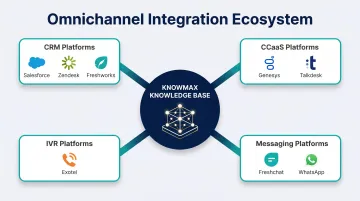
Knowmax is listed on the Salesforce AppExchange, Zendesk Marketplace, and Genesys AppFoundry, ensuring native integration and straightforward deployment. For global enterprises, the platform also supports 25+ languages and delivers knowledge across voice, chat, email, and mobile — covering the full range of channels where customers and agents actually operate.
Frequently Asked Questions
What are knowledge base systems?
Knowledge base systems are software platforms that organize, store, and deliver an organization's collective knowledge—including policies, guides, FAQs, and procedures—to employees or customers through a searchable, structured interface designed to improve efficiency and consistency.
What is an example of a KMS?
Knowmax is an AI-powered knowledge management system built for contact centers. Agents access guided decision trees, visual troubleshooting guides, and contextual answers across voice, chat, and digital channels — all from a single platform that integrates with leading CRMs and CCaaS solutions.
What are the 4 pillars of KM?
The four pillars of knowledge management are knowledge creation, knowledge storage, knowledge sharing, and knowledge application. Together, they cover how organizations capture new knowledge, organize it, distribute it across teams, and put it to work solving real problems.
What is the difference between a knowledge base and a knowledge management system?
A knowledge base is the content repository itself: the collection of articles, guides, and documents. A knowledge management system (KMS) is the broader platform that governs how that content is created, maintained, approved, and delivered across an organization.
How does an AI-powered knowledge base system improve customer support?
AI-powered knowledge base systems understand user intent, surface contextual answers in real time, and guide agents through complex resolutions using decision trees. They also learn from usage patterns to sharpen relevance over time — resulting in faster resolutions, fewer errors, and higher customer satisfaction.