Introduction
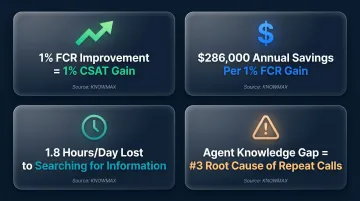
Many organisations invest in both a Knowledge Management System (KMS) and a Learning Management System (LMS) without fully understanding what problem each one solves. The result? Overlapping tools, content gaps, and platforms that go underused. According to SQM Group's 2025 benchmarking research, "agent lacked knowledge to resolve the issue" ranks as the #3 root cause of repeat calls in contact centres.
That stat points to a systems problem, not a training problem. Deploying the wrong tool—or the wrong combination—drives slower agent response times, inconsistent customer experiences, and inflated L&D budgets. A KMS and an LMS serve different moments in an employee's workflow: one supports learning before work happens, the other delivers knowledge during it.
Understanding which system does which job is the first step to building a stack that actually works.
This guide breaks down each system's purpose, where they diverge, and how to decide if your organisation needs one, the other, or both.
TLDR
- A KMS delivers real-time access to organisational knowledge, helping employees find the right information at the moment they need it to complete tasks or resolve customer issues
- An LMS structures formal learning programmes, tracks progress, and manages certifications before employees handle live work
- The two systems are not interchangeable—they solve different problems and serve different workflow moments
- For contact centre and BPO teams, a KMS drives greater daily operational impact — an LMS remains essential for onboarding and compliance
- Organisations using both systems with clear roles assigned to each build more capable and consistent workforces
KMS vs. LMS: Quick Comparison
| Dimension | Knowledge Management System (KMS) | Learning Management System (LMS) |
|---|---|---|
| Primary Purpose | Provide real-time access to operational knowledge during task execution | Deliver structured training courses and manage learning pathways |
| Primary Users | Contact centre agents, support teams, field technicians, customer service reps | New hires, employees requiring compliance training, learners in development programmes |
| Type of Content | SOPs, FAQs, troubleshooting guides, decision trees, visual guides, process workflows | Courses, video lessons, SCORM modules, quizzes, assessments, certification records |
| When It Is Used | During live customer interactions or task execution (moment of work) | Before going live, during onboarding, or for scheduled training (preparation for work) |
| Core Features | AI search, decision trees, visual guides, omnichannel deployment, CRM integration | Course authoring, learning paths, assessments, progress tracking, gamification |
| Best Suited For | Reducing AHT, improving FCR, ensuring consistency, supporting distributed teams | Onboarding, compliance training, skill development, certification management |
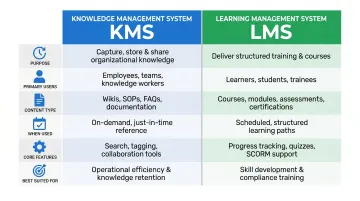
The table shows where each system fits — but the real question is which one your operation actually needs, or whether you need both. The sections below break that down.
What Is a Knowledge Management System (KMS)?
A Knowledge Management System (KMS) is a platform that captures, organises, and distributes organisational knowledge so employees can access accurate, up-to-date information on demand—not after completing a course, but in the moment they need it most.
Core Functions of a KMS
A KMS delivers knowledge through several critical capabilities:
- Centralised knowledge repository storing all operational content in one searchable location
- AI-powered semantic search that retrieves answers based on intent rather than exact keyword matches
- Interactive decision trees for guided issue resolution through complex workflows
- Visual troubleshooting guides including picture guides and annotated screenshots
Knowmax, for example, is an AI-powered KMS built for enterprise contact centres and customer support teams. It offers omnichannel knowledge delivery across agent desktop, self-service portals, chatbots, and mobile apps, with native integration into CRM platforms like Salesforce, Zendesk, Genesys, and Freshdesk. When embedded in these systems, Knowmax surfaces contextually relevant knowledge without requiring agents to leave their workflow or toggle between screens.
Types of Content Managed by a KMS
KMS platforms manage dynamic, task-oriented content that requires frequent updating:
- Standard operating procedures (SOPs)
- Product FAQs and policy documentation
- Troubleshooting workflows and escalation policies
- Process guides and compliance checklists
- Call scripts and agent assist prompts
This content changes as products, policies, and processes evolve. Unlike static training materials, KMS articles can be updated instantly and pushed live to all users in real time.
Use Cases of a KMS
A KMS fits directly into the daily operational workflow. A customer service agent receives a complex query, searches the KMS using natural language, and retrieves a step-by-step resolution guide—without putting the customer on hold or escalating unnecessarily.
Industries and teams with high KMS value:
- Telecom and broadband support teams
- Banking and insurance contact centres
- E-commerce customer service operations
- Healthcare helpdesks and patient support
- BPOs managing multi-client operations
The operational impact is measurable. SQM Group reports that every 1% improvement in First Call Resolution (FCR) drives a 1% CSAT gain, a 1.4-point NPS increase, and $286,000 in annual operational savings for a mid-sized call centre.
The time cost of poor knowledge access compounds this. McKinsey research finds employees spend 1.8 hours per day (20% of the workweek) just searching for information.
Key operational benefits:
- Reduced agent errors through standardised, verified knowledge
- Faster resolutions by eliminating manual search time
- Consistent answers across all customer touchpoints
- Shorter onboarding time as new hires reference the KMS instead of relying solely on colleagues
What Is a Learning Management System (LMS)?
A Learning Management System (LMS) is a platform designed to plan, deliver, and track structured learning experiences—including onboarding courses, compliance training, professional development programmes, and certification pathways. Unlike a KMS, an LMS is used before work happens, not during it.
Core Functions of an LMS
An LMS provides tools for formal, completion-based learning:
- Builds training modules using course creation and authoring tools
- Guides learners sequentially through structured learning paths
- Measures comprehension through quizzes and assessments
- Tracks certifications and compliance for regulatory requirements
- Gives managers visibility into learner progress via dashboards
- Drives engagement through gamification elements like badges and leaderboards
Types of Content Managed by an LMS
LMS platforms manage structured, sequential content designed for completion-based learning:
- SCORM-packaged e-learning modules
- Instructional video courses
- Formal quizzes and assessment rubrics
- Compliance checklists and policy acknowledgments
- Certification records and training transcripts
This content stays static between updates, and learners move through it in a defined sequence from start to finish.
Use Cases of an LMS
An LMS fits into the employee lifecycle at key moments: new hire induction, mandatory annual compliance training (such as data privacy or workplace safety), upskilling programmes, and leadership development.
Common contact centre and enterprise scenarios include:
- Onboarding a batch of new agents with standardised product knowledge
- Certifying agents on regulatory requirements before they handle live interactions
- Rolling out training on a new internal system before go-live
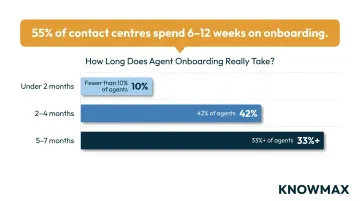
These scenarios take longer than most organisations expect. According to The State of Contact Center Training (2021), 55% of contact centres spend 6-12 weeks on new agent training and onboarding:
- Fewer than 10% of agents reach proficiency in under 2 months
- 42% take 2-4 months to reach full proficiency
- Over 33% take 5-7 months
Despite this investment, only 38.7% of contact centres currently use a dedicated Learning Management System.
Benefits from a management perspective:
- Auditability and compliance records for regulatory review
- Certification tracking and renewal management
- Measurable learning outcomes through assessment data
- Ability to identify knowledge gaps at team or individual level
Key Differences Between a KMS and an LMS
Purpose and Timing
A KMS serves the moment of work—it is accessed in real time during task execution. An LMS serves the preparation for work—it is completed before or between tasks.
Consider this contact centre example: an LMS teaches a new agent how your CRM works during onboarding. Three months later, that same agent uses the KMS to retrieve the exact policy or resolution steps mid-call when a customer raises an unexpected question.
Content Structure
KMS content is built for speed and flexibility. A single FAQ or decision tree can be edited, approved, and published live to all agents within minutes as products, policies, or processes shift.
LMS content follows a different design logic: structured, sequential, and assessment-driven. Updating a course means revising modules, reconfiguring assessments, and maintaining instructional consistency—a process that takes significantly longer.
The practical gap matters. Outdated LMS content is hard to fix quickly; a KMS article can be corrected instantly and pushed to every user at once.
Primary Users and Interaction Model
In a KMS, every employee is a potential daily user. Agents search and retrieve knowledge on demand, based on whatever query lands in front of them.
In an LMS, learners move through assigned content on a schedule. Training managers assign courses, set deadlines, and track completion rates.
The result: a KMS embeds itself into daily workflow, while an LMS is visited periodically for structured training events.
Outcome Metrics
The two systems are measured against entirely different success criteria:
KMS operational KPIs:
- Reduction in Average Handle Time (AHT)
- Improvement in First Call Resolution (FCR)
- Decrease in agent escalations
- Customer Satisfaction (CSAT) scores
SQM Group research confirms that every 1% improvement in FCR correlates with 1% improvement in CSAT and $286,000 in annual savings for mid-sized centres. The access gap is real: PwC's Consumer Intelligence Series found 80% of consumers rank "knowledgeable help" as critical, yet only 38% feel agents actually understand their needs.
LMS learning KPIs:
- Course completion rates
- Assessment pass rates
- Certification compliance percentages
- Time-to-productivity for new hires
Integration and Overlap
The boundary between the two has started to blur. Platforms like Knowmax combine a KMS with a built-in LMS module, meaning agents can complete training and access live knowledge from a single interface. A KMS may include short instructional content; some LMS platforms have added searchable knowledge libraries.
Even with feature overlap, the underlying design logic stays distinct—one system is built for retrieval under pressure, the other for structured learning at a pace. The question of whether you need one or both comes down to where your biggest operational gap sits.
Do You Need Both a KMS and an LMS?
The question is not either/or—it is about sequencing and role clarity.
An LMS builds the foundation: agents understand the product, the company, and the process. A KMS reinforces and operationalizes that knowledge daily: agents apply it accurately, consistently, and quickly.
Without a KMS, trained agents still forget, improvise, or search inefficiently. Without an LMS, agents using a KMS may lack the contextual understanding to apply it correctly.
Practical Decision Framework
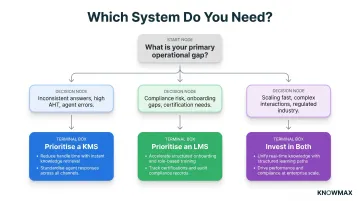
Prioritise a KMS first if your primary pain points include:
- Inconsistent answers across agents or channels
- High Average Handle Time (AHT)
- Frequent agent errors or escalations
- Large volume of tribal knowledge that walks out the door when employees leave
70% of critical operational knowledge is tribal—never written down, never formally taught, and at risk of permanent loss. With contact centre turnover rates averaging 30-45% annually, this knowledge loss is a continuous, compounding risk.
Prioritise an LMS first if your primary challenges include:
- Undocumented or inconsistent onboarding
- Compliance risk or audit failures
- Measurable skill gaps identified through assessments
- Lack of certification tracking for regulatory requirements
Invest in both if your organisation is:
- Scaling rapidly with high hiring volume
- Serving high-complexity customer interactions
- Managing distributed support teams across multiple channels
- Operating in regulated industries (banking, insurance, healthcare)
Brandon Hall Group research shows that more than 50% of voluntary attrition for new hires occurs during the first six months—a window in which both structured training (LMS) and accessible operational knowledge (KMS) are most critical.
How a KMS and LMS Work Best When Integrated
An LMS course introduces the concept and process; the KMS becomes the reference layer that agents return to every day.
For example, an LMS module teaches an agent how to handle billing disputes. Three months later, when the agent receives a call about a disputed charge, the KMS surfaces the exact decision tree for that scenario—complete with policy references, escalation triggers, and resolution steps.
Platforms like Knowmax are built to serve as the operational knowledge layer that complements an organization's existing LMS investment. Knowmax integrates directly with contact center workflows, CRM systems, and self-service channels, ensuring that the knowledge agents learned in the LMS is instantly accessible when they need it most.
Frequently Asked Questions
Frequently Asked Questions
What is the difference between LMS and knowledge management system?
An LMS delivers structured training courses for learning and compliance, while a KMS provides on-demand access to operational knowledge for daily task execution. The key distinction: an LMS is used before work, and a KMS is used during it.
Can a KMS replace an LMS?
No. A KMS cannot manage structured course delivery, certification tracking, or compliance audits. The two systems serve different moments in the employee knowledge lifecycle and are most effective when used together.
Which is more important for contact centres — a KMS or an LMS?
For active contact centre operations, a KMS typically has greater daily impact because agents need instant, accurate answers during live customer interactions. However, an LMS remains essential for initial onboarding and compliance training before agents go live.
Can a KMS and LMS be integrated?
Yes. Many organisations link their LMS and KMS so that training courses reference specific KMS articles for in-the-moment support. This creates a continuous loop where foundational learning in the LMS is reinforced by operational knowledge in the KMS.
What types of content does a KMS manage versus an LMS?
A KMS manages dynamic, task-oriented content such as SOPs, FAQs, decision trees, troubleshooting guides, and product policies. An LMS manages structured learning content such as video courses, SCORM modules, quizzes, assessments, and certification records.
How do I choose between a KMS and an LMS?
Start by identifying the primary gap: if employees lack real-time access to accurate information during their work, prioritise a KMS. If employees lack structured training, compliance coverage, or measurable skill development, prioritise an LMS. In most cases, both are needed for full coverage.