A well-implemented knowledge management system solves these problems by delivering faster resolutions, reducing agent errors, ensuring consistent customer experience across channels, and accelerating onboarding. This article covers core KMS definitions, top examples with real-world context, key use cases by industry, and how to evaluate the right system for your needs.
TL;DR
- A knowledge management system (KMS) is a structured platform for capturing, organising, and delivering accurate information to the people who need it
- Common KMS types include internal knowledge bases, AI-powered contact centre platforms, self-service portals, document management systems, and learning management systems
- The right choice depends on who needs the knowledge (agents, customers, employees) and how they consume it
- For customer support teams, an AI-powered KMS with guided resolutions and omnichannel delivery delivers the highest impact
- When evaluating options, prioritise AI search capability, tool integrations, ease of content creation, and measurable impact on resolution time
What Is a Knowledge Management System?
A knowledge management system is a platform — combining technology, processes, and content governance — that helps organisations capture, store, structure, and deliver knowledge to employees or customers. A KMS manages three core knowledge types:
- Explicit knowledge: Documented procedures, FAQs, manuals, troubleshooting guides
- Implicit knowledge: Best practices, workflows, standard operating procedures
- Tacit knowledge: Experiential know-how shared through collaboration or guided tools
Grand View Research values the knowledge management software market at $20.15 billion in 2024, projecting it will reach $62.15 billion by 2033 — a 13.6% compound annual growth rate.
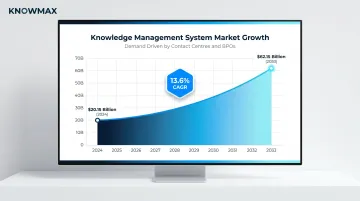
That demand is coming primarily from contact centres, BPOs, and digital-first service teams looking to reduce resolution times and deliver consistent support at scale.
KMS solutions are built for distinct use cases: some target internal employee use, others power customer-facing self-service, and others are purpose-built for agent-assisted support. The right fit depends on where your knowledge gaps are sharpest.
Top Knowledge Management System Examples
These examples were selected based on their relevance across enterprise use cases, their adoption in customer-facing and internal support environments, and their ability to reduce resolution time, improve accuracy, and scale with organisational needs.
Internal Knowledge Base
An internal knowledge base is a centralised, searchable repository for company policies, SOPs, troubleshooting guides, and FAQs — designed primarily for employee use. It's one of the most widely adopted KMS types.
Structured content categories, role-based access controls, and search functionality mean agents and employees can self-serve answers without escalating or asking colleagues. This reduces onboarding time and prevents errors from outdated information.
| Aspect | Details |
|---|---|
| Key Features | Searchable article library, content versioning, role-based permissions, tagging and categorisation |
| Best For | Employee onboarding, HR policy access, IT support, contact centre agent enablement |
| Tool Examples | Confluence (Atlassian), Notion, Guru, Microsoft SharePoint |
AI-Powered Contact Centre Knowledge Management System
Purpose-built for contact centres and BPOs, this KMS type goes beyond static article storage — it delivers contextual, guided answers to agents in real time, reducing Average Handle Time and ensuring every agent responds with accuracy.
Key capabilities that separate this from a standard knowledge base:
- AI-powered search understands intent, not just keywords
- Interactive decision trees walk agents through guided issue resolution
- Visual troubleshooting guides simplify complex, multi-step processes
- Omnichannel delivery ensures agents get the right answer on call, chat, or email
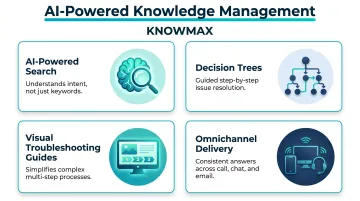
Knowmax is built specifically for this use case — serving enterprises in telecom, banking, insurance, eCommerce, and BPOs with AI author tools, 25+ language support, and a ready repository for 18,000+ devices.
| Aspect | Details |
|---|---|
| Key Features | AI-powered intent-based search, decision trees, visual guides, omnichannel knowledge delivery, CRM/telephony integration |
| Best For | Contact centres, BPOs, telecom and banking support teams, enterprise customer service operations |
| Tool Examples | Knowmax (AI-powered KMS for CX), purpose-built contact centre knowledge platforms |
Customer Self-Service Portal
A customer-facing knowledge base or self-service portal allows customers to find answers independently — through help articles, FAQs, guided troubleshooting, and chatbots — reducing inbound ticket volume and improving satisfaction.
Well-structured self-service portals deflect a significant share of support tickets. Gartner research from 2024 shows 73% of customers use self-service, yet only 14% fully resolve their issues there — with 43% failing because they cannot find relevant content. Integrating chatbots or live chat escalation paths closes that gap, connecting self-service with assisted support when customers get stuck.
| Aspect | Details |
|---|---|
| Key Features | Public-facing help centre, AI chatbot integration, search bar, article categorisation, ticketing escalation fallback |
| Best For | eCommerce, SaaS, telecommunications, any high-volume customer support environment |
| Tool Examples | Zendesk Guide, Freshdesk, HelpJuice, Document360 |
Document Management System (DMS)
A DMS focuses on lifecycle management of formal documents — contracts, compliance policies, SOPs, regulatory filings — with version control, access permissions, and audit trails.
DMS is the right tool when organisations need to enforce document governance, meet compliance requirements (GDPR, HIPAA, SOC 2), and give teams the ability to search, retrieve, and update critical files. It's distinct from a knowledge base in that it manages structured files, not conversational or procedural content.
| Aspect | Details |
|---|---|
| Key Features | Version control, metadata tagging, OCR search, access control lists, audit trail |
| Best For | Legal, compliance, finance, HR, regulated industries (healthcare, banking) |
| Tool Examples | Microsoft SharePoint, Box, Google Workspace (Drive) |
Learning Management System (LMS)
An LMS manages the creation, delivery, and tracking of employee training programmes — from onboarding courses and compliance modules to product certifications and skills development.
Where a knowledge base stores information, an LMS structures how people learn it. Organisations use LMS platforms when they need measurable outcomes: completion rates, quiz scores, certification records, and compliance audit trails — not just content access.
| Aspect | Details |
|---|---|
| Key Features | Course authoring, learning paths, quiz and assessment tools, progress tracking, certification management |
| Best For | Employee onboarding, compliance training, agent upskilling, multi-location organisations |
| Tool Examples | Docebo, Moodle, SAP Litmos, TalentLMS, Cornerstone OnDemand |
Key Use Cases for Knowledge Management Systems
Understanding KMS types is only part of the picture — the real value emerges when mapped to specific organisational use cases. The use cases below represent the most common and high-impact applications across enterprise environments.
Contact Centre and BPO Agent Enablement
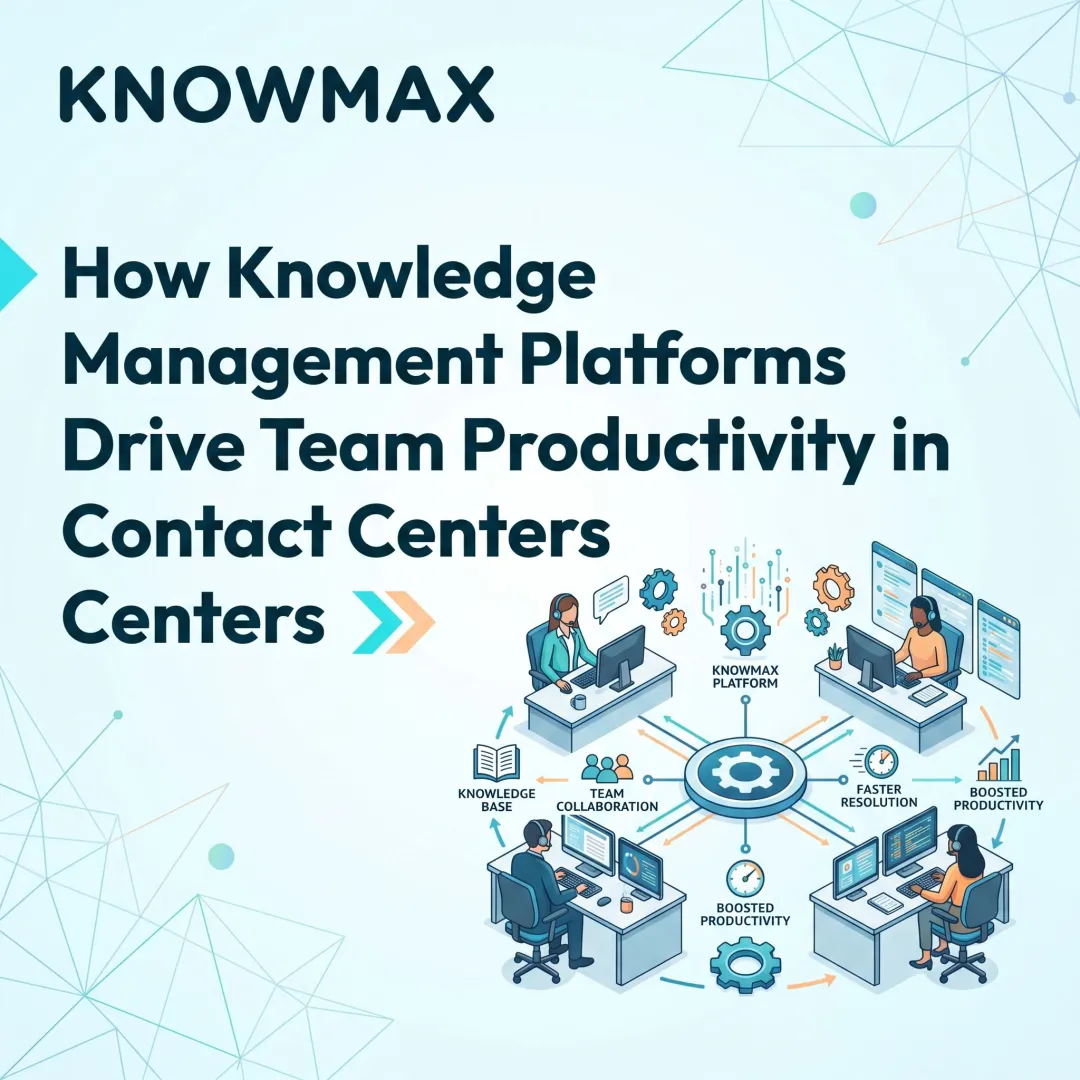
KMS directly impacts contact centre performance. Agents handling hundreds of interactions daily need instant access to accurate answers, escalation procedures, and product FAQs. An AI-powered KMS delivers guided resolution paths and contextual suggestions, directly improving First Call Resolution and reducing Average Handle Time.
SQM Group's 2024 contact centre benchmark study found industry-wide average FCR at 69%, with telecom lagging at 62–67% and insurance achieving 73–75%. For every 1% improvement in FCR, there's a corresponding 1% improvement in customer satisfaction and 1% reduction in operating costs.
In modern contact centres, agents switch between call, email, chat, and social within a single shift. The knowledge base must follow them across every channel — or the consistency breaks down.
Customer Self-Service and Ticket Deflection
A customer-facing KMS (help centre plus chatbot integration) allows customers to resolve common issues (order status, account questions, troubleshooting) without contacting an agent. This reduces support ticket volume, cuts operational costs, and improves satisfaction for customers who prefer self-service.
Gartner reports the median self-service cost at $1.84 per contact versus $13.50 for assisted channels, a 7x cost difference. The primary obstacle isn't channel availability but content quality: 43% of self-service failures occur because customers cannot find relevant content.
Employee Onboarding and Knowledge Retention
A KMS accelerates new hire ramp-up time. Instead of depending on informal knowledge passed between colleagues or mentoring alone, new agents access structured SOPs, video guides, and decision trees from day one.
Panopto and YouGov research found new employees receive an average of 2.5 months of formal training but need 6 months to reach full proficiency, a 3.5-month gap where productivity lags. Structured KMS tools directly target this deficit.
Knowledge retention matters equally. When experienced employees leave, 42% of institutional knowledge unique to those individuals risks walking out the door. A KMS captures that knowledge permanently within the system.
Industry-Specific Use Cases: Telecom, Banking, and Insurance
High-complexity industries particularly benefit from domain-aware KMS platforms. Each sector presents a distinct knowledge challenge:
| Industry | Core Knowledge Challenge | What KMS Solves |
|---|---|---|
| Telecom | Device troubleshooting across thousands of models; frequent plan changes | Guided resolution paths, visual device guides, real-time content updates |
| Banking | Compliance-accurate answers for regulatory FAQs and account queries | Pre-built content repositories with governance workflows and audit trails |
| Insurance | Claims procedures and policy FAQs accessible across assisted and digital channels | Omnichannel delivery with structured, version-controlled policy content |
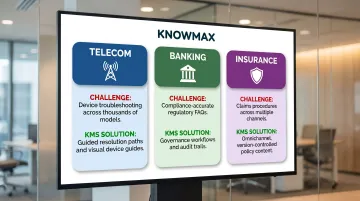
Telecom contact centres average 62–67% FCR (below the industry benchmark of 69%), reflecting the complexity of large product portfolios. Insurance centres, by contrast, reach 73–75% FCR — consistent with the impact of compliance-driven content governance on answer accuracy.
How to Choose the Right Knowledge Management System for Your Business
Organisations often make three mistakes when evaluating KMS: choosing a tool based on feature volume rather than use-case fit, underestimating the cost of poor content governance, and failing to account for integration requirements with existing CRM, telephony, and ticketing platforms.
Key evaluation criteria tied to business outcomes:
- AI search capability — Look for intent-based search, not just keyword matching. A system that surfaces the right answer regardless of how the question is phrased reduces agent effort and deflects unnecessary escalations.
- Content authoring ease — Non-technical teams must be able to create, update, and retire content without IT involvement. Slow authoring cycles mean outdated knowledge reaching agents and customers.
- Integration depth — Verify native connectors for your CRM, helpdesk, and telephony stack. Shallow integrations create context-switching; deep integrations surface knowledge inside the tools agents already use.
- Omnichannel delivery — The same knowledge base should power agent desktops, self-service portals, chatbots, and mobile — without maintaining separate content sets for each channel.
- Analytics and feedback loops — Reporting should show which articles are used, where agents abandon searches, and what queries go unanswered. Without this, content gaps go undetected.
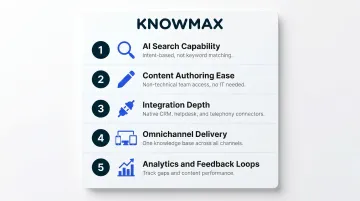
Once you have a shortlist based on these criteria, compliance becomes the final filter — not an afterthought.
For regulated industries like healthcare, banking, and insurance, the following certifications are non-negotiable:
- GDPR — required for any platform handling EU customer data
- SOC 2 — confirms security controls around data availability and confidentiality
- HIPAA — mandatory for platforms touching patient or health-related information
- ISO 27001 — validates a formal information security management framework
Platforms that cannot demonstrate these certifications should be eliminated before feature evaluation begins.
Conclusion
The right KMS is not just a storage tool — it is the operational backbone of consistent, accurate, and fast customer and employee experiences. Choosing between an internal knowledge base, customer self-service portal, LMS, or AI-powered contact centre KMS should be driven by use-case fit and measurable business outcomes, not by which platform has the most recognisable name.
For organisations looking to unify knowledge across agent-assisted and digital channels, Knowmax provides an AI-powered platform built specifically for contact centres, BPOs, and enterprise CX teams. It combines omnichannel knowledge delivery, interactive decision trees, and AI search to help agents resolve issues faster and customers find answers without picking up the phone — across telecom, banking, insurance, and eCommerce operations globally.
Frequently Asked Questions
What is knowledge management with an example?
Knowledge management is the process of capturing, organising, and delivering information within an organisation. A concrete example is a contact centre using an AI-powered knowledge base to give agents instant access to troubleshooting guides and FAQs during customer calls, reducing handle time and improving accuracy.
What are some examples of knowledge management systems?
The top KMS examples include internal knowledge bases, AI-powered contact centre platforms, customer self-service portals, document management systems, learning management systems, and collaboration tools. Each type serves a distinct audience — agents, customers, employees, or compliance teams — so the right choice depends on your primary use case.
What are the 5 types of knowledge management?
The five types are:
- Explicit KM — documented procedures and manuals
- Implicit KM — best practices and repeatable workflows
- Tacit KM — experiential or skills-based knowledge
- Internal KM — employee-facing knowledge
- External KM — customer-facing knowledge
Most enterprise KMS platforms address a combination of these.
What are the 4 pillars of knowledge management?
The four pillars are:
- People — knowledge creators and users
- Process — workflows for capturing and governing knowledge
- Technology — the KMS platform that stores and delivers knowledge
- Content — the structured information itself
All four must align for a KMS to deliver measurable value.
How do knowledge management systems improve customer service?
A KMS improves customer service in four key ways:
- Gives agents instant access to accurate answers, cutting handle time and errors
- Enables customer self-service, reducing inbound ticket volume
- Ensures consistent responses across every support channel
- Accelerates new agent onboarding with structured training content
What features should you look for in a knowledge management system?
Look for these core capabilities:
- AI-powered intent-based search (not just keyword matching)
- Decision trees for guided issue resolution
- Omnichannel content delivery across agent desktop, self-service, and chatbot
- CRM and helpdesk integrations (Salesforce, Zendesk, Freshworks)
- Role-based access controls and content versioning
- Analytics to identify knowledge gaps and track content performance