Introduction
Most customer service decision trees fail not because the logic is wrong, but because agents stop using them mid-conversation. They're too deep, too disconnected from real workflows, or full of jargon that doesn't match how customers actually phrase problems. Contact centers experience 30-45% annual turnover, creating a constant knowledge gap that decision trees are supposed to bridge — but only if agents trust and follow them.
The bigger issue? According to Smart Customer Service, fewer than 50% of agents trust the accuracy of the systems they're asked to use. When decision trees are built without agent input, crammed into workflows as an afterthought, or left to decay after launch, they become another ignored tool on an already overwhelming agent desktop.
The result: agents revert to guesswork, resolutions stay inconsistent, and Average Handle Time (AHT) climbs.
This article covers how to build a decision tree that agents will navigate during live calls — the five-step build process, what to prepare before you start, the design variables that drive adoption, and the mistakes that get trees abandoned within weeks.
TL;DR
- A customer service decision tree is a branching flowchart for human agents, not a machine learning model
- Build in five steps: define the use case, map scenarios, write clear nodes, set resolution endpoints, then test with agents
- Agents use trees that stay under 7 steps, use plain language, and match how they already think through issues
- Common failure points: building without agent input, scoping too broadly, and skipping updates when policies change
- Platforms like Knowmax embed decision trees directly into CRM and ticketing systems, so agents can reference them without switching tools mid-call
How to Build a Customer Service Decision Tree: Step-by-Step
A customer service decision tree is not a machine learning model — it's a guided conversation map built for human agents. During live interactions, agents follow a sequence of conditional Yes/No or multiple-choice questions that lead to a specific resolution, removing guesswork from the process entirely.
Step 1: Define the Use Case and Root Node
Every decision tree starts with a single, well-scoped problem. Don't try to map "all billing issues" in one tree. Instead, focus on "customer wants to dispute a charge on a telecom bill" or "order tracking for delayed shipments." The root node should reflect the most common, highest-volume entry point for that issue category.
Scope directly affects resolution quality. SQM Group's 2024 benchmarks show that 49% of non-resolved calls trace back to organisation-related errors — process gaps, policy confusion, or missing tools. A tightly scoped tree cuts through these gaps with a clear path instead of a sprawling maze.
To identify where to start, leading contact centres analyse:
- Ticket volume by issue type
- Escalation rates per category
- Average handle time (AHT) outliers
The top 10-15 issue types from this analysis become the priority list for decision tree coverage.
Step 2: Map All Possible Scenarios and Paths
Scenario mapping is where theory meets reality. Interview experienced agents, review historical ticket data, and walk through edge cases to capture the full range of customer situations the tree needs to handle — including edge cases that rarely surface in documentation but frequently trip up newer agents.
How to conduct scenario mapping:
- Shadow agents on live calls and document the actual questions they ask
- Pull ticket data for the target issue type and identify common resolution paths
- Identify the variations: payment method differences, account types, time-sensitive conditions
- Note where agents currently get stuck or escalate unnecessarily
Each node should branch into clearly distinct outcomes with no overlap. If an agent faces ambiguity about which path to follow, they'll skip the tree entirely and improvise.
Step 3: Write Decision Nodes as Crisp, Single-Answer Questions
Each decision node should ask one thing and offer two to four possible responses. Avoid compound questions like "Is the customer angry AND on a premium plan?" — split these into separate nodes.
The cognitive load problem:
Miller's Law puts working memory capacity at roughly 7±2 items, but modern refinements suggest the real ceiling is closer to 4 chunks. When nodes ask compound questions or present too many choices, agents hit overload and abandon the tree mid-call.
Language best practices:
- Mirror how agents actually speak to customers, not internal policy jargon
- Use plain language that matches what agents see on their screens
Example contrast:
- ❌ "Is the subscriber's account in arrears by more than 30 days?"
- ✅ "Has the customer missed a payment in the last month?"
Both mean the same thing, but the second is what an agent can verify instantly on screen.
Step 4: Define Resolution Endpoints (Leaf Nodes)
Leaf nodes should deliver a specific, actionable outcome: a script snippet, a procedure, an escalation path, or a link to a knowledge article. The agent should never reach a dead end without a clear next action.
What makes a complete leaf node:
- A concrete action the agent takes — issue refund, escalate to tier 2, send reset link
- Exact script phrases for common scenarios so responses stay consistent
- Clear escalation instructions when the issue can't be resolved at tier 1
Incomplete leaf nodes push agents off the tree and into improvisation. Knowmax addresses this by embedding knowledge article links, picture guides for visual troubleshooting, and external documentation directly within leaf nodes — so agents have everything they need without switching tools.
Step 5: Test with Real Agents Before Full Deployment
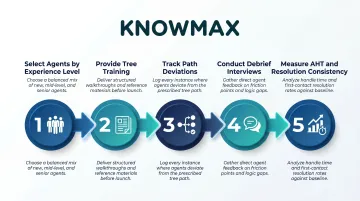
A technically correct tree becomes a usable tree only through agent validation. Select 5-10 agents to run the tree on 20-30 live or simulated interactions, then collect feedback on where they got confused, skipped nodes, or found paths missing.
Structured pilot approach:
- Choose agents with varying experience levels (1 novice, 3-4 mid-level, 1-2 veterans)
- Provide brief training on the tree's purpose and navigation
- Track where agents deviate from the intended path
- Conduct debrief interviews to capture qualitative feedback
- Measure resolution consistency and AHT during the pilot
Agent feedback during testing is what separates a logically sound tree from one that gets used. Organisations that skip this step consistently see adoption rates fall below 40%.
When Do Customer Service Decision Trees Work Best?
Decision trees aren't a one-size-fits-all tool. They work best when issue types are well-defined, customer paths are predictable, and resolution criteria are consistent enough to map in advance.
Where decision trees excel:
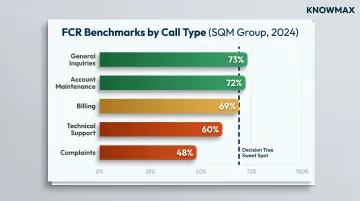
SQM Group's 2024 benchmarks by call type show measurable differences in First Call Resolution (FCR) across categories:
- General inquiries: 73% FCR
- Account maintenance: 72% FCR
- Billing: 69% FCR
- Technical support: 60% FCR
- Complaints: 48% FCR
Decision trees perform best in the 69-73% FCR range — structured issues where the path to resolution is logical but not always obvious to newer agents.
Where decision trees become counterproductive:
- Highly emotional interactions — complaints and escalations need empathetic, free-form conversation, not a script
- Rare or niche issues where the build cost outweighs the benefit of occasional agent confusion
- Situations tied to unpredictable external variables, for example resolutions that depend on third-party vendor timelines
For these scenarios, a contextual knowledge article or a defined escalation protocol serves agents better than forcing a branching path that doesn't map to reality.
Best-fit issue categories by industry:
- Telecom/ISP: Device troubleshooting, plan changes, billing disputes
- Banking: Transaction disputes, account maintenance, eligibility checks
- eCommerce: Order tracking, return eligibility, refund processing
- Insurance: Claims status, policy coverage questions, beneficiary changes
What You Need Before You Start Building
Preparation quality directly determines tree quality. Teams that skip this phase build trees that are structurally sound but operationally useless.
Subject Matter Experts and Ticket Data
The two non-negotiable inputs:
- Access to experienced agents who can articulate the real decision logic behind common issue resolutions
- Historical ticket/contact data showing issue frequency, escalation rates, and resolution categories
Without both, the tree will miss critical branches. For example, ticket data might reveal that 30% of "billing dispute" calls involve auto-pay setup errors — a scenario veteran agents know instinctively but that won't surface in generic policy documentation.
A Defined Scope and Success Metric
Before building, define what "success" looks like:
- Target reduction in AHT (e.g., 10-15% decrease for this issue type)
- Improvement in FCR (e.g., move from 65% to 72%)
- Reduction in escalations for a specific issue category
Without a clear metric, there's no basis for knowing whether the tree is working or needs revision. SQM Group research shows that every 1% improvement in FCR reduces operating costs by 1%, equaling approximately $286,000 in annual savings for an average midsize call center.
Integration and Access Planning
Decide how agents will access the tree before a single branch is built. A tree that requires opening a separate browser tab or searching manually will be abandoned within weeks.
Good access planning means confirming:
- Embed location: CRM panel, agent desktop widget, or standalone knowledge base
- Trigger point: Does the tree surface automatically by issue type, or does the agent search for it?
- Platform compatibility: The tree must work within the tools agents already use
Some platforms handle this natively. Knowmax, for instance, integrates decision trees as embedded widgets or side panels directly inside Salesforce, Zendesk, Freshdesk, Genesys, and Talkdesk — so agents never leave their primary workspace to find guidance.
Key Design Variables That Determine Whether Agents Will Actually Use It
Two decision trees covering identical issues can produce completely different adoption outcomes based entirely on design choices. The following variables explain why.
Tree Depth and Branching Factor
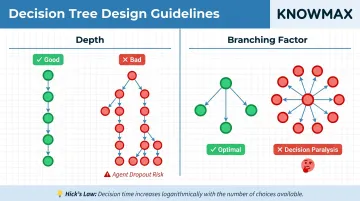
Depth (number of steps to reach a resolution) and branching factor (how many choices exist at each node) are the two most powerful levers of usability.
Hick's Law demonstrates that decision time increases logarithmically as the number of choices increases. Excess options lead to decision fatigue and task abandonment.
Two patterns consistently break agent trust:
- Overly deep trees (10+ steps to common resolutions) cause agents to skip ahead or abandon mid-tree
- Excessively wide branching (6+ choices per node) creates decision paralysis
Aim for 5-7 steps to resolution for common paths. Complex issues may need deeper paths, but these should be the exception — always with early off-ramp options built in.
Node Language and Framing
Every node must be written from the agent's perspective — it should reflect the question the agent is mentally asking, not what a business analyst would write in a requirements document. Misaligned language causes hesitation and errors.
Example contrast:
- ❌ "Is the subscriber's account in arrears by more than 30 days?"
- ✅ "Has the customer missed a payment in the last month?"
The first uses policy language. The second matches what an agent can verify on screen in seconds.
Completeness of Leaf Nodes
A complete leaf node must include three things:
- A clear resolution action the agent can take immediately
- Exact script language for the most common scenario variations
- A defined escalation path when the issue can't be resolved at tier 1
Agents need to trust that following the tree gives them everything they need. A single incomplete endpoint breaks that trust — and once broken, agents stop using the tree entirely. Tools like Knowmax let leaf nodes link directly to knowledge articles, picture guides, and escalation paths, so agents never reach a dead end.
Handling Exceptions Gracefully
Build "escape hatches" at key nodes — clear instructions for what to do when the customer's situation doesn't match any of the available branches. Without this, agents freeze or free-style, producing inconsistent outcomes.
Example escape hatch:
At a node asking "What type of account does the customer have?", include a final option: "None of these match → Document details and escalate to Account Specialist."
Visual Layout and Navigation
Even with perfect content, a poorly laid out tree frustrates users.
Key design principles:
- Use a top-to-bottom flow (not left-to-right for complex trees)
- Highlight the current active node visually
- Use colour coding to differentiate question nodes from resolution nodes
- Ensure the tree is navigable on the agent desktop resolution
These principles aren't aesthetic — they directly affect performance. Research shows AI-guided tools increase agent productivity by 22.2%, but only when the interface doesn't introduce additional friction. Comcast demonstrated this concretely by consolidating 20+ desktop applications into a single unified interface, which led to 91% agent trust in the information provided.
Common Mistakes That Kill Decision Tree Adoption
Building Without Agent Input
Most decision trees are designed by managers or process teams without meaningful input from frontline agents. The result: a tree that is technically accurate but practically unusable. It doesn't match how agents think, what they see on their screens, or how customers phrase problems.
Organizations that treat adoption as a "downstream issue" rather than a core design requirement consistently see program failure.
Scoping Too Broadly
Attempting to build a single mega-tree that covers all customer service scenarios produces a branching nightmare. Instead, build modular, issue-specific trees — one for billing disputes, one for device troubleshooting — that can be linked rather than merged.
Knowmax supports linking between modular decision trees, allowing a billing tree to connect to a plan-change tree without forcing everything into one monolithic structure. This keeps each tree focused and maintainable.
Treating the Tree as "Done" After Launch
Decision trees decay when products change, policies update, or new issue types emerge. A tree that was accurate at launch but hasn't been revised in six months will send agents to wrong resolutions — eroding trust faster than a bad initial build would.
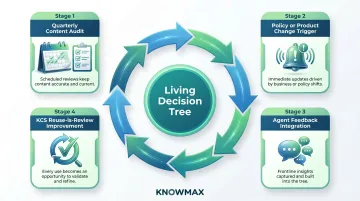
Governance matters here. COPC Inc. best practices outline a clear maintenance rhythm:
- Conduct quarterly content audits with governance council reviews
- Update trees whenever product, policy, or process changes occur
- Apply the KCS v6 "Reuse is Review" principle — improve knowledge each time it's accessed, creating demand-driven continuous improvement
Ignoring Integration with the Agent Workflow
If a decision tree doesn't live inside the tools agents already use — their CRM, ticketing system, or agent desktop — it won't get used. Leading BPOs have achieved 20% AHT reduction by consolidating disconnected systems into unified agent desktops.
Knowmax embeds interactive decision trees directly in the agent's working environment — appearing as widgets within Salesforce, Zendesk, Genesys, and other platforms — eliminating the friction of context-switching.
Conclusion
Building a customer service decision tree agents actually use comes down to three things done right: scoping the right problems, writing nodes that match agent thinking, and embedding the tree where work actually happens.
The best-built trees are treated as living documents: reviewed after policy changes, improved based on agent feedback, and measured against FCR and AHT metrics to prove their value. Organizations that follow this approach see measurable gains:
- 21% improvement in FCR for telecom operators
- 15% AHT reduction for online delivery platforms
- 60% ticket deflection to self-service channels
Decision trees aren't magic. But when built with agent input, kept shallow and focused, and integrated into existing workflows, they bridge the knowledge gap that high turnover creates, ensuring new agents resolve issues as confidently as veterans from day one.
Frequently Asked Questions
What are the 4 elements of a customer service decision tree?
Every decision tree is built on four components:
- Root node — the initial customer issue or entry point
- Decision nodes — yes/no or multiple-choice questions the agent answers
- Branches — the paths connecting nodes based on each response
- Leaf nodes — the final resolution endpoints or actions taken
What are the different types of decision trees used in customer service?
The four main types are:
- Diagnostic/troubleshooting trees — for technical issues like device setup or connectivity problems
- Policy-guidance trees — for eligibility or entitlement decisions
- Scripted resolution trees — for high-volume, repeatable queries like order tracking
- Escalation trees — for routing complex cases to the right team or specialist
Can ChatGPT create a decision tree for customer service?
AI tools like ChatGPT can draft an initial structure or generate node questions, but the output needs significant validation by subject matter experts and agents before use. Logic, policy accuracy, and usability all require human review and testing before the tree goes live.
How deep should a customer service decision tree be?
Most effective trees resolve common issues within 5-7 steps from the root node. Beyond that, agents tend to disengage due to cognitive load. Complex issues may require slightly deeper paths, but these should be the exception with early off-ramp options.
How often should a customer service decision tree be updated?
Review trees whenever product, policy, or process changes occur, and audit on a regular cadence — quarterly at minimum. Stale trees erode agent trust faster than having no tree at all; outdated guidance leads to incorrect resolutions and frustrated customers.
What is the difference between a decision tree and a standard SOP in customer service?
An SOP is a linear, step-by-step document written for sequential reading and training purposes, while a decision tree is an interactive branching guide that responds to the specific conditions of each customer interaction. Decision trees are better suited for real-time guided resolution. SOPs are better for compliance documentation and onboarding.