A well-built knowledge base portal addresses all three challenges: it centralizes organizational knowledge, reduces response time through structured access, and enables consistent, accurate self-service. But launching a portal isn't enough. Despite 73% of customers using self-service at some point in their journey, only 14% of issues are fully resolved without escalation.
This article walks through what a knowledge base portal is, the step-by-step process to build one, the tips that separate effective portals from ignored ones, and the mistakes that cause even well-funded portals to fail.
TL;DR
- A knowledge base portal centralizes organizational knowledge into a searchable, navigable hub for agents, customers, or both
- Structure content around how users search, not how your organization is built — start by defining audience needs
- Search quality, content governance, and regular updates drive portal adoption
- Common failures: outdated content, poor navigation, and no ownership plan for ongoing maintenance
What Is a Knowledge Base Portal and When Do You Need One?
A knowledge base portal is more than a document library. It's a structured, searchable environment that contextualizes information, personalizes access based on user role, and enables action. An agent viewing a customer issue can access a guided resolution in the same portal—without switching applications or hunting through folders.
Gartner defines a customer service knowledge management system as a collection of technologies that enable the timely provision of accurate, contextually relevant, personalized information to customers and support employees. Mandatory capabilities include intelligent search, guided assistance, content curation, and contextual ranking.
Internal vs. External Portals
Internal portals serve agents and staff. They contain:
- SOPs and compliance procedures
- Troubleshooting guides and decision trees
- Product specifications and pricing details
- Escalation workflows
External portals serve customers. They include:
- FAQs and how-to articles
- Self-service troubleshooting flows
- Account management guides
- Visual device guides
Many enterprises need both, often surfaced from the same underlying knowledge base. Platforms like Knowmax support role-based access controls, ensuring agents and customers see only content relevant to their role, which matters especially in regulated industries like banking, telecom, and healthcare.
When You Need a Knowledge Base Portal
Clear signals indicate it's time to build a portal:
- High inbound ticket volume for repetitive queries: 25% of callers already tried self-service and failed before calling, pushing volume into higher-cost channels
- Inconsistent agent responses: 60% of agents fail to promote self-service, and those who do often provide conflicting answers
- Long average handle times: agents lose minutes per call searching across disconnected systems
- Poor First Contact Resolution rates: without quick access to accurate knowledge, issues spill into repeat contacts
- Self-service that doesn't deflect: customers abandon existing FAQs or help centers without finding answers
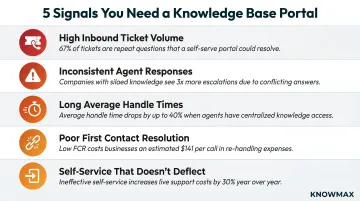
Each of these symptoms points to the same underlying gap: the right knowledge isn't reaching the right person at the right moment. Building a portal addresses that gap directly.
How to Build a Knowledge Base Portal: Step-by-Step
Step 1: Define the Portal's Purpose and Map Your Users
Clarify who will use the portal and why. Are you building for frontline agents, customers, or both? What tasks must they complete? Success for an agent (resolving a ticket in under 3 minutes) differs from success for a customer (finding an answer without opening a ticket).
Map your user types:
- Customers — Need simple, jargon-free answers to common problems
- Frontline agents — Need detailed troubleshooting steps, escalation paths, and product specs
- Subject matter experts — Need access to technical documentation and policy updates
Identify specific use cases the portal must support at launch:
- Product troubleshooting for top 10 issues
- Billing query resolution
- Onboarding guidance for new customers or agents
Defer out-of-scope use cases to avoid scope creep. You can't solve everything on day one.
Step 2: Audit Existing Knowledge and Identify Gaps
Conduct a content inventory across all current sources: shared drives, email threads, agent cheat sheets, old intranets, ticketing system notes. Knowledge workers spend over a quarter of their time searching for information, and only 16% of content within typical businesses is posted where others can access it.
Audit steps:
- List every knowledge source currently in use
- Identify what's accurate, what's outdated, and what's missing
- Tag content by topic, audience, and how often it's actually used
- Prioritize content for the portal based on query frequency
Look at top support ticket categories and search terms. High-value knowledge should be ready at launch, not months later. Migration is where manual effort tends to pile up — platforms like Knowmax offer AI-powered migration engines to automate content transfer and cut that burden significantly.
Step 3: Design Your Information Architecture
Build content categories and navigation based on how users think about problems—not how your departments are organized. Customers searching for "why is my bill wrong" don't think in terms of "Billing Department" or "Finance Operations."
Why org-chart structures fail:
Users search by task and intent, not organizational hierarchy. Nielsen Norman Group research found that search usability accounted for 43% of the difference in employee productivity across intranets tested. Task-based navigation consistently outperforms department-based structures.
Define a metadata and tagging framework:
- Topic tags (billing, troubleshooting, account management)
- Product tags (mobile service, broadband, hardware)
- Audience type (customer, agent, manager)
- Content type (FAQ, decision tree, visual guide)
This framework powers both browsable navigation and search relevance. Without consistent tagging, users searching the same problem with different words will get different results — or none at all.
Step 4: Create and Structure Content for the Portal
Establish writing standards before content creation begins:
- Plain language guidelines — avoid jargon, use active voice
- Consistent article structure — symptom → cause → resolution
- Visuals where relevant — screenshots, diagrams, step-by-step images
Content types your portal should contain:
| Content Type | Best Used For |
|---|---|
| Articles | Detailed explanations, policy overviews, product information |
| FAQs | Quick answers to common, straightforward questions |
| Decision trees | Guided troubleshooting for complex, multi-step resolutions |
| Visual guides | Step-by-step device setup, installation, physical troubleshooting |
| Escalation paths | When and how to escalate issues beyond frontline support |
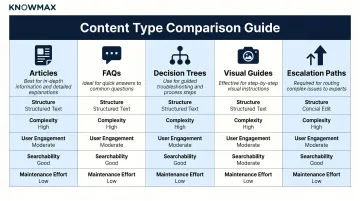
Decision trees are particularly effective for reducing agent error. Knowmax's no-code decision tree builder allows teams to convert complex SOPs into interactive workflows, guiding agents through each resolution step without requiring technical expertise.
Tools like Knowmax use AI author features to help teams create, rephrase, summarize, and auto-translate knowledge content across 25+ languages, cutting content creation time.
Step 5: Configure Search and Access Controls
Search is the most-used function in any portal. Users don't browse — they search. What separates effective portal search from basic keyword matching is intent-based search: it understands what a user is trying to resolve, not just the words they type.
Intent-based search vs. keyword search:
| Search Type | How It Works | Where It Fails |
|---|---|---|
| Keyword search | Matches exact terms | Fails when users phrase queries differently |
| Intent-based search | Interprets query context and meaning | Rarely fails — surfaces relevant content even without exact terminology |
For example, a customer searching "my internet is slow" and an agent searching "bandwidth throttling" may need the same knowledge article. Intent-based search connects both queries to the right content.
Role-based access controls:
Set up permissions so agents and customers see only content relevant to their role. Exposing internal-only content on customer-facing portals creates compliance and accuracy risks — especially in regulated industries like healthcare (HIPAA) and finance.
Knowmax holds SOC 2, GDPR, HIPAA, and ISO 27001 certifications, ensuring strict access controls and data handling for enterprise deployments.
Step 6: Integrate, Test, and Deploy
Agents need knowledge in-workflow, not buried in a separate tab they have to switch to mid-call. Digital workers toggle between applications roughly 1,200 times each day, adding up to just under four hours each week spent reorienting. Context switching can cost up to 40% of productive time.
Knowmax integrates natively with Salesforce, Zendesk, Genesys, Freshdesk, and Talkdesk, and is listed on their respective marketplaces (AppExchange, Zendesk Marketplace, Genesys AppFoundry). This ensures agents access knowledge without leaving their primary workspace.
Conduct structured user testing before full launch:
- Test search success rate for the top 10 most common queries
- Verify navigation path completion for key tasks
- Measure time-to-answer for both agents and customers
- Gather feedback from real users, not just stakeholders
Testing reveals gaps that aren't obvious until real users interact with the portal.
Tips to Make Your Knowledge Base Portal Actually Effective
Design for Findability Over Comprehensiveness
A portal with 500 perfectly organized articles outperforms one with 5,000 inconsistently structured ones. Prioritize depth and accuracy on high-frequency topics over breadth.
Users abandon portals when search returns too many irrelevant results or contradictory answers. Focus on quality, not quantity.
Leverage AI-Powered Authoring and Search
AI reduces the manual burden of content creation and maintenance. Knowmax's AI author features help teams create, rephrase, summarize, and auto-translate content across 25+ languages. Intent-based search resolves queries even when users don't use exact terminology, improving search success rates.
91% of customer service leaders report pressure from executive leadership to implement AI. AI already resolved 30% of service cases in 2025 — a figure projected to reach 50% by 2027.
Implement Formal Content Governance
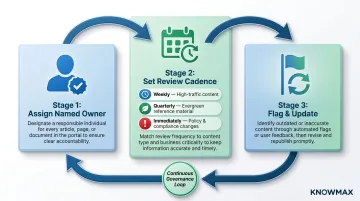
Assign a named owner to each content section. Set review cadences:
- Quarterly minimum for evergreen content
- Immediately for policy or product changes
- Weekly for high-traffic articles based on search failure data
Establish a clear workflow for flagging outdated articles. Without governance, portals decay rapidly as product lines and policies evolve. Knowmax addresses this with article ownership assignment, scheduled review cycles, and content expiry workflows that keep knowledge current.
Ensure Omnichannel Consistency
Agents on voice, chat, or email — and customers on web or mobile — should all access the same up-to-date content. Omnichannel consistency prevents agents from giving different answers depending on their channel.
The data makes the stakes clear:
- 79% of customers expect consistent interactions across departments, yet 55% say it feels like they're communicating with separate departments
- 74% of consumers find it very frustrating to repeat themselves across interactions
Knowmax's omnichannel integration ensures the same knowledge base serves agents and customers across all channels, eliminating inconsistencies.
Actively Promote Adoption
A portal only delivers value if people actually use it. Train new agents on using the portal during onboarding. Surface the self-service portal proactively in customer communications before tickets are raised. Share usage metrics with teams to reinforce the portal's value.
Knowmax's integrated Learning Management System (LMS) includes guided learning journeys, gamification (badges, quizzes, points), and AI-powered course creation, reducing time to proficiency by up to 40%.
Common Mistakes That Undermine Knowledge Base Portals
Launching with Unreviewed Legacy Content
Migrating old documents wholesale without auditing for accuracy or relevance immediately erodes user trust. If users search and find three conflicting answers, they stop using the portal.
Before migration, take these steps:
- Audit all legacy content for accuracy and current relevance
- Archive outdated material rather than migrating it
- Delete or consolidate conflicting information
- Launch with less content if it means launching with accurate content
Structuring the Portal Around Internal Org Charts
Customers don't think in terms of departments. Research the actual language users use to describe their problems, then let that shape your navigation labels and categories.
Nielsen Norman Group's intranet research showed measured usability improved by 44% when task-based navigation replaced organizational hierarchy.
Ignoring Mobile and Omnichannel Accessibility
Navigation structure is only half the accessibility challenge. A portal that only works well on desktop fails agents using tablets in the field and customers accessing help from their phones.
82% of customers use mobile apps for communicating with a company, but only 51% of customer service teams use mobile apps.
Field service operations typically distribute devices across multiple form factors:
- Laptops for documentation-heavy roles
- Handheld mobile computers for warehouse and logistics teams
- Smartphones for on-site technicians and agents
Your portal must perform consistently across all of them.
Measuring the Impact of Your Knowledge Base Portal
Track metrics that reflect actual user outcomes:
Self-service resolution rate — Percentage of customers who found an answer without opening a ticket. The baseline is low: only 14% of customer service issues are fully resolved in self-service. Even for "very simple" issues, only 36% resolve fully. A well-structured portal can push that number well above the baseline.
Ticket deflection volume — Number of tickets prevented because users found answers themselves. Only 14% of contact centers currently measure deflection rate—yet it's one of the clearest indicators of whether a portal is actually working.
Search success rate — Percentage of searches that end in a content view rather than a dead end or escalation. Failed searches signal knowledge gaps.
Agent-side performance indicators:
- Reduction in Average Handle Time (AHT)
- Improvement in First Contact Resolution (FCR) rate
- Fewer repeat contacts on the same issue
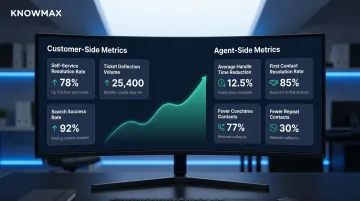
These metrics signal whether the portal is giving agents the right answer at the right moment. The average cost of an inbound call is $7.20—47% more than email and 23% more than web chat. Reducing call volume through effective self-service delivers measurable ROI.
Search failure data is one of the most actionable improvement signals available. Queries with no results—or queries that end in immediate escalation—point to specific content gaps. Build a weekly review process where these are surfaced to content owners and converted into new or updated articles.
Platforms like Knowmax surface these patterns automatically, tracking content usage, time spent, user feedback, and search behavior so teams can act on gaps rather than guess at them.
Frequently Asked Questions
What is the difference between a knowledge base and a knowledge base portal?
A knowledge base is the content repository—the collection of articles, guides, and documentation. A knowledge base portal is the interface layer that makes that content searchable, navigable, and actionable for specific user types. One is the content store; the other is how users experience it.
How often should content in a knowledge base portal be updated?
Update frequency depends on content type. Product and policy content should be reviewed immediately after changes; high-traffic articles quarterly. Every article needs an assigned owner with a scheduled review cycle — ad hoc updates alone lead to knowledge decay.
What features should a knowledge base portal have?
Core features include intent-based search, category navigation, role-based access, multiple content types (articles, decision trees, visual guides), analytics, and integration with CRM or ticketing tools.
How do you improve search performance in a knowledge base portal?
Strong search performance depends on consistent metadata and tagging, intent-based search (not just keyword matching), and regular review of failed query logs to fill content gaps. Search quality is the single biggest driver of portal adoption.
Can a knowledge base portal serve both agents and customers simultaneously?
Yes. Many enterprise portals use the same underlying knowledge base but serve separate portal experiences for agents and customers via role-based access. This ensures consistency while controlling what each audience can view, maintaining compliance and relevance.