Introduction
Picture this: a customer waits on hold while their support agent frantically types keywords into a knowledge base, only to face a wall of article titles instead of the answer they need. The agent scans five different documents, pieces together a response, and finally returns to the call — three minutes later. This scenario costs contact centers measurable money: the average inbound call costs $7.20 in the US, and every minute of delay compounds that expense.
The real culprit is outdated search technology.
Enterprise knowledge bases power customer support operations, yet many still rely on keyword-based search that works like a table of contents rather than an answer engine. When agents phrase queries differently than knowledge base tags — or customers ask multi-step questions — traditional search fails.
That gap between keyword search and AI-powered search directly impacts Average Handle Time (AHT), First Call Resolution (FCR), and customer satisfaction scores.
This article breaks down how each approach works, where each falls short, and what the difference means for contact center performance.
TL;DR
- Regular search matches keywords — fast for simple lookups but unreliable when agents rephrase queries or ask complex questions
- AI-powered search understands intent — surfaces the right answer even when queries are incomplete, conversational, or misspelled
- Performance gap is measurable — AI search directly reduces AHT, improves FCR, and lowers agent error rates
- For high-volume contact centers with complex queries, AI-powered search delivers clear ROI — though neither approach is obsolete
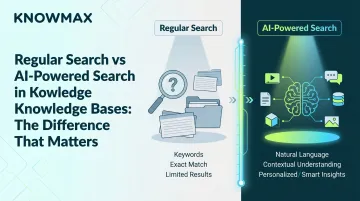
Regular Search vs AI-Powered Search in Knowledge Bases: Quick Comparison
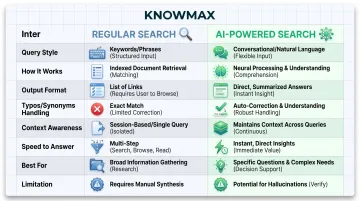
Here's how the two approaches stack up across the dimensions that matter most for knowledge base performance:
| Dimension | Regular Search | AI-Powered Search |
|---|---|---|
| Query Style | Exact keyword input | Natural language, conversational queries |
| How It Works | Scans indexed text for keyword matches | Interprets intent using NLP and machine learning |
| Output Format | Ranked list of articles | Direct answers or best-match content |
| Handles Typos/Synonyms | Limited — requires exact or near-exact matches | Yes — handles variations, misspellings, incomplete queries |
| Context Awareness | None — no memory of previous queries | Context-aware across interactions |
| Speed to Answer | Fast for known-item lookup | Faster resolution for complex, multi-step queries |
| Best For | Structured content navigation, simple lookups | Diverse query types, conversational support, omnichannel delivery |
| Limitation | Struggles with phrasing variations and multi-step queries | Requires high-quality, well-structured content foundation |
What is Regular Search in a Knowledge Base?
Regular search — also called keyword-based or lexical search — scans indexed knowledge base content for exact or near-exact keyword matches. It returns a ranked list of articles based on term frequency and relevance scoring. Think of it as a sophisticated table of contents: it tells agents where to look, not what the answer is.
Keyword search works by matching literal terms in queries to indexed documents, without understanding the meaning or intent behind the words. If an agent searches "password reset," the system retrieves articles containing those exact words — but variations like "recover my account credentials" may return irrelevant or zero results.
Where Regular Search Works Well
Regular search performs effectively in environments with:
- Tightly structured content — well-tagged articles, clear naming conventions, and consistent terminology
- Known-item lookups — agents searching for a specific policy name, product code, or SOP by title
- Low query complexity — simple, predictable questions that match knowledge base tagging exactly
Use Cases of Regular Search
Regular search is sufficient when queries are straightforward:
- An agent searches for "return policy electronics" and retrieves the exact policy document
- A new hire locates an onboarding checklist by typing the checklist name
- A team browses categorized FAQs to find a specific troubleshooting guide
Limitations in High-Volume Support
These use cases represent ideal conditions. In contact centers, queries rarely arrive that neatly.
Regular search breaks down when agents use different terminology than what's tagged in the knowledge base. Terminology mismatch and synonym gaps cause recall failures — the right answer exists, but keyword search can't find it.
Key weaknesses include:
- Phrasing variations — "How do I cancel my subscription?" vs. "Steps to stop billing" return different results, even though the intent is identical
- Multi-step queries — keyword ranking produces article lists, forcing agents to scan multiple documents while a customer waits
- Scanning time — agents open several articles to piece together a single answer, adding seconds (sometimes minutes) to every interaction
In high-volume contact centers, these gaps translate directly into longer handle times, more escalations, and lower first-contact resolution rates.
What is AI-Powered Search in a Knowledge Base?
AI-powered search uses Natural Language Processing (NLP) and machine learning to interpret the intent behind a query — not just the words used. Unlike keyword search, it processes conversational, incomplete, or context-heavy questions and surfaces the most relevant answer from across the knowledge base.
How It Works (Without the Jargon)
AI-powered search understands semantic meaning, not just literal text matches. It recognizes synonyms, phrasing variations, and can synthesize answers from multiple knowledge base articles rather than listing links. Semantic search models the relationship between words and meaning, enabling retrieval of conceptually related content even when exact keywords don't appear.
Knowmax grounds responses in verified company content, eliminating the hallucination risk common in public AI tools. Grounding AI in proprietary knowledge bases with explicit attribution reduces fabricated answers — agents get accurate information, not generated guesses.
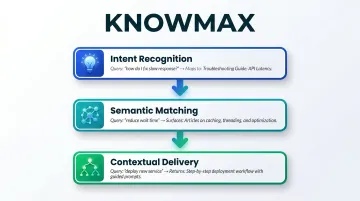
Three Key Capabilities That Set AI Search Apart
1. Intent Recognition: Even vague queries land on the right content. "How do I fix connectivity issues?" and "Customer can't connect to WiFi" both trigger the same troubleshooting article — the system reads intent, not just phrasing.
2. Semantic Matching: Relevant content surfaces even without exact keywords. An agent searching "refund timeline" retrieves articles tagged "return processing time" or "reimbursement schedule" because the AI treats these as conceptually identical.
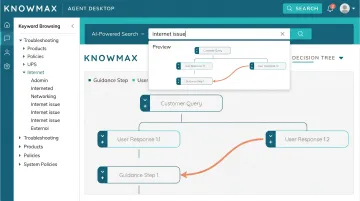
3. Contextual Delivery: Instead of a list of links, agents get step-by-step answers, decision trees, or guided workflows. Knowmax delivers interactive decision trees and visual guides directly in response to agent queries, cutting the time it takes to reach a resolution.
These capabilities only hold up when the underlying content is structured and current — which brings in a harder problem.
Content Quality: The Foundation
AI-powered search is only as good as the knowledge base it draws from. Well-structured, regularly updated content is the prerequisite — without it, even advanced AI will surface incomplete or outdated answers. Organizations must maintain content governance, eliminate duplicate or conflicting articles, and keep information current to realize AI search benefits.
Use Cases of AI-Powered Search
AI-powered search delivers the most value in:
- High-volume contact centers where agents handle diverse query types across telecom, banking, insurance, or BPO environments
- Self-service portals where customers ask questions in natural language and expect instant, accurate answers
- Omnichannel environments where the same knowledge must power chatbots, IVR systems, agent desktops, and mobile apps simultaneously
Knowmax's AI search operates across all these touchpoints — chatbot, agent desktop, self-service portal — so the answer a customer gets never depends on which channel they used to ask.
Regular Search vs AI-Powered Search: Which One Works Better for Your Knowledge Base?
Decision Factors That Matter Most
The right search capability depends on three core factors:
Query complexity — how varied and conversational are the questions agents or customers ask? If queries follow predictable patterns and use consistent terminology, regular search may suffice. When agents phrase the same question ten different ways, or customers ask multi-step questions, AI-powered search becomes essential.
Scale — how large and frequently updated is the knowledge base? Smaller, tightly controlled repositories with minimal content changes can work with keyword search. Large knowledge bases spanning multiple product lines, geographies, or service types benefit from semantic search that navigates complexity without requiring agents to memorize tagging conventions.
Performance targets — are AHT, FCR, or CSAT goals being missed because agents can't find answers fast enough? Industry benchmarks show average FCR sits at 69%, with only 5% of contact centers achieving world-class 80%+ rates. If knowledge retrieval delays contribute to missed targets, AI-powered search offers measurable improvement.
When Regular Search Is Sufficient
Choose regular search if:
- Your knowledge base is small, well-organized, and rarely changes
- Agents handle predictable query types with consistent terminology
- Content is tightly tagged and indexed
- Volume is manageable and agents have time to scan article lists
Regular search remains effective for structured browsing: agents navigating a known hierarchy or retrieving a specific document by name.
Once those conditions break down — higher query volume, more complex questions, or performance pressure — the limitations of keyword search show up fast.
When AI-Powered Search Becomes the Better Choice
Choose AI-powered search if:
- Agents handle nuanced, varied, or multi-step queries
- The knowledge base spans multiple product lines, service types, or geographies
- You have measurable targets around AHT, FCR, or CSAT that aren't being met
- Customers or agents use natural language and expect instant answers
- You deploy knowledge across multiple channels (agent desktop, chatbot, IVR, self-service)
Hybrid Approach: The Best of Both
AI-powered search works best when the underlying content is well-organized. Knowmax supports both keyword-based browsing and AI-powered search simultaneously. Agents can use structured navigation for known-item lookups — retrieving a specific SOP by name, for instance — while relying on AI search for complex, conversational queries. This hybrid approach gives teams flexibility without sacrificing speed.
Real-World Impact: What AI-Powered Search Delivers for Customer Support Teams
The Before State: Keyword Search Bottlenecks
Contact centers relying on keyword search face a predictable pattern: agents spend time scanning article lists, customers experience longer hold times, and answer consistency varies by agent experience level. Average Handle Time increased 18% year-over-year as of 2024, driven partly by the complexity of information retrieval in scaled operations.
When agents can't find answers quickly, they escalate calls, guess at solutions, or cobble together responses from multiple outdated documents — all of which erode customer trust and inflate operational costs.
The After State: AI-Powered Knowledge Retrieval
AI-powered search changes the equation. Agents get the right answer on the first query, the system surfaces resolution steps in context, and self-service channels deliver consistent answers without human intervention. Research on generative AI in customer support showed productivity gains of 14% on average, with 34% improvements for novice agents when AI-assisted knowledge tools were deployed.
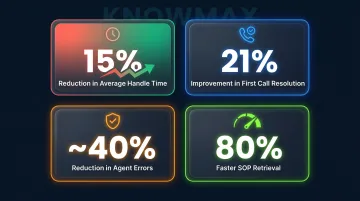
Measurable outcomes include:
- Up to 15% reduction in Average Handle Time, reported by Knowmax customers
- 21% improvement in First Call Resolution, achieved by a leading telecom provider after deploying Knowmax
- ~40% reduction in agent errors through consistent, verified answer delivery
- 80% faster retrieval of client SOPs and service information
Every 1% improvement in FCR is associated with a 1.4-point increase in NPS and $286,000 in annual savings for a mid-size contact center, making AI-powered knowledge search a direct driver of bottom-line results.
Knowmax's AI-Powered Search in Action
Those outcomes depend on how the underlying search works. Knowmax's knowledge management platform is built specifically for enterprise contact centers — its AI search engine (Max AI) understands intent, handles phrasing variations, and delivers answers grounded in verified company content, eliminating hallucination risk.
Key capabilities include:
- Consistent answers across agent desktops, chatbots, IVR, and self-service portals from a single knowledge source
- Direct embedding into Salesforce, Zendesk, Genesys, and Freshchat — answers surface in the agent workflow, no tab-switching required
- Step-by-step decision trees and visual guides delivered in context, not generic article links
- Proven across telecom, banking, BPO, eCommerce, and healthcare with customers including Vodafone, Airtel, Concentrix, Tech Mahindra, and CIMB
For contact centers handling complex, high-volume queries, the right search capability isn't a technical detail — it's a direct driver of customer experience quality.
See how Knowmax transforms knowledge search for contact centers in your industry — request a demo today.
Frequently Asked Questions
Frequently Asked Questions
What is the difference between traditional search and AI-powered search?
Traditional search matches keywords to indexed content and returns a ranked list of articles. AI-powered search understands the intent behind a query and surfaces direct, synthesized answers, making it faster and more accurate in complex support environments.
How does AI-powered search improve agent performance in a contact center?
AI-powered search reduces the time agents spend scanning results by surfacing the right answer immediately. This leads to lower Average Handle Time, fewer escalations, and more consistent responses across the team.
Can AI-powered search in a knowledge base reduce Average Handle Time (AHT)?
Yes. By eliminating the need for agents to scroll through multiple articles, AI-powered search directly shortens the time from query to resolution — one of the most measurable benefits for contact center operations.
What makes AI-powered search more accurate than keyword search in a knowledge base?
AI-powered search uses NLP to interpret meaning and context, not just exact words. It handles synonyms, phrasing variations, and incomplete queries that would cause keyword search to return irrelevant or no results.
Is AI-powered search in a knowledge base suitable for all industries?
AI-powered search is particularly valuable in high-complexity support environments: telecom, banking, healthcare, and eCommerce. These are industries where agents handle diverse query types and answer consistency is critical to customer trust.
Does switching to AI-powered search require replacing the existing knowledge base?
No. AI-powered search layers on top of existing knowledge content using integrations and APIs. The key requirement is that content is well-structured and up-to-date, as AI search amplifies quality content rather than substituting for it.