Introduction
When agents place customers on hold to search for answers, new hires spend weeks finding their footing, and managers field the same questions on repeat, the hidden cost of scattered knowledge adds up fast. Research from McKinsey found that interaction workers spend nearly 20% of their time looking for internal information or tracking down colleagues who can help. That's one full day per week lost to knowledge chaos.
An internal knowledge base is operational infrastructure — and for contact centers, support teams, and BPOs, it's often the difference between consistent service and constant firefighting.
This guide is for operations leads, support managers, and customer experience teams tired of knowledge living in email threads, Slack messages, or individual heads. We'll cover what an internal knowledge base is, what belongs in it, how to set one up correctly, and the practices that keep it accurate and useful over time.
TL;DR
- An internal knowledge base centralizes company information so employees find what they need without asking colleagues
- Done well, it cuts onboarding time, improves response consistency, and prevents knowledge loss when employees leave
- Successful setup depends on defined goals, clear ownership, logical structure, and ongoing governance
- Common failures — unclear ownership, poor search, stale content — each has a direct fix
- AI-powered platforms cut the manual effort of creating and maintaining knowledge at scale
What Is an Internal Knowledge Base?
An internal knowledge base is a private, searchable repository of documents, guides, SOPs, and resources built exclusively for employees. Unlike external knowledge bases that serve customers, internal KBs contain proprietary processes, policies, and organizational know-how that must be access-controlled.
What Belongs Inside
Well-structured internal KBs typically contain:
- Standard operating procedures (SOPs)
- Onboarding materials and training guides
- HR and compliance policies
- Product documentation for agents
- Troubleshooting runbooks
- Decision trees for escalations
- FAQ libraries
The exact mix depends on your industry and team function. Contact centers prioritize call scripts and escalation workflows; IT teams need device troubleshooting guides; HR departments store policy handbooks.
The Knowledge Silo Problem
Without a centralized KB, that content gets scattered — and the cost adds up fast.
When critical content lives in email chains, personal drives, or only in the minds of senior employees, organizations face productivity loss, inconsistent service, and serious operational risk when key staff leave. IDC research compiled by M-Files found that workers spend an average of 5 hours per week searching for documents.
Knowledge silos create downstream problems:
- New hires can't find what they need to ramp up
- Agents give inconsistent answers because they're working from different information
- Experienced employees leave and take their expertise with them
- Managers become bottlenecks answering the same questions repeatedly
Why Your Organization Needs an Internal Knowledge Base
The Productivity Case
A centralized KB means employees spend less time hunting for answers and more time doing their jobs. McKinsey's research found that companies implementing searchable knowledge records could reduce the time employees spend searching for information by up to 35%, and raise interaction worker productivity by 20-25%.
The math is simple: if your team of 50 people wastes 5 hours per week searching for information, you're losing 250 hours of productive work weekly—equivalent to six full-time employees.
The Consistency and Quality Case
For customer-facing teams, a single source of truth means every agent gives the same accurate answer. Inconsistency in support responses directly drives poor customer satisfaction and repeat contacts.
The numbers tell the story. SQM Group research found that only 29% of agents actually use their knowledge management tool when they need help — despite 94% of call centers claiming they update it regularly. That gap has a direct cost:
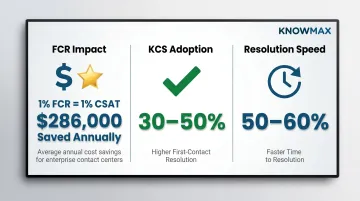
- Every 1% improvement in FCR drives a 1% improvement in customer satisfaction
- A 1% FCR gain saves an average call center roughly $286,000 annually
- Organizations adopting Knowledge-Centered Service (KCS) see 30-50% higher first-contact resolution and 50-60% faster time to resolution
The Knowledge Retention Case
Every time an experienced employee leaves, accumulated expertise walks out the door with them — unless it's been documented. SHRM reports that replacing an employee costs 50-200% of their annual salary. For contact centers and BPOs, where turnover averages 40-45% annually, that adds up to millions in lost productivity each year.
The knowledge retention problem compounds during rapid growth. New agents require 6-8 months to reach full performance, but without documented processes, they rely on shadowing and tribal knowledge. Organizations that address this with structured KCS practices report 20-35% improvement in employee retention and 20-40% higher employee satisfaction — a direct return on the documentation investment.
Setting Up Your Internal Knowledge Base
Setting up an internal KB involves more than picking a platform. Scoping, governance, content structure, and adoption planning all need to be defined upfront — shortcuts in any of these phases create recurring problems down the line.
Prerequisites: What to Define Before You Start
Identify Purpose and Scope First
Is this KB for one department (customer support), cross-functional teams, or the entire organisation? Narrower scope allows faster launch and easier iteration. Broader scope requires stronger governance from day one.
Assign Clear Ownership
Designate:
- A KB owner responsible for overall structure
- Departmental contributors responsible for content within their domain
- A review/approval workflow
Without designated ownership, content ownership gaps appear quickly — and outdated articles are harder to fix than missing ones.
Define Access Levels Upfront
Map which content needs to be visible to all employees, which is role-specific (agent playbooks, HR policies), and which is restricted to managers. Role-based access control is both a security requirement and a usability feature.
What to Include: Structuring Your Content
Choose a Logical Top-Level Structure
Common approaches include organising by:
- Department (HR, IT, Customer Support)
- Content type (SOPs, policies, training, FAQs)
- Workflow stage (onboarding, daily operations, escalation)
The structure should reflect how users search, not how leadership thinks about the org chart.
Prioritise High-Impact Content First
Identify:
- Questions managers answer repeatedly
- Documents new hires always ask for
- Processes most prone to inconsistency
These are your first articles. Don't aim for comprehensive coverage on day one.
Establish a Content Style Guide
Decide on these standards before contributors start writing:
- Standard article format (title, summary, body, related links)
- Tone of voice
- Naming conventions
Consistency in format improves both search results and user trust.
With your scope, ownership, and content plan in place, the build phase becomes much more straightforward.
How to Build It: Step-by-Step
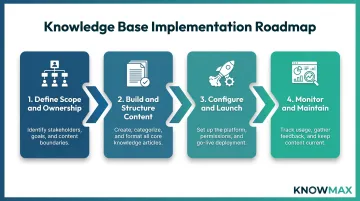
Step 1: Choose the Right Knowledge Base Software
Look for platforms with:
- AI-powered search (intent-based, not just keyword matching)
- Intuitive content creation tools
- Role-based permissions
- Version control
- Integration with existing tools (CRM, ticketing, helpdesk, chat)
- Analytics to track what employees search for and can't find
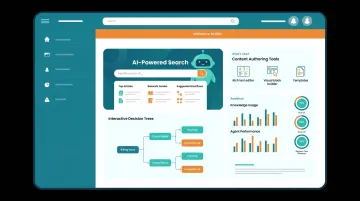
Platforms like Knowmax offer AI author tools to create, rephrase, summarise, and auto-translate content in 25+ languages, along with interactive decision trees for guided issue resolution, which is particularly useful for contact centres managing high-volume, process-heavy queries.
Step 2: Migrate and Create Foundational Content
- Gather existing documentation from drives, email, and wikis
- Audit for accuracy
- Reformat to your style guide
- Upload
A KB with 70% of key content that launches on schedule will be used. One delayed in pursuit of completeness often never launches at all.
Step 3: Configure Permissions and Test Navigation
Set access controls per your defined roles, then ask real employees from each user group to find three specific pieces of information. If they struggle, adjust structure or search before broad rollout.
Step 4: Launch and Embed into Daily Workflows
- Announce in team meetings
- Link from onboarding checklists
- Embed relevant articles into CRM or ticketing system
The more the KB is embedded in existing workflows — rather than sitting as a separate tab employees have to remember — the higher the adoption rate.
Launch is the midpoint, not the finish line. What happens in the weeks and months after rollout determines whether the KB becomes a lasting resource or a neglected repository.
Post-Launch: Driving Adoption and Keeping It Current
Track Usage and Fill Gaps
Monitor search volume, most-viewed articles, and zero-result searches. Zero-result searches are direct signals for content gaps to fill.
Establish a Content Review Cadence
- Assign article owners
- Set review dates (quarterly for most content, monthly for high-change areas)
- Archive irrelevant content
Once employees encounter two or three outdated articles, they stop trusting the KB entirely — even for content that is current.
Encourage Contribution Without Losing Control
Create a simple process for employees to flag outdated content or suggest articles. Route submissions through a defined review workflow before publishing. Recognise contributors to sustain engagement.
Common Internal Knowledge Base Setup Challenges
Poor Adoption After Launch
The KB exists, but employees still ping colleagues or search Slack instead. Usually, the tool isn't broken — it's just isolated from daily workflows, requiring deliberate effort to use.
Embed the KB into tools employees already use (CRM, ticketing, chat). Run short training sessions showing real use cases. Have managers actively reference it to normalize the habit.
Content Becomes Outdated Quickly
Articles start accurate but drift as products and processes change. Employees lose trust and stop consulting the KB — usually because no ownership model was established and content was treated as a one-time project.
Assign every article an owner and review date at creation. Use KB analytics to flag high-traffic articles with low satisfaction ratings as priority review targets. SQM Group notes that top-performing contact centers target a 1-day turnaround for reviewing and releasing updates.
Search Returns Poor Results
Poor search results are often a structural problem, not a content one. Inconsistent titles, missing tags, and a keyword-only search engine combine to make findable content effectively invisible.
Three fixes that move the needle:
- Standardize article titles using the language employees actually type, not internal terminology
- Add tags and related article links to improve surface-area across searches
- A platform with semantic or AI-powered search — one that understands intent, not just exact phrasing — resolves this at the infrastructure level
Best Practices for a High-Performing Internal Knowledge Base
Write for the Reader, Not the Author
Every article should answer a specific question or enable a specific task. Avoid long narrative documents when a checklist, decision tree, or step-by-step guide would serve users better. Interactive formats outperform static text for procedural content, especially in contact center environments.
Make Search Your Highest-Priority Feature
The KB is only as useful as its ability to surface the right answer quickly. Ensure your platform supports intent-based search (not just keyword matching), offers predictive suggestions, and indexes all content types including attachments and multimedia.
Use AI to Reduce Content Maintenance Burden
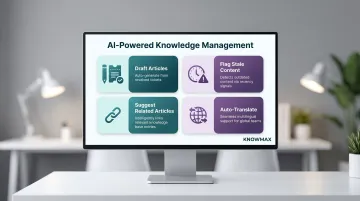
Modern knowledge management platforms offer AI tools that can:
- Draft articles from resolved tickets
- Flag potentially outdated content based on recency signals
- Suggest related articles for linking
- Auto-translate content for multilingual teams
Forrester's 2024 evaluation found that generative AI is redefining KM by automating content lifecycle tasks. Knowmax supports AI authoring natively, enabling teams to create, rephrase, summarize, and translate content with minimal effort.
Balance Openness with Access Control
Give employees the broadest access appropriate to their role. Excessive restriction frustrates users; insufficient restriction creates compliance and confidentiality risks. Review permissions quarterly as teams and roles change.
Measure What Matters
Track KB health using:
- Search analytics (volume, zero-result rate, top searches)
- Content engagement (views, time on page, article ratings)
- Downstream impact (reduction in repeat questions, improvement in agent handle time or onboarding speed)
HDI's case study of Ellie Mae shows what this looks like in practice: tracking 30,000 monthly views across 6,000+ articles surfaced knowledge gaps that, once addressed, drove a 4.9/5 CSAT score and cut contact volume by 300+ cases per software release.
Conclusion
An internal knowledge base is not a document archive—it's operational infrastructure that directly affects how fast agents resolve issues, how quickly new hires contribute, and how consistently the organization delivers on its standards.
Start smaller than you think you need to. A focused, well-governed KB for one team or function is far more valuable than an ambitious but unmaintained company-wide repository. Once that foundation holds—search is working, content stays current, ownership is clear—expansion becomes straightforward rather than risky. Platforms like Knowmax are built specifically for this staged approach, giving contact centers and support teams the structure to scale knowledge without losing governance along the way.
Frequently Asked Questions
What is an internal knowledge base?
An internal knowledge base is a centralized, access-controlled repository built for employees. It covers SOPs, policies, training materials, and guides, giving teams instant access to what they need without interrupting colleagues or managers.
What is an example of an internal knowledge base?
A customer support team's KB might include product FAQs, escalation decision trees, call scripts, troubleshooting guides, and onboarding checklists—all organized by topic and searchable by agents during live interactions.
What are the 4 pillars of KM?
The four pillars of knowledge management are People, Process, Technology, and Content. Each covers a distinct layer — culture and contribution, governance workflows, tools and platforms, and the knowledge assets themselves. A strong internal KB depends on all four.
What is the difference between an internal and external knowledge base?
An internal KB is private and built for employees (containing processes, policies, and proprietary information), while an external KB is public-facing and designed for customers to self-serve answers about products and services.
How do you maintain an internal knowledge base over time?
Assign article ownership, set review cadences (quarterly works for most content), and use KB analytics to surface stale or missing articles. Maintenance sticks when it's part of regular team workflows, not a separate task.
What features should I look for in internal knowledge base software?
Prioritize these capabilities when evaluating platforms:
- AI-powered search that understands intent, not just keywords
- Role-based access control to manage what each team sees
- Version history to track changes and roll back errors
- Integrations with your CRM, ticketing system, and chat tools
- Content analytics to identify gaps and underperforming articles
- Authoring simplicity so subject matter experts can contribute without training